3-19
BIOS Setup
▍
MS-7609
Ths sub-menu dsplays the nformatons of nstalled CPU.
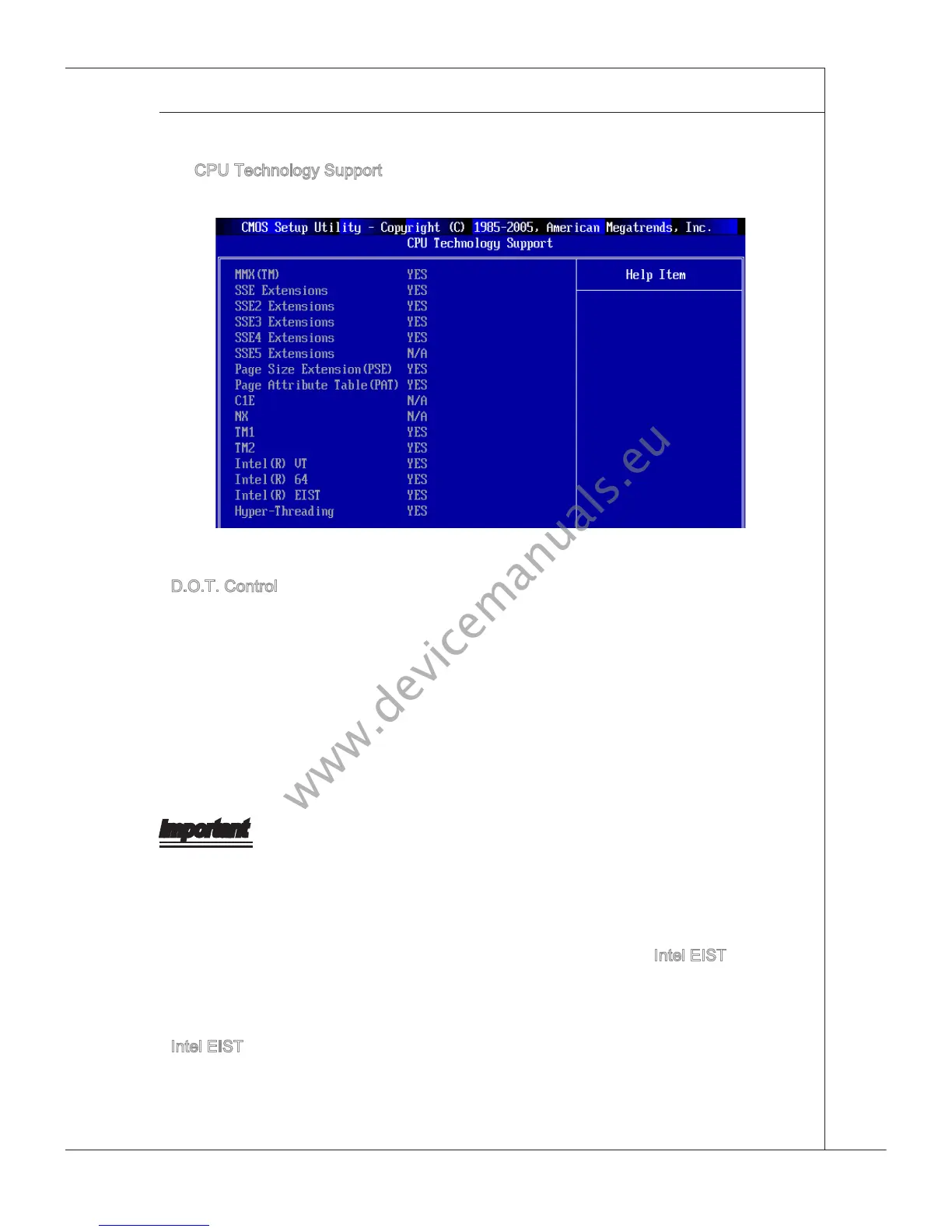
CPU Technology Support
Press <Enter> to enter the sub-menu and the followng screen appears.
▶
Ths sub-menu dsplays the technologes that the nstalled CPU supported.
D.O.T. Control
D.O.T. (Dynamc Overclockng Technology) s an automatc overclockng functon, n-
cluded n the
MSI
TM
’s newly developed Dual Core Center
TM
Technology. It s desgned
to detect the load balance of CPU whle runnng programs, and to adjust the best fre-
quency automatcally. When the manboard detects system s runnng programs, t wll
speed up automatcally to make the program run smoothly and faster. When the system
s temporarly suspendng or stayng n the low load balance, t wll restore the default
settngs nstead. Usually the Dynamc Overclockng Technology wll be powered only
when users’ PC need to run huge amount of data lke 3D games or the vdeo process,
and the CPU and PCIE frequency need to be boosted up to enhance the overall per-
formance.
Important
Even though the Dynamc Overclockng Technology s more stable than manual over-
clockng, bascally, t s stll rsky. We suggest user to make sure that your CPU / mem-
ory modules can aord to overclockng regularly rst. If you nd the PC appears to be
unstable or reboot ncdentally, t’s better to dsable the Dynamc Overclockng or to
lower the level of overclockng optons. By the way, f you need to conduct overclockng
manually, you also need to dsable the Dynamc OverClockng rst.
Intel EIST
The Enhanced Intel SpeedStep technology allows you to set the performance level of
the m
croprocessor whether the computer s runnng on battery or AC power. Ths eld
wll appear after you nstalled the CPU whch support EIST technology.
Intel EIST
The Enhanced Intel SpeedStep technology allows you to set the performance level of
the m
croprocessor whether the computer s runnng on battery or AC power. Ths eld
wll appear after you nstalled the CPU whch support EIST technology.
▶
▶



 To Next Page