Degraded RAID Array
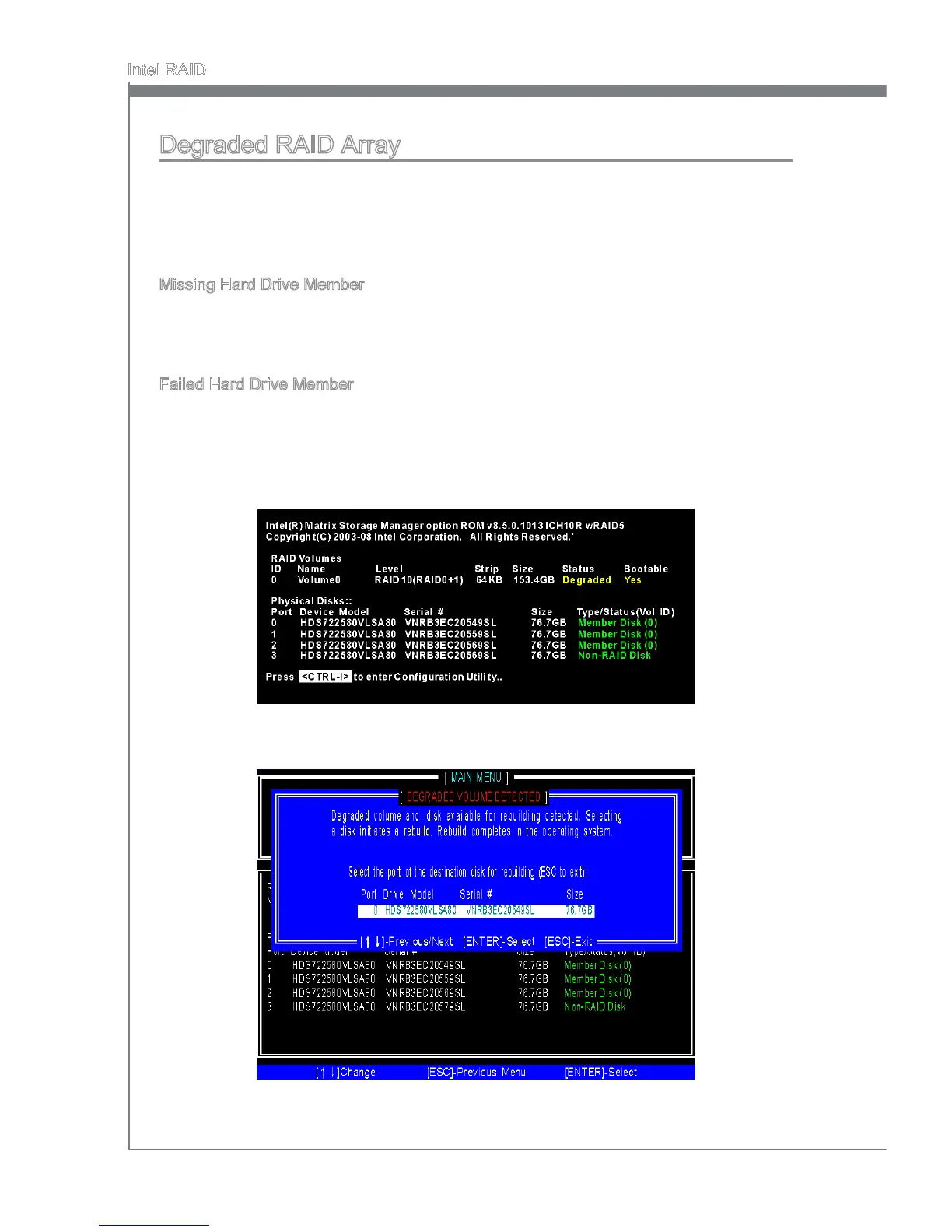
A RAID 1, RAID 5 or RAID 10 volume s reported as degraded when one of ts hard drve
members fals or s temporarly dsconnected, and data mrrorng s lost. As a result, the
system can only utlze the remanng functonal hard drve member. To re-establsh
data mrrorng and restore data redundancy, refer to the procedure below that corre-
sponds to the current stuaton.
Mssng Hard Drve Member
Make sure the system s powered o.
Reconnect the hard drve.
Reboot the system to Wndows; the rebuld wll occur automatcally.
Faled Hard Drve Member
Make sure the system s powered o.
Replace the faled hard drve wth a new one that s of equal or greater capacty.
Reboot the system to Intel RAID Opton ROM by press <Ctrl> and <I> keys smul
-
taneously durng the Power-On Self Test (POST).
1.
2.
3.
1.
2.
3.
Select the port of the destnaton dsk for rebuldng, and then press ENTER.4.




 To Next Page