MS-7327 Mainboard
3-6
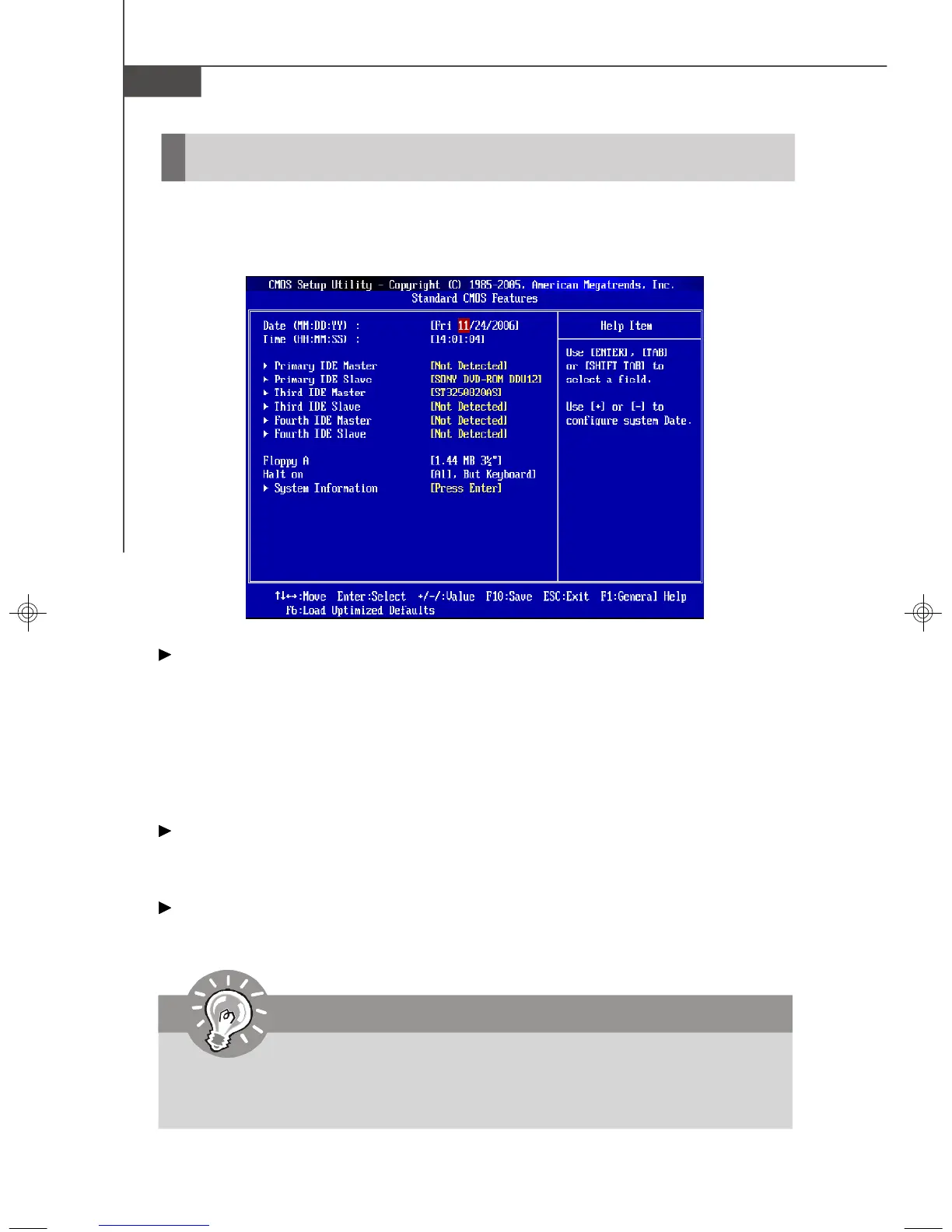
The items in Standard CMOS Features Menu includes some basic setup items. Use
the arrow keys to highlight the item and then use the <PgUp> or <PgDn> keys to select
the value you want in each item.
Date (MM:DD:YY)
This allows you to set the system to the date that you want (usually the current date).
The format is <day><month> <date> <year>.
day Day of the week, from Sun to Sat, determined by
BIOS. Read-only.
month The month from Jan. through Dec.
date The date from 1 to 31 can be keyed by numeric function keys.
year The year can be adjusted by users.
Time (HH:MM:SS)
This allows you to set the system time that you want (usually the current time). The
time format is <hour> <minute> <second>.
Primary IDE Master/ Slave, (Third/ Fourth IDE Master/ Slave => for SATAA
devices)
Press <Enter> to enter the sub-menu, and the following screen appears.
Standard CMOS Features
Important
Primary IDE Master/ Slave, Third/ Fourth IDE Master/ Slave are
appearing when you connect the HD devices to the IDE/ SATA connector
on the mainboard.
7327v1.0-3_ami.p65 2007/4/13, 上午 10:406




 To Next Page