Chapter 3
3-26
PC Health Status
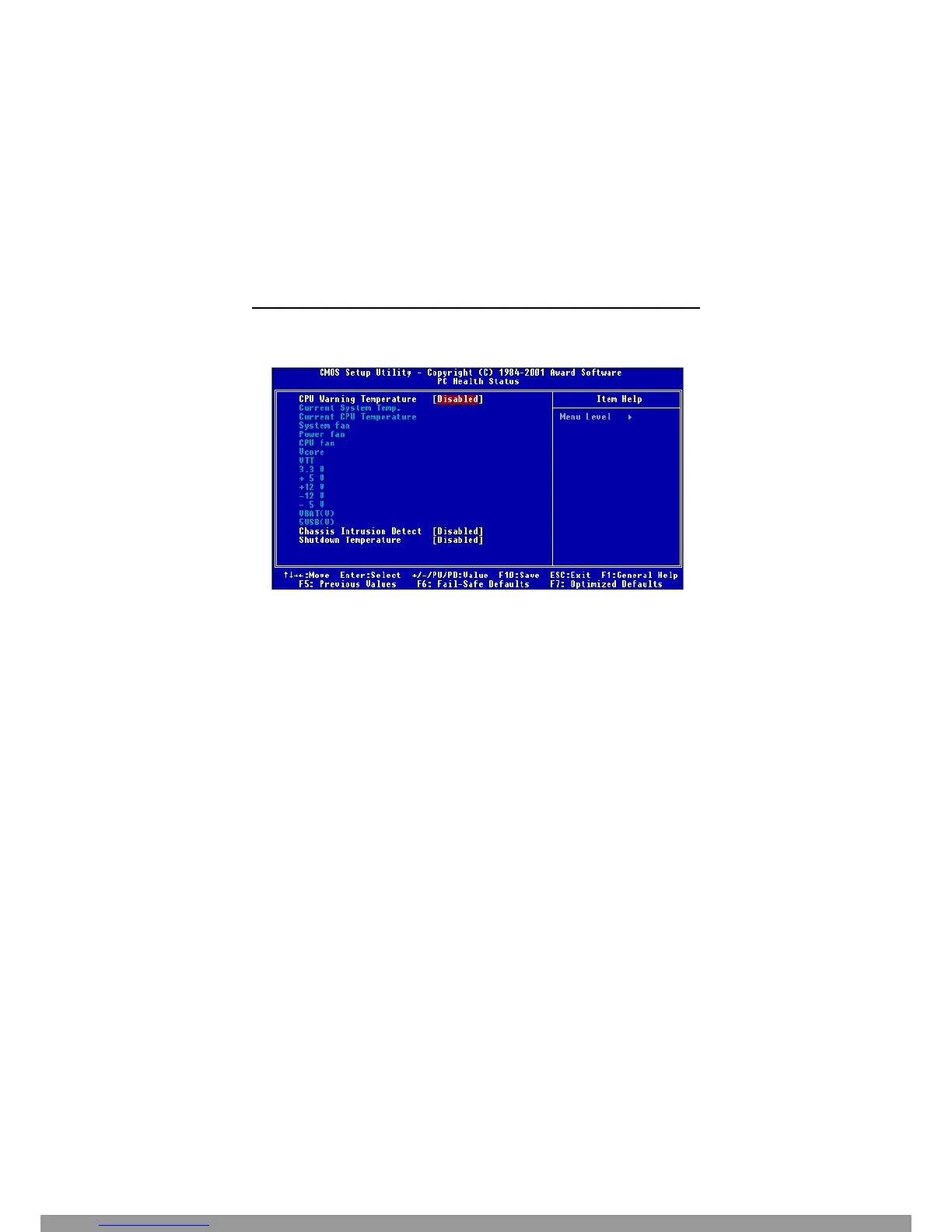
This section shows the status of your CPU, fan, warning for overall system
status.
CPU Warning Temperature
If the CPU temperature reaches the upper limit preset in this setting, the warn-
ing mechanism will be activated. This helps you to prevent the CPU overheat
problem.
Current System/CPU Temperature, System/Power/CPU FAN, Vcore, VTT,
+3.3V, +5V, +12V, -12V, -5V, VBAT(V), 5VSB(V)
These items display the current status of all of the monitored hardware de-
vices/components such as CPU voltages, temperatures and all fans’ speeds.
Chassis Intrusion Detect
Set this option to enable, reset, or disable the chassis intrusion detector. Dur-
ing Enabled, any intrusion on the system chassis will be recorded. The next
time you turn on the system, it will show a warning message. To be able to clear
those warnings, choose Reset. After clearing the message it will go back to
Enabled.
Shutdown Temperature
The setting allows ACPI-aware OS to automatically shutdown if the system
temperature reaches a thermal level preset in the field. This can prevent the
system components from being damaged due to overheat.
This Manual: http://www.manuallib.com/file/2541279



 To Next Page