2-11
Hardware Setup
The mainboard provides connectors to connect to FDD, IDE HDD, case, LAN,
USB Ports and CPU/System FAN.
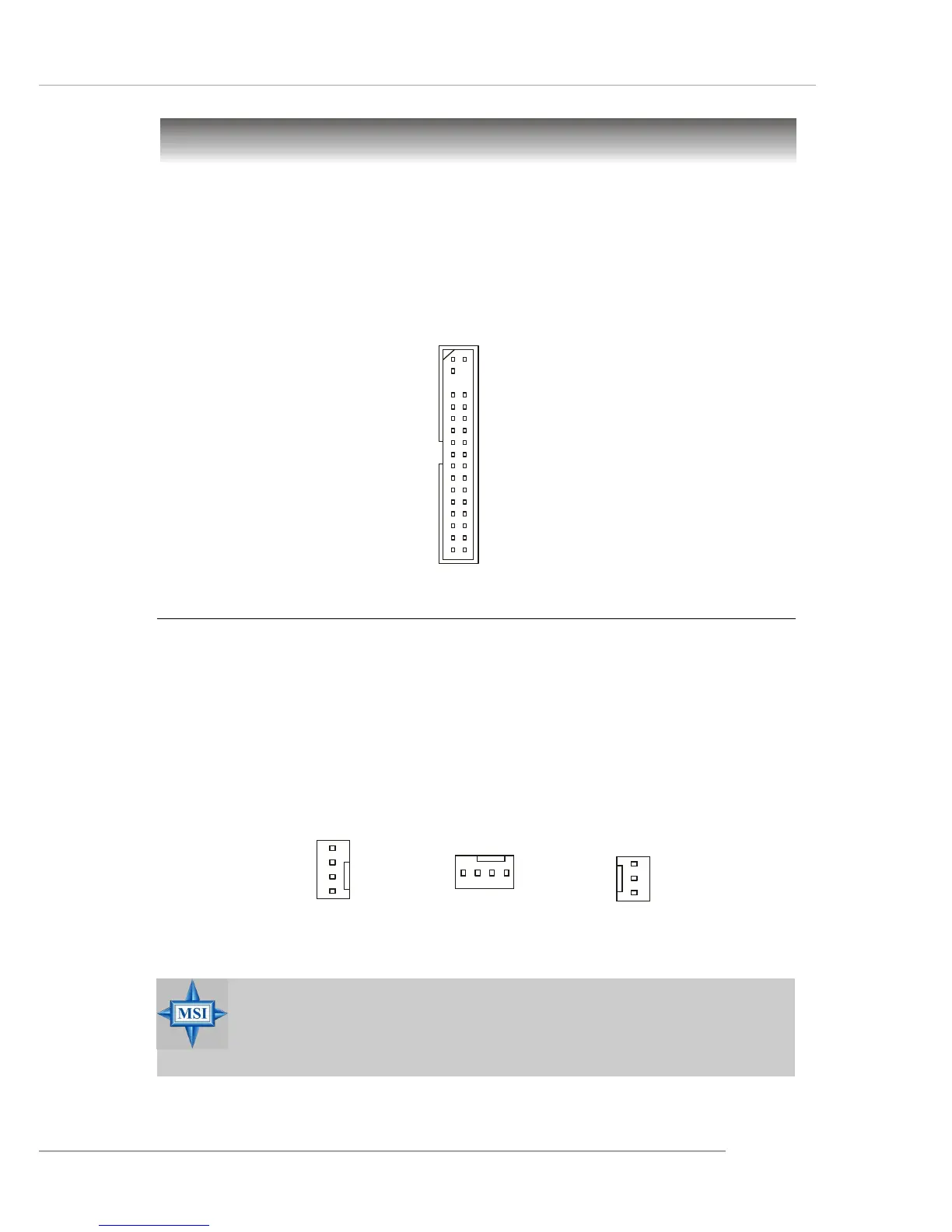
Floppy Disk Drive Connector: FDD
The mainboard provides a standard floppy disk drive connector that supports
360K, 720K, 1.2M, 1.44M and 2.88M floppy disk types.
Connectors
Fan Power Connectors: CPU_FAN/SYS_FAN/PWR_FAN
The fan power connectors support system cooling fan with +12V. When
connecting the wire to the connectors, always note that the red wire is the positive
and should be connected to the +12V, the black wire is Ground and should be
connected to GND. If the mainboard has a System Hardware Monitor chipset onboard,
you must use a specially designed fan with speed sensor to take advantage of CPU
fan control.
PWR_FAN
SENSOR
+12V
GND
MSI Reminds You...
1. Always consult vendors for proper CPU cooling fans.
2. Please refer to the recommended CPU fans at Intel
®
official website.
3. CPU_FAN & SYS_FAN support fan control.
FDD
CPU_FAN
GND
Control
+12V
SENSOR
SYS_FAN
GND
Control
+12V
SENSOR



 To Next Page