2-9
Hardware Setup MS-S0121
Power Supply
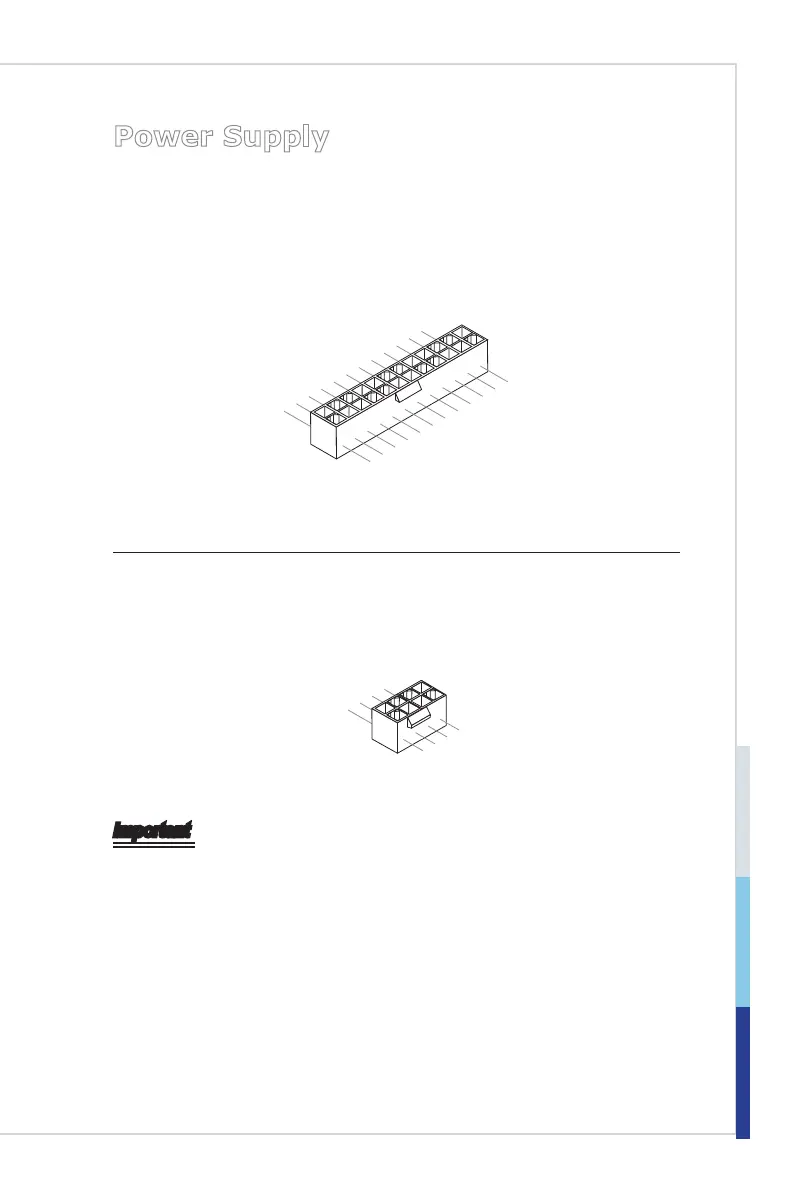
System Power Connector: JPWR1
This connector allows you to connect a power supply. To connect to the power
supply, make sure the plug of the power supply is inserted in the proper orienta-
tion and the pins are aligned. Then push down the power supply rmly into the
connector.
13.+3.3
V
1.+3.3
V
14.-12V
2.+3.3
V
15.Ground
3
.Ground
16.PS-ON
#
4.+5
V
17.Ground
5
.Ground
18.Ground
6.+5
V
19.Ground
7
.Ground
22.+5
V
10.+12V
20.Res
8.PW
R O
K
23.+5
V
11
.+12V
21.+5
V
9.5VSB
24.Ground
12.+3.3
V
CPU Power Connector: JPWR2
This connector provides 12V power output to the onboard CPU.
7.+12V
3.
Ground
5.+12V
1.Ground
8.+12V
4
.Ground
6.+12V
2
.Ground
Important
Make sure that all power connectors are connected to the power supply to ensure
stable operation of the mainboard.


 To Next Page