3-17
BIOS Setup MS-S0121
Boot
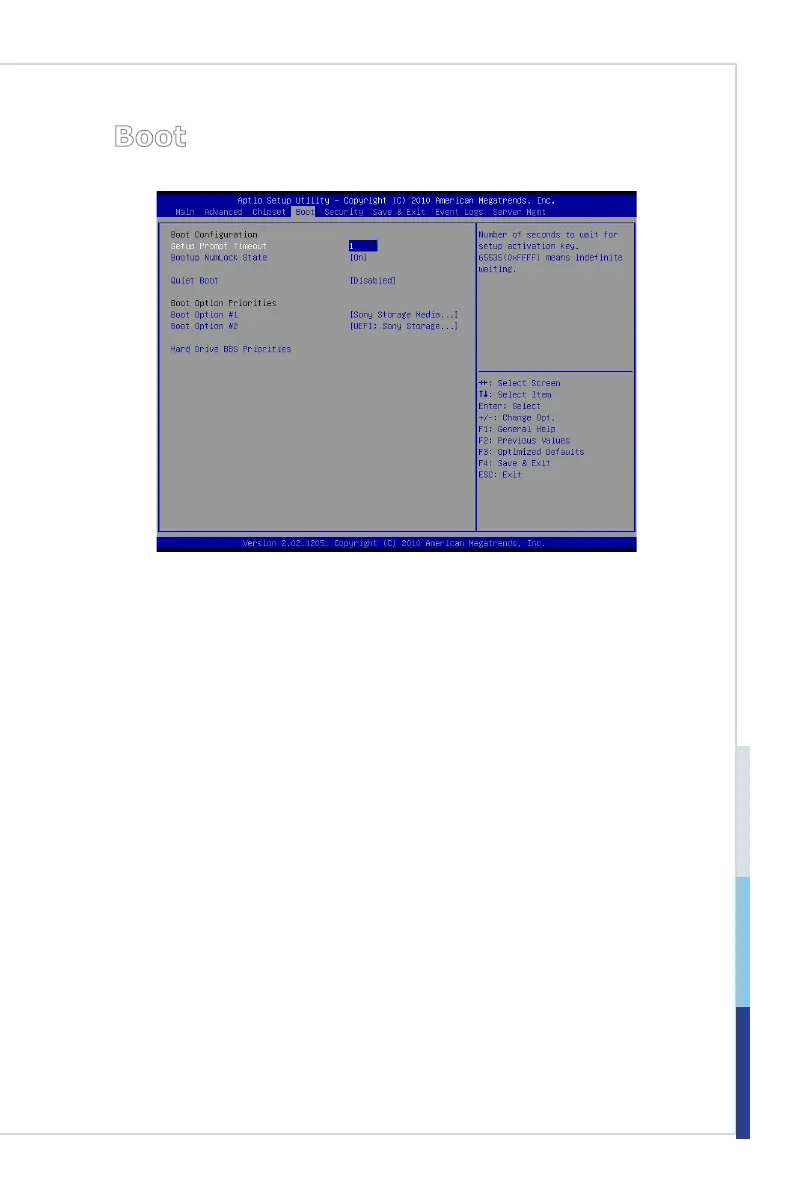
Setup Prompt Timeout
This setting species the number of seconds to wait for setup activation key.
Bootup NumLock State
This setting is to set the Num Lock status when the system is powered on. Setting
to [On] will turn on the Num Lock key when the system is powered on. Setting to
[Off] will allow users to use the arrow keys on the numeric keypad.
Quiet Boot
This BIOS feature determines if the BIOS should hide the normal POST mes
-
sages with the motherboard or system manufacturer’s full-screen logo.
When it is enabled, the BIOS will display the full-screen logo during the boot-up
sequence, hiding normal POST messages.
When it is disabled, the BIOS will display the normal POST messages, instead
of the full-screen logo.
Please note that enabling this BIOS feature often adds 2-3 seconds of delay to
the booting sequence. This delay ensures that the logo is displayed for a suf
-
cient amount of time. Therefore, it is recommended that you disable this BIOS
feature for a faster boot-up time.
Boot Option Priorities
The items allow you to set the sequence of boot devices where BIOS attempts to
load the disk operating system. First press <Enter> to enter the sub-menu. Then
you may use the arrow keys ( ↑↓ ) to select the desired device, then press <+>,
<-> or <PageUp>, <PageDown> key to move it up/down in the priority list.
▶
▶
▶
▶


 To Next Page