3-14
BIOS Setup MS-S0121
Console Redirection
Console Redirection operates in host systems that do not have a monitor and
keyboard attached. This setting enables/disables the operation of console re
-
direction. When set to [Enabled], BIOS redirects and sends all contents that
should be displayed on the screen to the serial COM port for display on the
terminal screen. Besides, all data received from the serial port is interpreted
as keystrokes from a local keyboard.
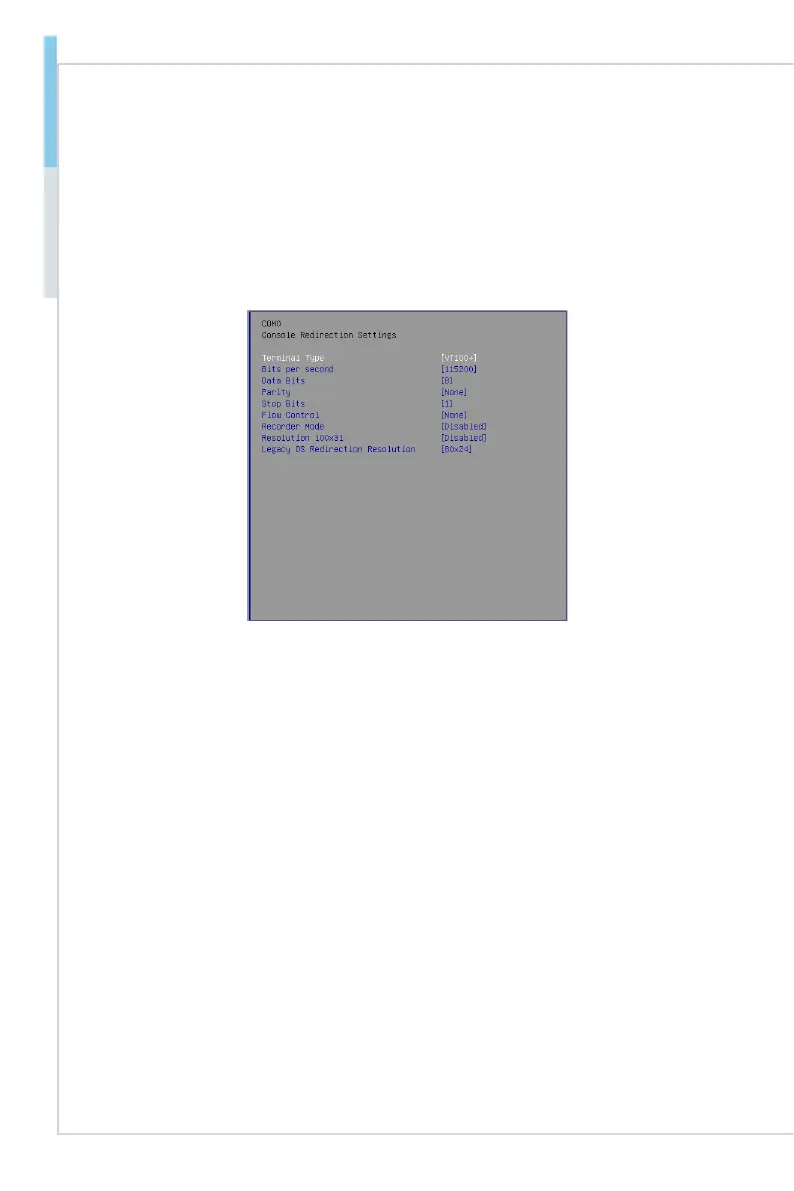
Console Redirection Settings
Terminal Type
To operate the system’s console redirection, you need a terminal support
-
ing ANSI terminal protocol and a RS-232 null modem cable connected be-
tween the host system and terminal(s). This setting species the type of
terminal device for console redirection.
Bits per second, Data Bits, Parity, Stop Bits
This setting species the transfer rate (bits per second, data bits, parity,
stop bits) of Console Redirection.
Flow Control
Flow control is the process of managing the rate of data transmission be
-
tween two nodes. It’s the process of adjusting the ow of data from one
device to another to ensure that the receiving device can handle all of the
incoming data. This is particularly important where the sending device is
capable of sending data much faster than the receiving device can receive
it.
Recorder Mode, Resolution 100x31
These settings enable/disable the recorder mode and the resolution
100x31.
Legacy OS Redirection Resolution
This setting species the redirection resolution of legacy OS.
▶
▶
▶
▶
▶
▶
▶


 To Next Page