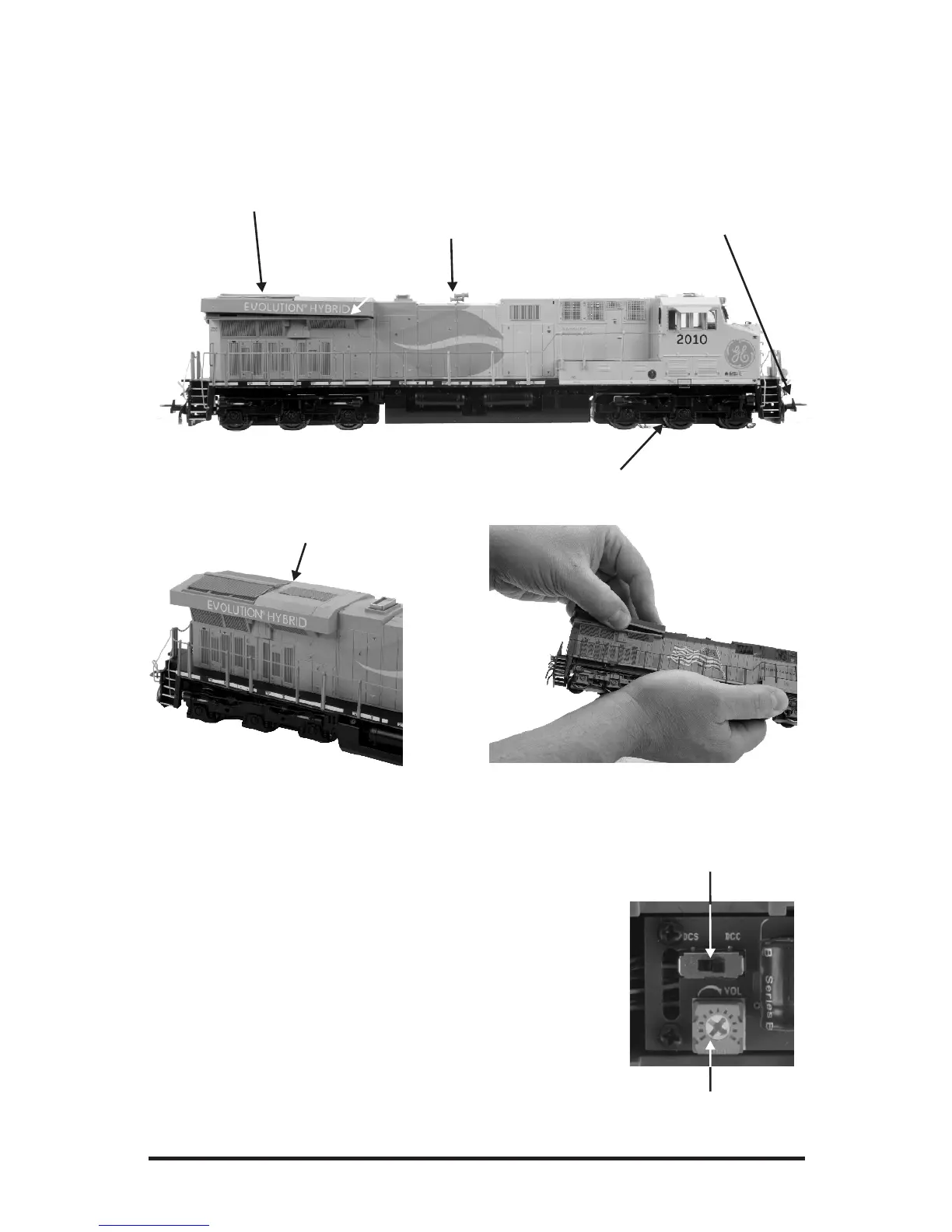
ENGINE DIAGRAM
Locomotive
M.T.H. HO ES44AC PS3E+ Diesel Engine
7
All wheels Powered
Detailed Horn
Metal See-Through Fan Vents
Accessing the controls
DCC-DCS Switch
DCC-DCS Switch
If you remove the fan vent at the rear of the engine (as shown
above), you will find your DCC-DCS Switch, and volume
Potentiator. As a factory default, the switch is set to the DCC
position. To operate the engine in DCS mode, ensure the
switch is set to DCS. If you wish to run the engine in DCC
mode, ensure the switch is set to DCC. If you inadvertently
leave the switch in DCC it won’t hurt anything, you just won’t
be able to communicate with your engine with your DCS
system. Likewise, if you leave the switch in DCS and try to
operate the engine under DCC you may notice a humming
coming from your engine and you will likely notice that your
DCC system’s overload light will be on.
Control Hatch
To remove the Control Hatch, gently pull it
outward and lift it off from the side.
Volume Potentiator
NEM 360/362 coupler


 To Next Page