EasyManua.ls Logo

MTP 3100 - Page 10

MTP 3100
30 pages
Print Icon
To Next Page IconTo Next Page
To Previous Page IconTo Previous Page
Loading...
www.mtpinc.com 8
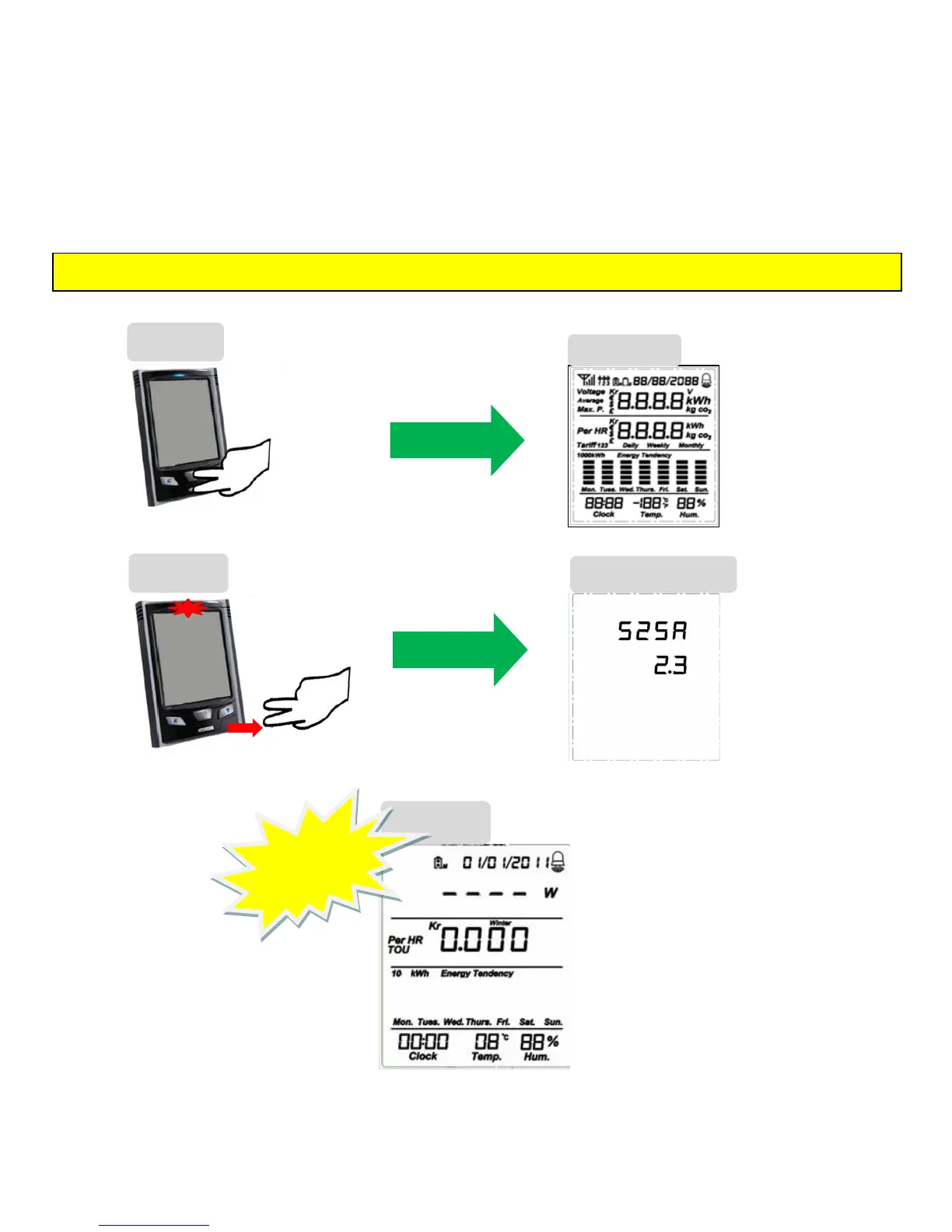
Factory Reset
1. When the default screen is displayed, simultaneously press and hold down the MODE/SET and HISTORY
keys. The full LCD screen will appear after 10 seconds.
2. When the red LED starts blinking, release MODE/SET and HISTORY keys and the ʺSoftware Versionʺ will
appear.
3. Memory Reset done = Factory setting Date: 01/01/2011 and Time: 00:00.
* The user should do the pairing again.

Hold
simultaneously
for 10 seconds
MODE/SET &
HISTORY
keys
STEP 1
Software Version
Full LCD
STEP 3
Memory
Cleared
STEP 2
Release
the keys when
the RED LED
starts blinking
The Full LCD
will appear
The Software
Version will
appear after
releasing the
keys
IMPORTANT: A Factory Reset will permanently delete all the data in the monitor, including the history.