LINKING THE MTP 3100 - ENERGY MONITORING SYSTEM
6. Linking the MTP 3100 – Energy Monitoring System
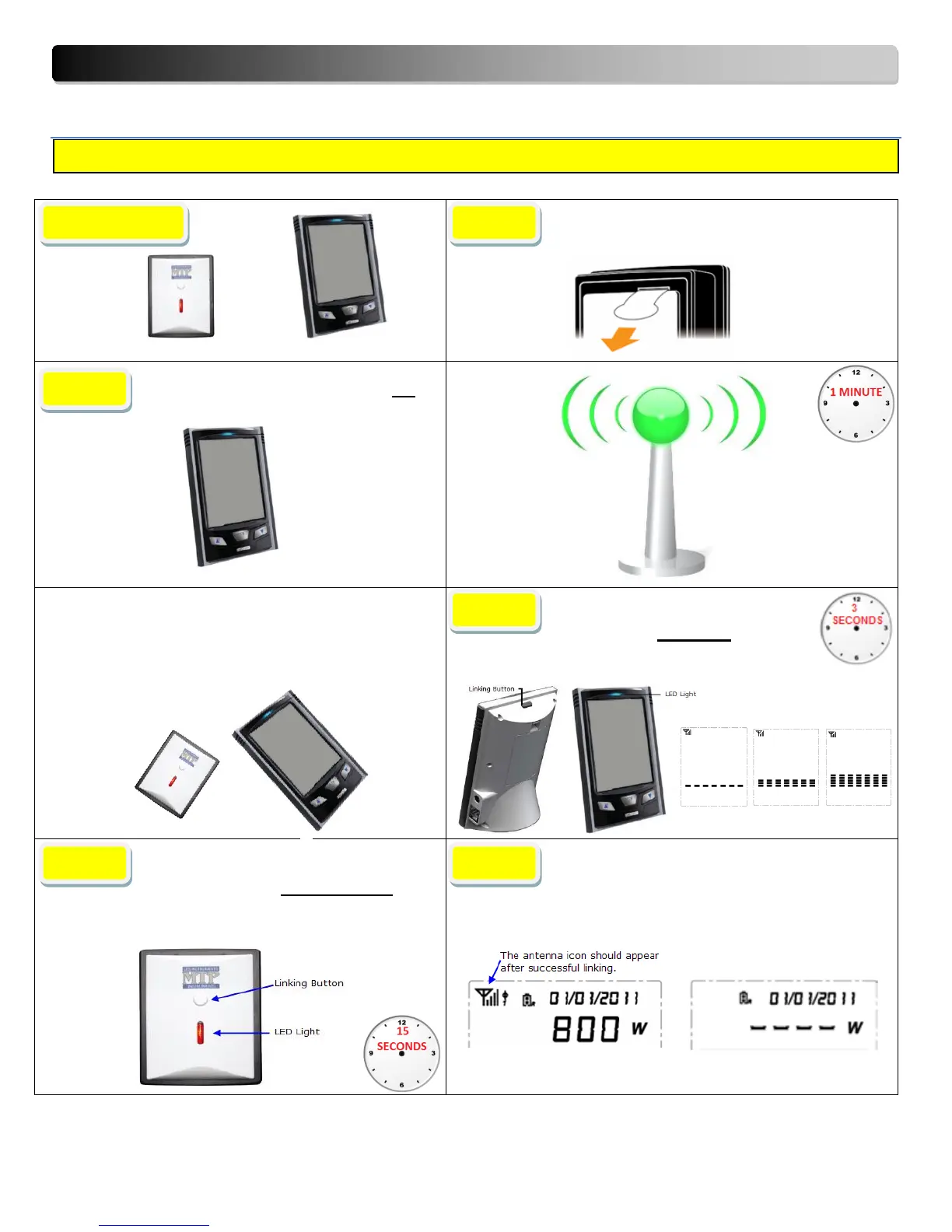
Remove plastic tab on Transmitter
(Found on back of transmitter)
Power the Monitor with batteries OR
using the power adaptor
IMPORTANT
During the Linking process, STEPS #3 and #4 must be
performed seconds apart.
Begin by activating the signal search on the monitor,
followed soon after by activating the signal search on
the transmitter. The signal search on the monitor has a
duration of 1 minute.
IMPORTANT
During the Linking process, STEPS #3 and #4 :
Keep the Monitor and Transmitter as close as
possible.
Press and hold down the linking
button on the MONITOR for approx.
3 seconds, until the LED light starts blinking
then release the button.
Press and hold down the linking button
on the front of the TRANSMITTER for
15 seconds, then release. A red LED will flash
rapidly on the transmitter during the linking
period.
SUCCESSFUL linking is demonstrated by an
antenna in the top left corner of the screen.
FAILED Linking will not display an antenna on the left
corner of the screen.
00
PASS FAIL
Note : During the linking process, keep the transmitter as close as possible to the monitor.


 To Next Page