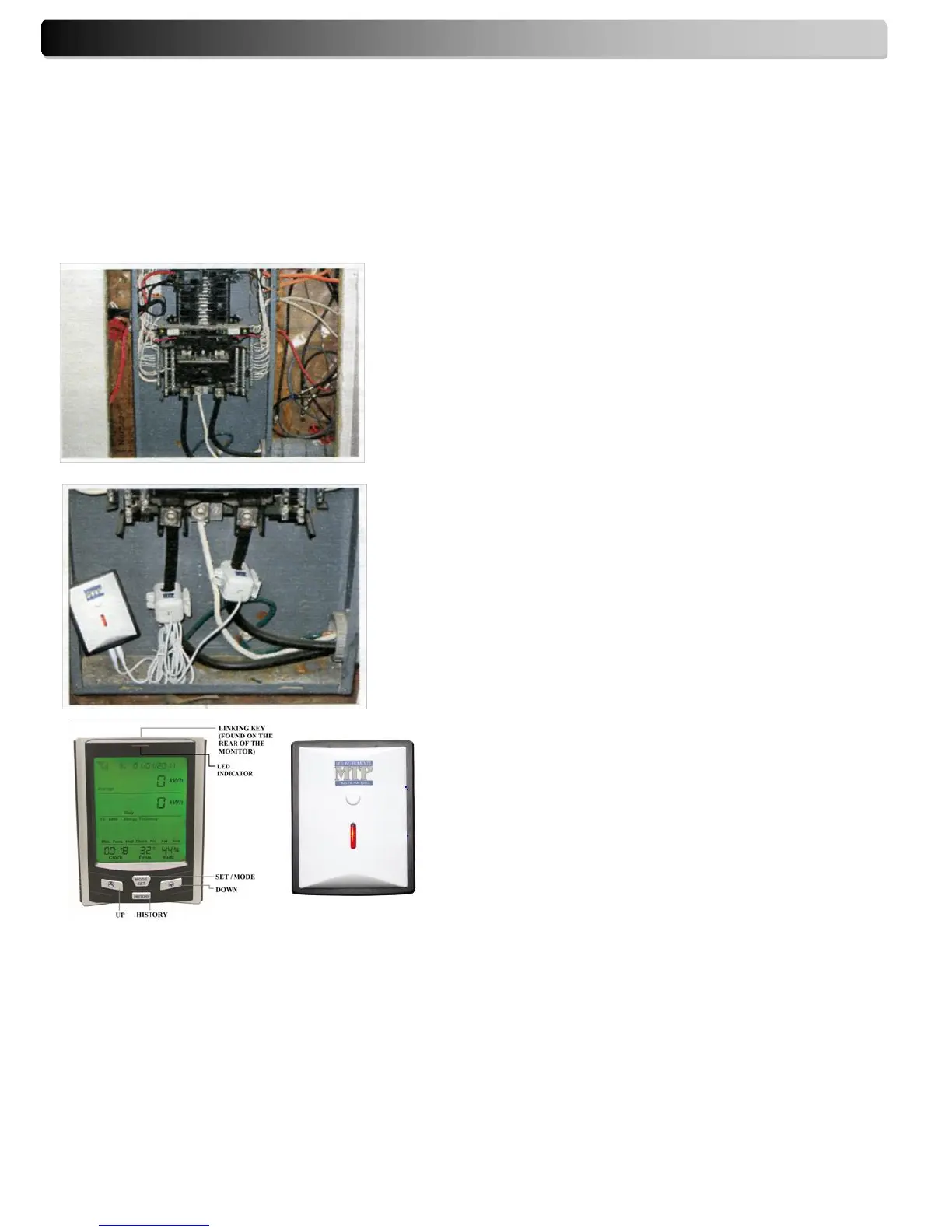
Installation on standard 200A panel
Unscrew the four corners to remove the electrical panel
protection cover.
Fit the two enclosed 200A clip-on sensors (sensors are
suitable for use with wire diameters up to 18mm) to the
live feed cables of the electrical panel.
Insert each plug on the end of the white wire into any of
the input sockets of transmitter.
The clip-on sensor acts as a current sensor and relays the
current being drawn into the home to the transmitter.
From there, it is sent wirelessly to the monitor display
unit. Clip the sensor clamp around the "Live Wire" of the
electricity panel. The live wire is usually located behind a
metal cover. (Please contact a qualified electrician).
Please refer to this manual for set-up of monitor.
Important: Select 120V as reference voltage.
Please note that monitor displays the Apparent
Power (VA) and not the Active Power (watts).
11. Installation (Single Phase System)
IMPORTANT NOTICE: Please contact a qualified electrician to carry out the installation. We will not be held
responsible for damage as a result of a wrong connection which may cause injury or death. Please note that
monitor displays the Apparent Power (VA) and not the Active Power (watts).


 To Next Page