www.mtpinc.com 18
10. Operation
Viewing History and Average Data
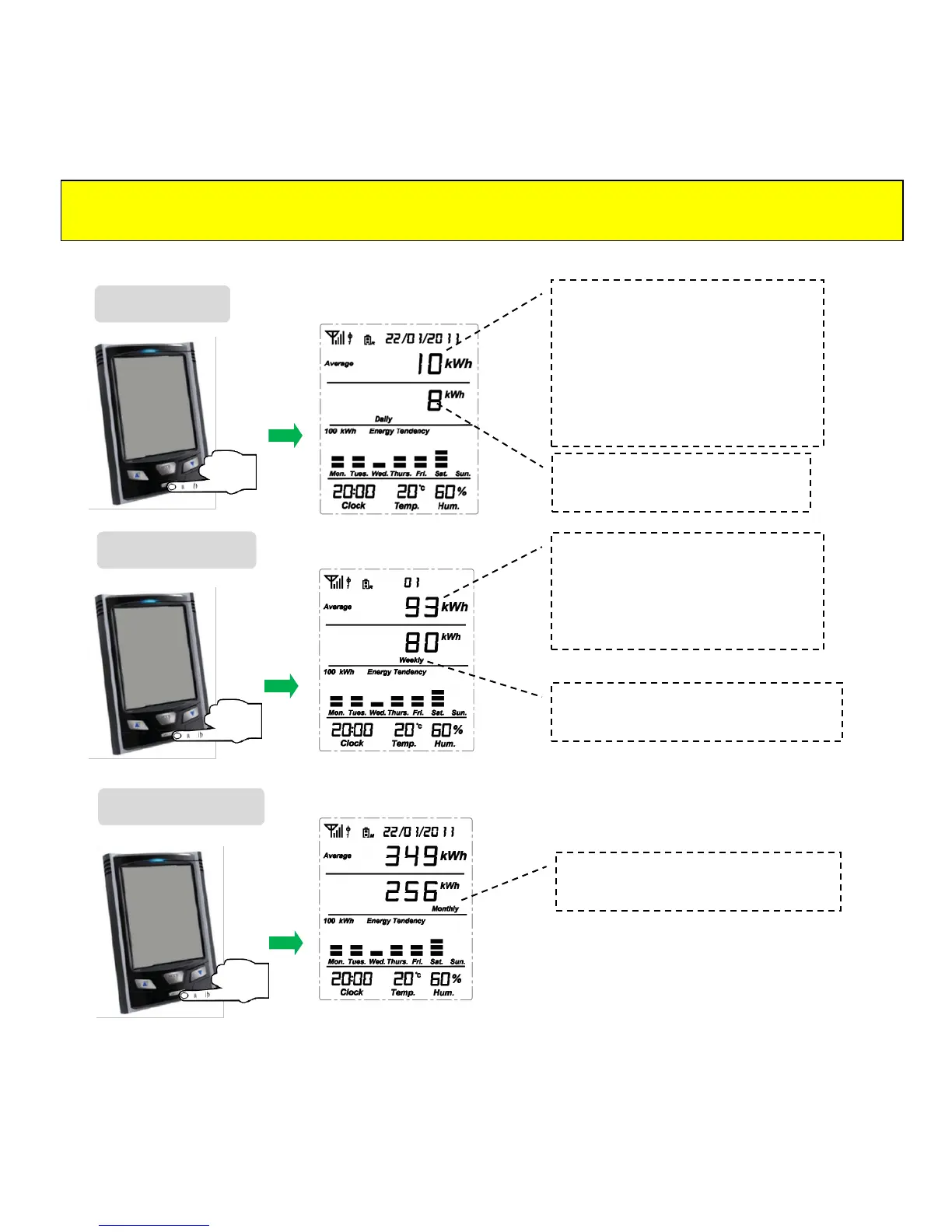
When the default screen is displayed, press the HISTORY key to view the data that have been gathered up
to present time for various time periods (Day, Week and Month).
Press the
HISTORY
key once
Accumulated data up to now
from 00:00 of today.
Accumulated data up to now from
00:00 Monday of current week.
Accumulated data up to now from
00:00 the 1
st
of current month.
The Average for each time period is
displayed on the top line. The average for a
time period is the forecast of a complete
day, week or month based on data
accumulated during a smaller time frame.
E.g. Current day has an accumulated data
of 8kWh in 20 hours, so the forecast of the
complete day should be 8/20*24=9.6kWh,
displayed as 10kWh.
E.g. of Average value for the current week :
displays an accumulated consumption of
80kWh in 6 days meaning the daily average
kWh is 80/6, hence the forecast of the
complete week should be 80/6*7=93kWh.
Press the
HISTORY
key twice
Press the
HISTORY
key three
times
Note: When viewing the history data, if there is no button operation for 20 seconds, the display will return
to default screen.


 To Next Page