Dolito Bedienungsanleitung / Operators Manual
40
The Dolito oers the ability to lock one program in place so that other programs or settings
cannot be selected or changed. This allows the doctor or therapist to ensure that the patient
uses only the program that has been prescribed. The therapist can read information about
the compliance of the patient on the display at any time he wants. This way it is possible to
evaluate, whether the device was used according to the instructions of the doctor (quantity,
intensity, etc.)
For this purpose the LOCK-button in the battery-compartment has to be pressed with a small
pin once (the metal-pins of the electrode-lead wires are well suited). The lock symbol appears
on the display and the program cannot be changed by pressing the „P“-button anymore.
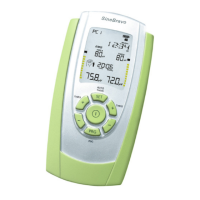
Pressing the LOCK-button a second time allows reading the following statistics for the
treatment in the display:
If the program was not locked, it is necessary to press the LOCK button twice to read the
memory. The statistics are always recorded regardless of whether the unit is locked or unlocked.
The statistics should be reset after 60 days of use or if the device is used by another person.
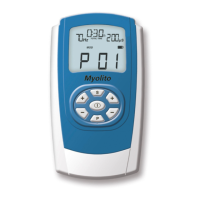
To get more detailed information press the + button of the left channel (A). You will see the data
of the rst session of the rst day.
LOCK-Button and Statistics
Average number of sessions
per day (= number of
numerals)
Most used program
Number of treatment days
Total record
hours in use
Average used intensity per channel
Selected session ashes
Used program
Average used intensity per channel
Treatment day
Total time of session
LOCK-symbol


 To Next Page