SPECIFICATIONS AND HARDWARE INFORMATION
MultiConnect
®
Conduit
TM
AP MTCAP User Guide for Europe 11
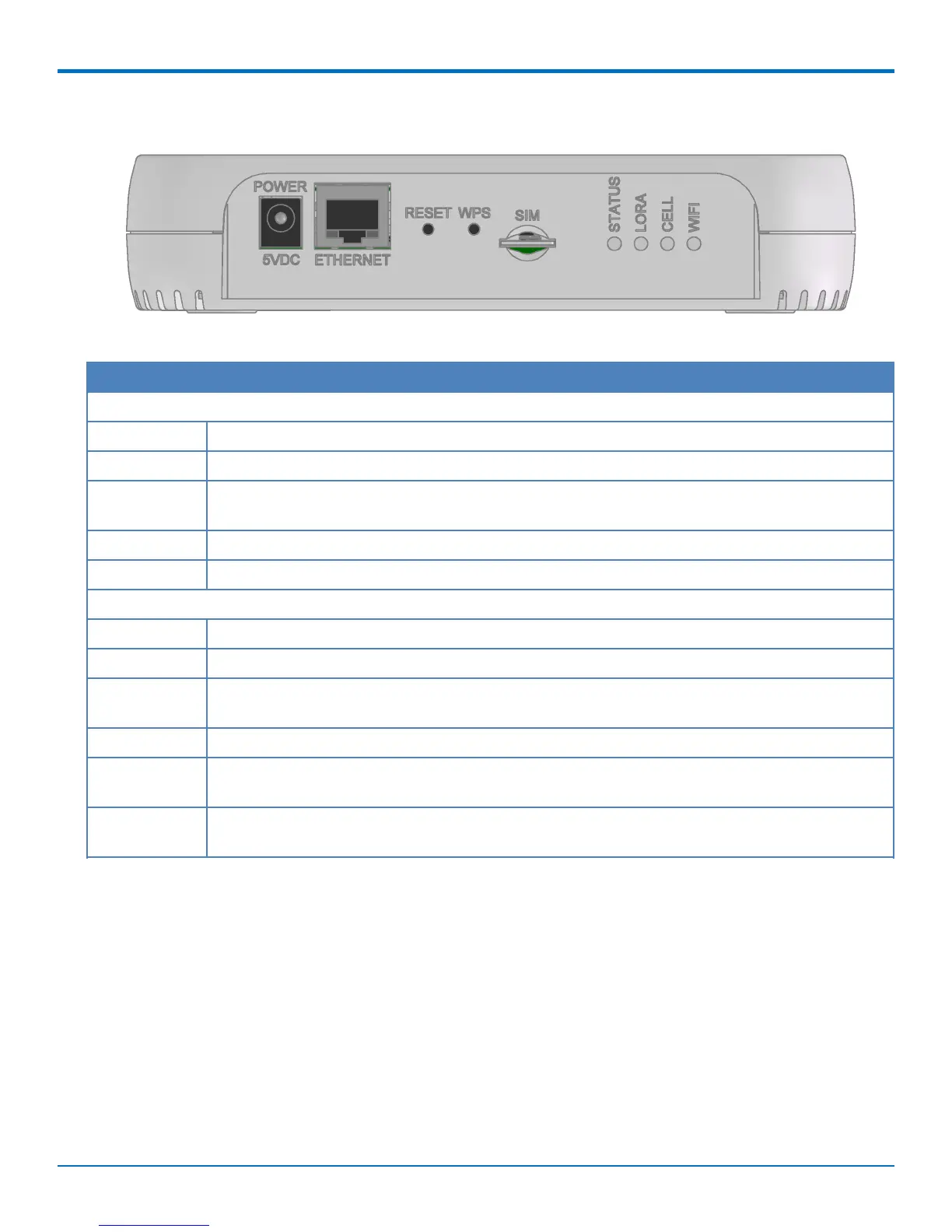
Connectors and LEDs
Note: Some features are available only on select models. The above image shows the model with all features.
For models that don't have a cellular radio, the chassis will not have a SIM slot.
Item Description
Connectors
Power 5 Volt power jack.
Ethernet RJ45 Ethernet jack.
Reset Reset button. Reboots device or restores factory defaults. Refer to Resetting the Device for
details.
WPS Reserved for future use.
SIM Available in -LEU1 models only. SIM slot. Refer to Installing SIM Card for details.
LEDs
STATUS Blinks when operating system is fully loaded.
LORA Lights when LoRa software is active.
CELL Used by -LEU1 models only. Lights when there is power to the cellular radio. Blinks when the
SIM is registered with the carrier.
WIFI Used by -002 models only. Lights when there is a Wi-Fi connection.
Ethernet Link Left LED on the Ethernet connector. Blinks when there is transmit and receive activity on the
Ethernet link. It shows a steady light when there is a valid Ethernet connection.
Ethernet Speed Right LED on the Ethernet connector. Lit when the Ethernet is linked at 100 Mbps. If it is not lit,
the Ethernet is linked at 10 Mbps.



 To Next Page