Page46of78
ITPP047 Thermal Printer Windows Software Manual
Version 2.00
Figure 3- 26 Prompt Interface
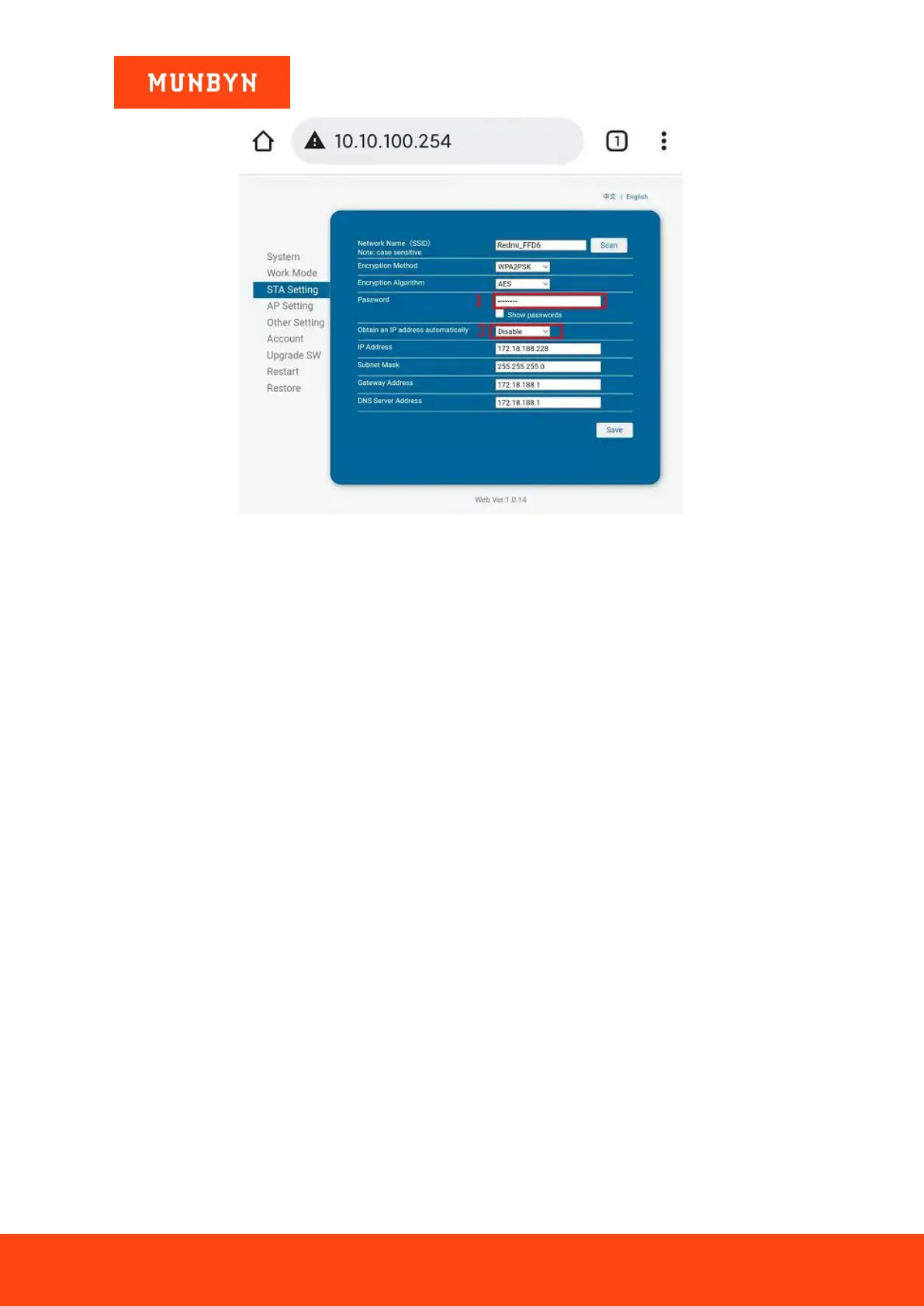
9) Set IP address.
IP Address: the top three numbers are the same as the first three digits of the router IP address, the last digit can
fill any of the 3-253.
Subnet Mask: 255.255.255.0.
Gateway Address: The top three numbers are the same as the first three digits of the router IP address, and the
last digit is 254 (x.x.x.254).
DNS Server Address: The top three numbers are the same as the first three digits of the router IP address, and
the last digit is 1 (x.x.x.1).
Note: Please refer to step 1 to check the Router IP address.
For example: The IP address of the router is 172.18.188.1. The IP address is 172.18.188.228(The range is
3-253). The Subnet Mask is 255.255.255.0, and the Gateway Address is 172.18.188.254. The DNS server
address is 172.18.188.1. Please see the picture below.



 To Next Page