4-25
4.18 Cleaning the Unit
Use a mild cleaning solution on a lint-free cloth to wipe the machine’s cover, handset and paper cassette
tray. Never spray cleaner directly onto the fax machine as the spray could damage components inside the
fax.
Curing frequent jams in the ADF
If you’re having trouble with getting your original documents to feed properly, try this procedure:
1. Turn off your fax machine.
2. Get two soft, lint-free cloths and moisten them as follows:
• One with a cleaner suitable for use on platen/rubber rollers. In steps 4 and 6, we’ll call this the
rollers cleaner.
• The other with isopropyl alcohol
3. Open the scanner cover by holding the scanner cover release.
Important: You must hold the cover open. It won’t stay open by itself.
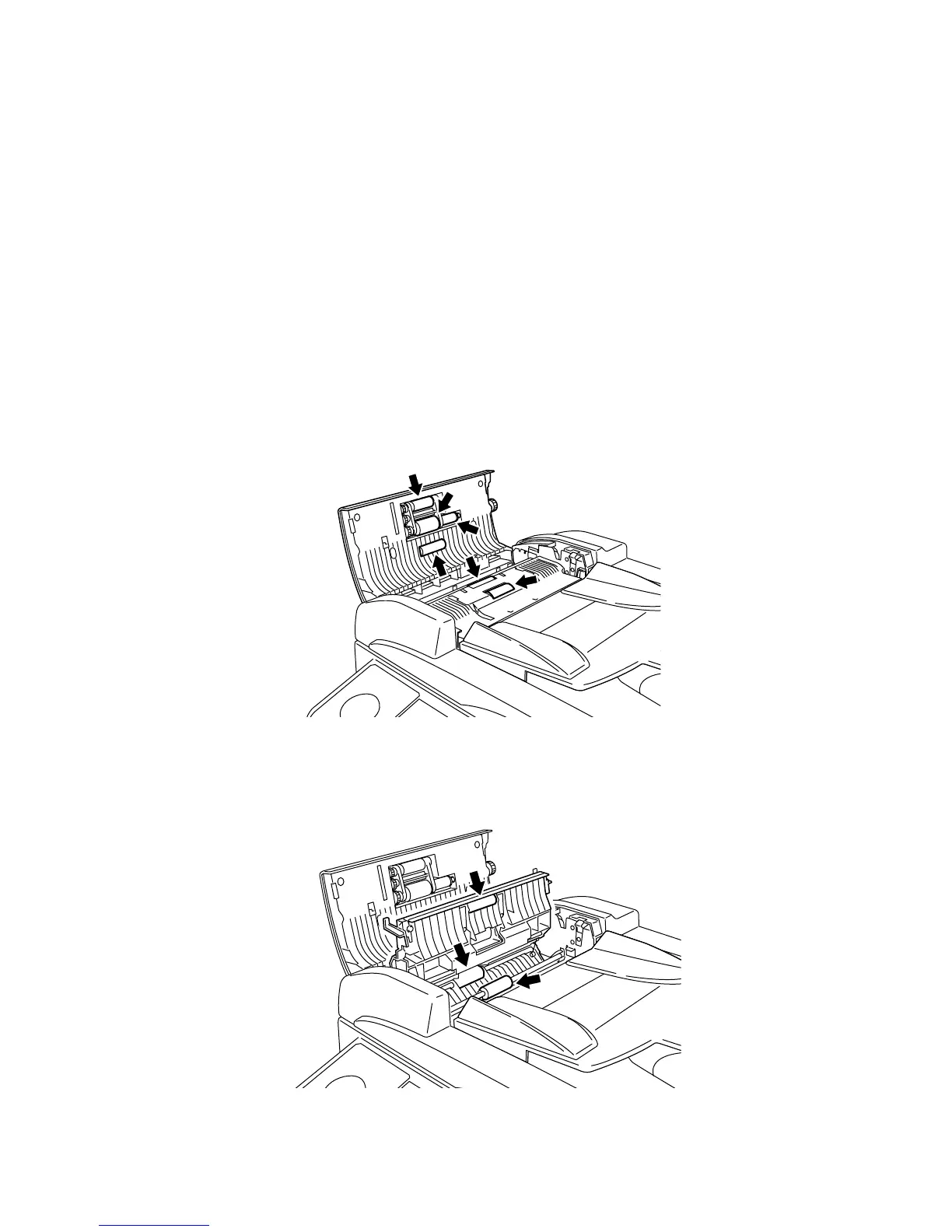
4. Use the cloth with the rollers cleaner to clean the face of the rollers. Rotate the rollers by hand to allow
cleaning of the entire roller surface.
5. Open the inner cover fully.
Important: You must hold the cover open. It won’t stay open by itself.
6. Use the cloth with the rollers cleaner to clean the face of the rollers. Rotate the rollers by hand to allow
cleaning of the entire roller surface.






 To Next Page