Appendix A - menu system > 136
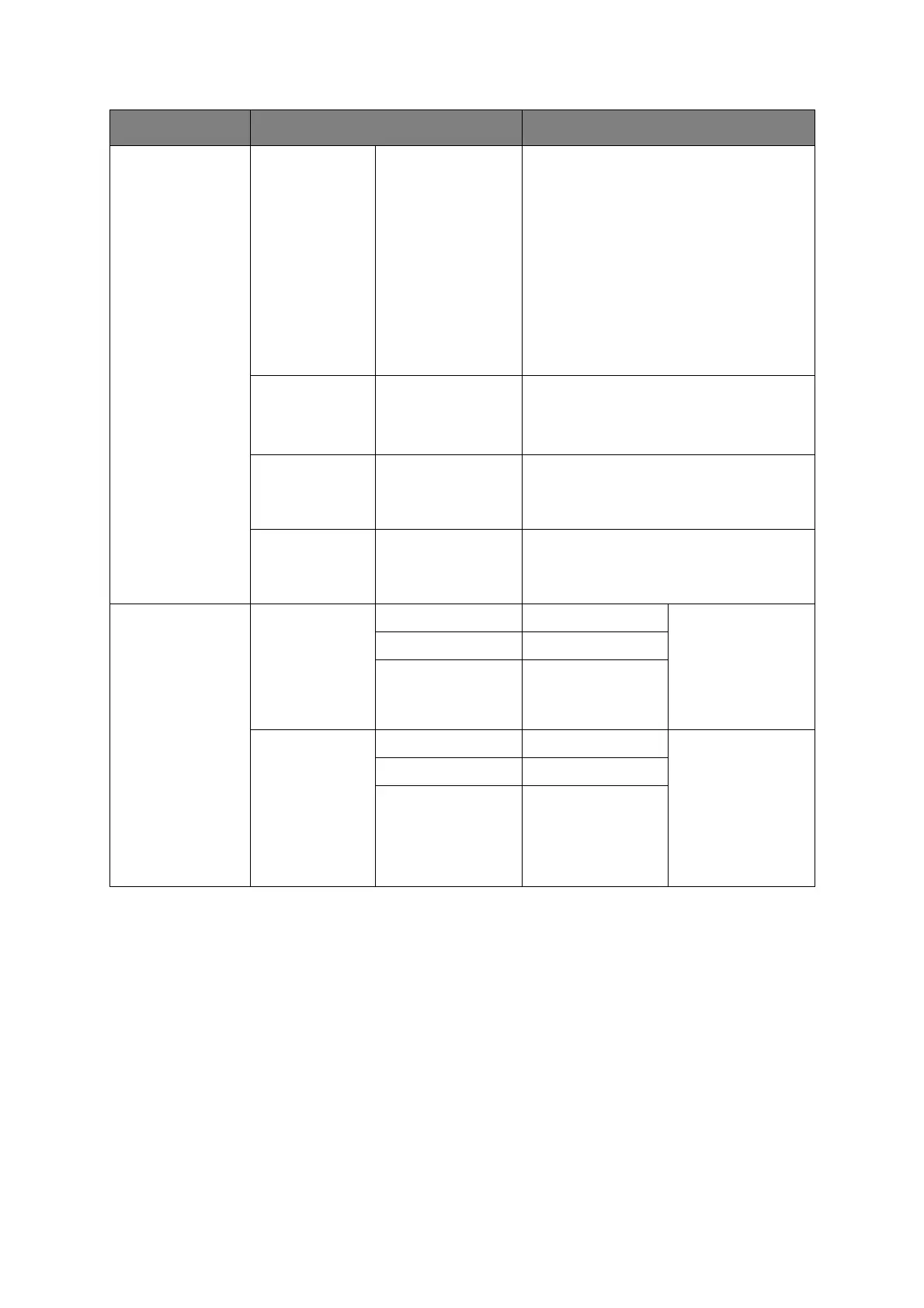
MP Tray Paper Size
A4/A5/A6/B5/
Letter/Legal13/
Legal13.5/Legal14/
Executive/
16K(184x260mm)/
16K(195x270mm)/
16K(197x273mm)/
Custom/COM-9
Envelope/COM-10
Envelope/Monarch
Envelope/DL
Envelope/C5
Envelope/Index
Card
Select the size of paper to be fed from the
multi purpose tray.
Custom Width:
64~210~216mm
Length:
127~297~1321mm
Enter paper width and length.
Media Type Plain/Letter Head/
Labels/Bond/
Recycled/Card
Stock/Rough/Glossy
Select the type of media to be fed from the
multi purpose tray so that the MFP can
adjust its internal parameters to better
accommodate the selected type of media.
Media Weight Light/Medium Light/
Medium/Heavy/
Ultra Heavy1/Ultra
Heavy2
Select the media weight to be fed from the
multi purpose tray.
Select Tray
Fax
Tray 1: ON/OFF/ON(Prior) Fax: Set tray for
received Fax.
Tray usage, priority
given to trays set to
ON(Prior), then ON.
If tray is set to OFF,
it will not be used.
Tray 2: ON/OFF/ON(Prior)
MP Tray: ON/OFF/ON(Prior)
Copy Tray 1: ON/OFF/ON(Prior) Copy: Set tray for
copy jobs.
If Tray Selection is
set to “Auto”: Tray
usage, priority
given to trays set to
ON, then ON(Prior).
If tray is set to OFF,
it will not be used.
Tray 2: ON/OFF/ON(Prior)
MP Tray: ON/OFF/ON(Prior)
.
ITEM OPTION OPTION/DESCRIPTION



 To Next Page
 Loading...








