EasyManua.ls Logo

Murrplastik mp-IM1 - Page 18

Murrplastik mp-IM1
40 pages
Print Icon
To Next Page IconTo Next Page
To Previous Page IconTo Previous Page
Loading...
18
Menu item
Figure
Description
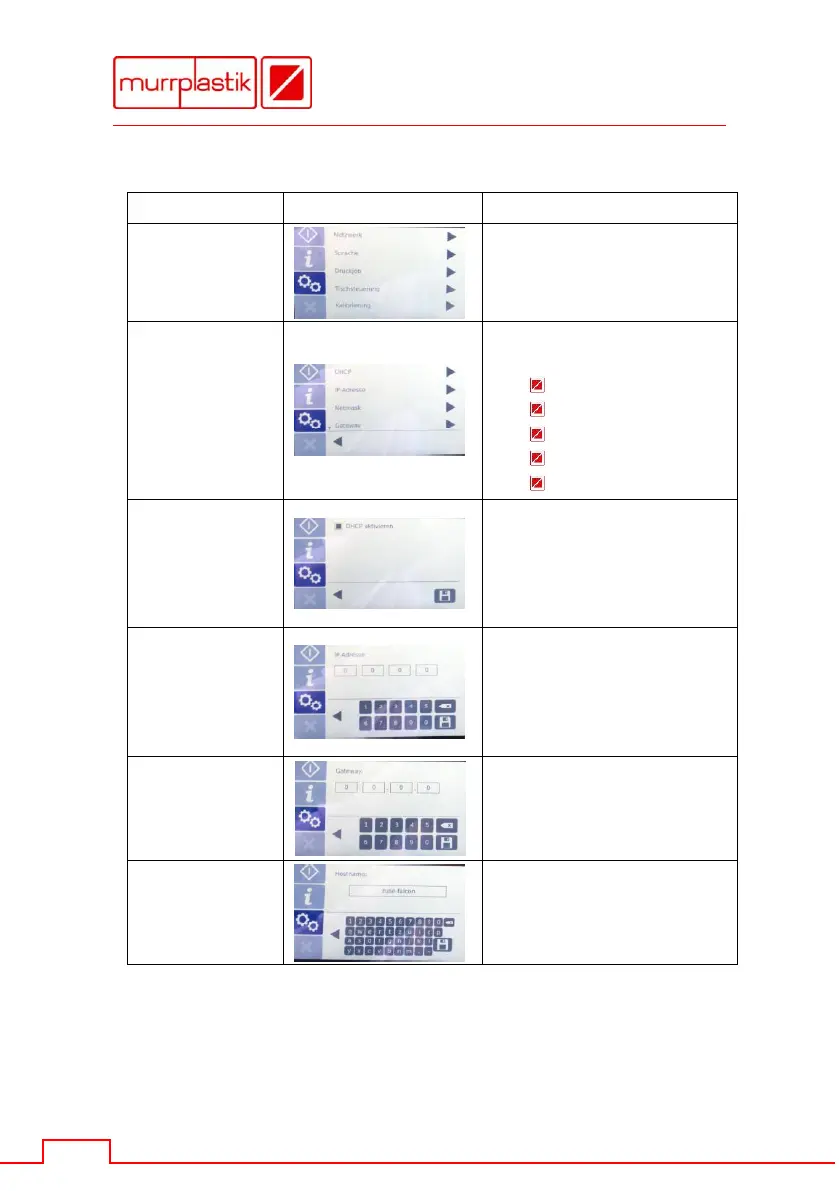
Settings
You get access to the
settings of the device.
Settings
Network
You get access to the
following network settings:
DHCP
IP address
Netmask
Gateway
Hostname
Settings
Network
DHCP
If you want to activate
DHCP, the checkbox must
be filled.
After that save with the
floppy disk symbol.
Settings
Network
IP address
If DHCP is not requested,
you can enter a static IP
address.
After that save with the
floppy disk symbol.
Settings
Network
Gateway
You can enter the gateway
address here.
After that save with the
floppy disk symbol.
Settings
Network
Hostname
Select the name of the host.
After that save with the
floppy disk symbol.