8
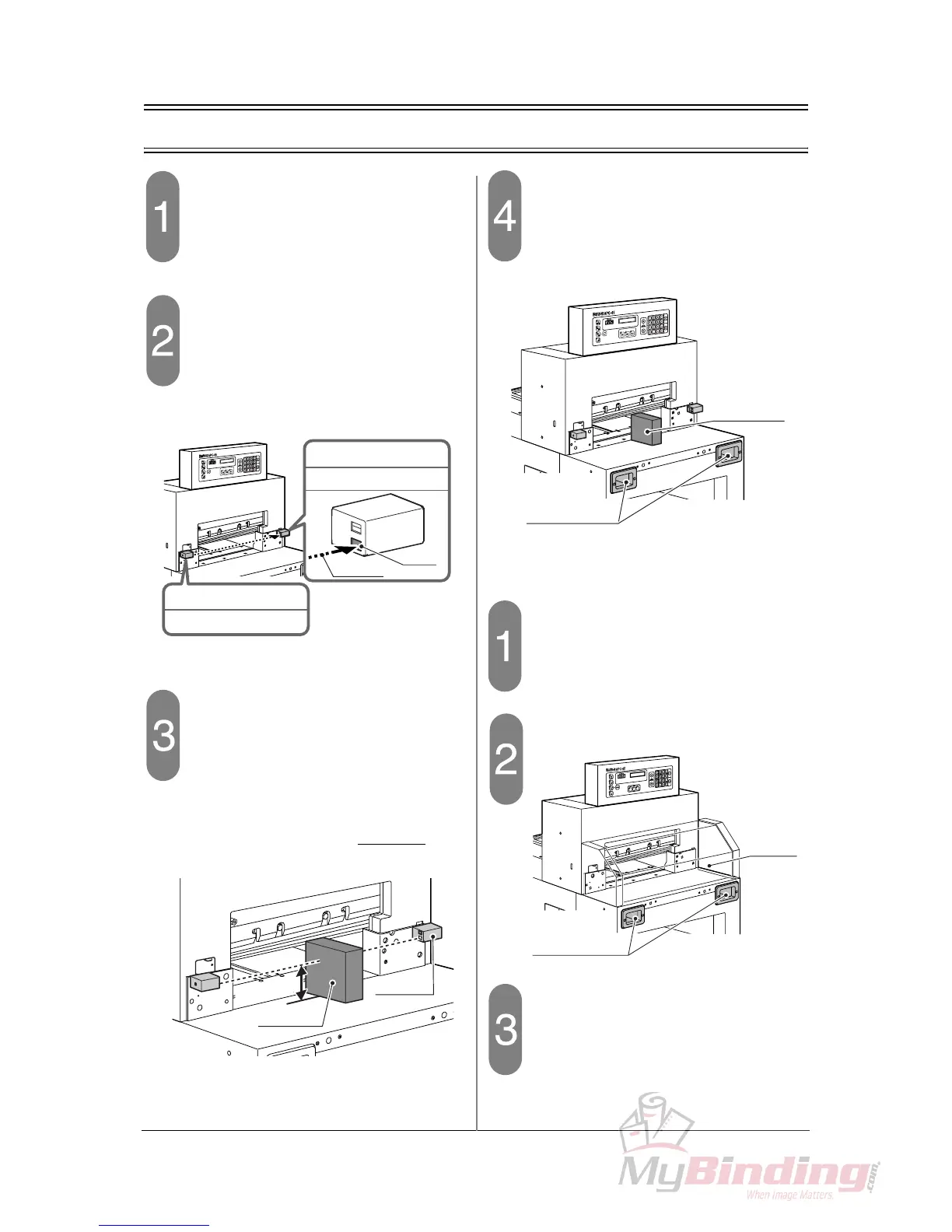
2-3 Check the Beam Light Sensors
Turn on the power switch.
- When the initialization is completed, the cur-
rent position value (=400.0) appears.
Check the beam sensor.
- If the LED on the receiver on the right sensor
illuminates red, the machine is OK.
Block the beam light between sen-
sors.
- The beam light is about 77 mm (3.0”) above
the table. Place any obstacle on the table to
block the beam. (Do not place the obstacle
under the knife.)
- If the LED on the receiver illumi-
nate, the machine is OK.
Press both cutting buttons.
- Continue to press the cutting buttons while the
obstacle is on the table.
- If the clamp and the knife do not move, the
machine is OK.
If the optional cutting section cover is
installed,
Turn on the power switch.
- When the initialization is completed, the cur-
rent position value (=400.0) appears.
Open the cutting section cover.
Press both cutting buttons.
- Continue to press the cutting buttons while the
cutting section cover is open.
- If the clamp and the knife do not move, the
machine is OK.
LED
Receiver
Beam
When the beam light
is received
= Red
Beam Light Sensor
Emitter
Beam Light Sensor
“does not”
77mm (3.0")
Receiver
Obstacle
Cutting Buttons
Obstacle
M1
M2
M3
Cutting Buttons
Cutting
Section
Cover



 To Next Page