38
Cutting Stick Replacement Replacement and Adjustment
4-3 Cutting Stick Replacement
When the groove of the cutting stick
becomes deep, the bottom sheet may
remain uncut, or torn. In these cases,
replace the cutting stick.
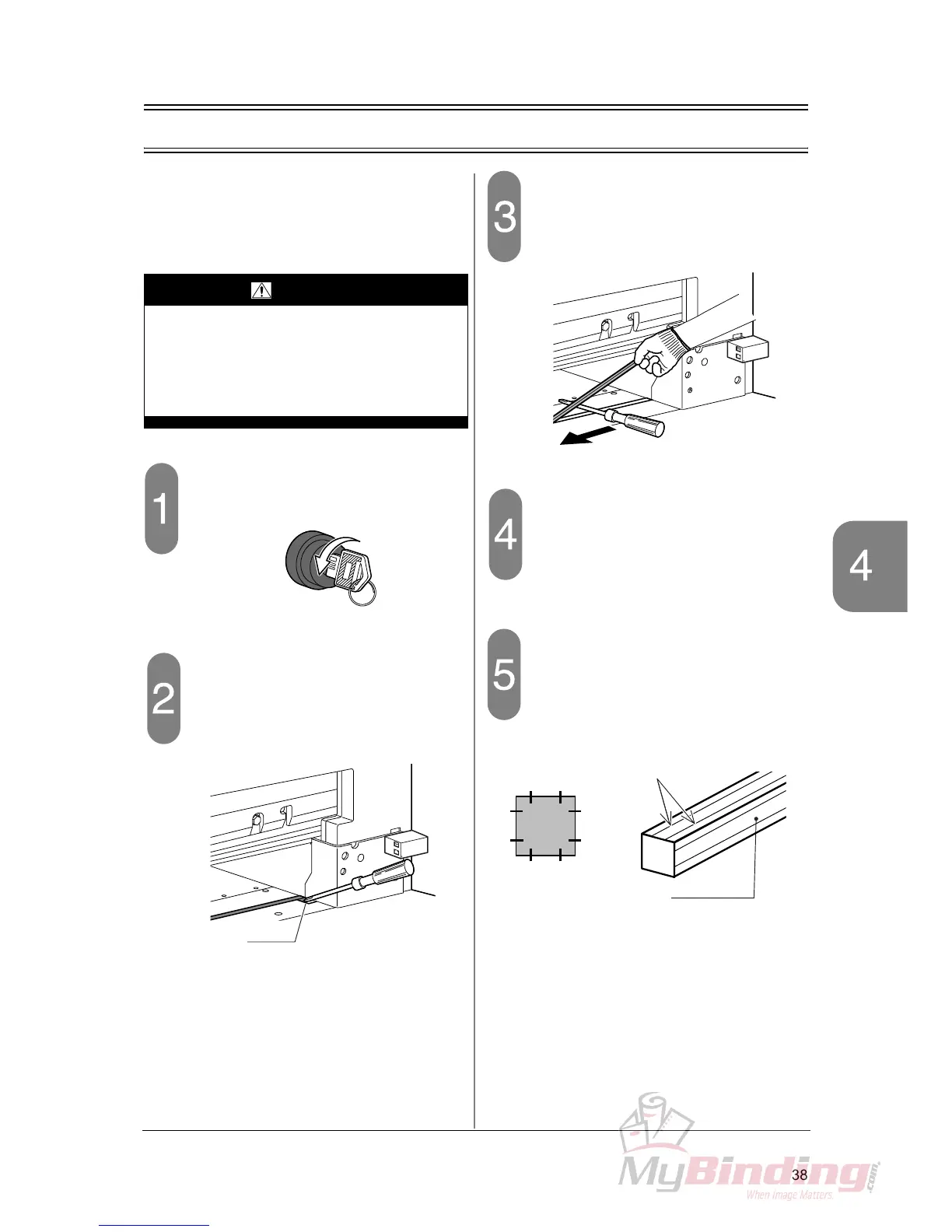
Turn off the power switch.
Lift the cutting stick.
- Insert a screwdriver under the cutting stick
from the right and left groove, and lift it.
Remove the cutting stick.
- Lift the cutting stick, insert a screwdriver under
the cutting stick and slide it. The cutting stick
can be removed easily.
Clean the groove.
- In the groove for the cutting stick, paper chips
and paper dust remain. Remove them com-
pletely.
Insert a new cutting stick.
- Each cutting stick can be used up to eight
times - four faces and two surfaces per face.
Insert the unused surface of the cutting stick
face up.
WARNING
A single operator must replace the cutting
stick.
Wear gloves and be careful to keep your
hands away from the knife. Otherwise,
sharp knife can cause severe personal
injury.



 To Next Page