(Revised 2015-09-28) Page 17 of 157
SERIAL INTERFACE
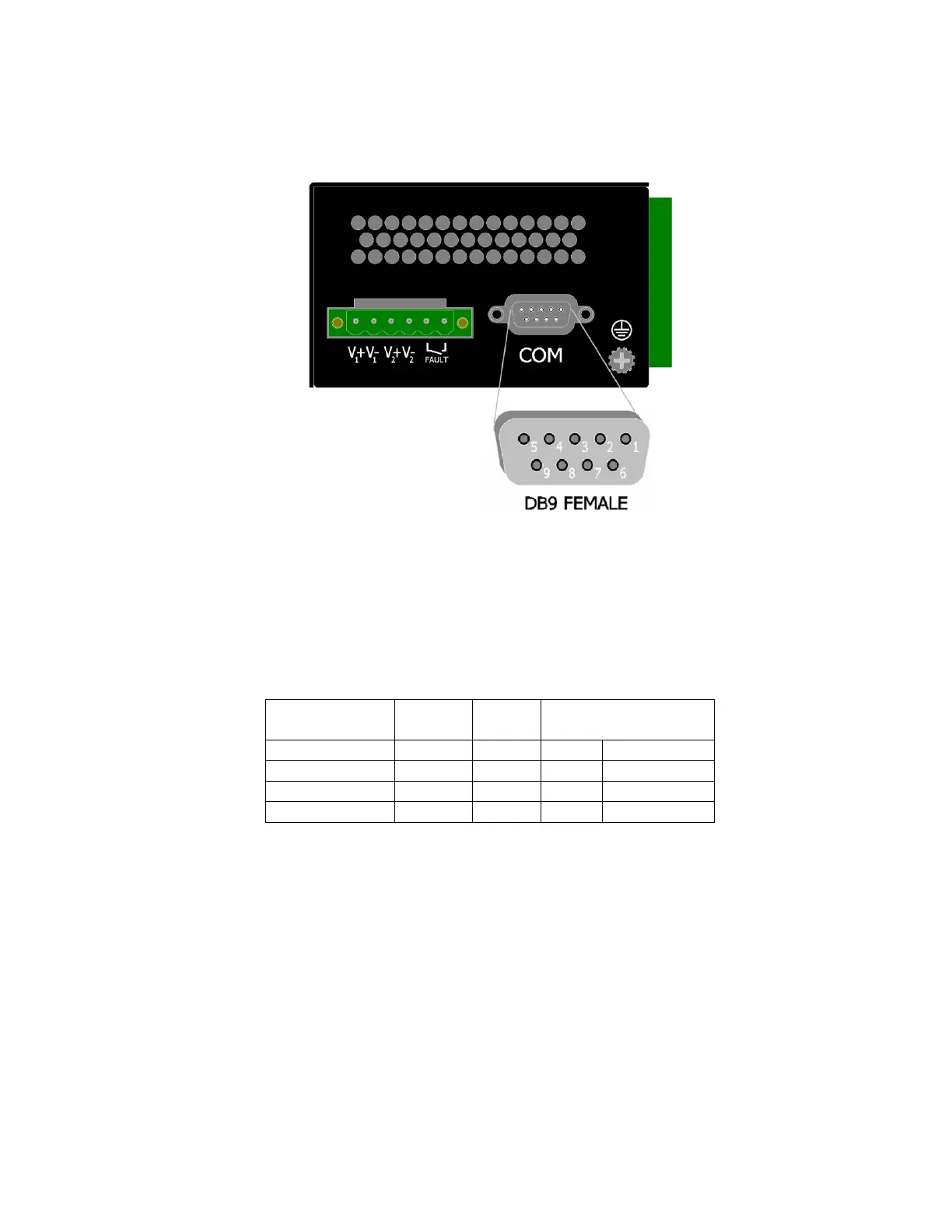
The 700 Series switches provide an EIA-232 interface accessed via a 9-pin female connector (labeled
‘COM’ on the unit). This is used to access the Command Line Interpreter (CLI). The pin-outs are shown
below:
Serial Cable
Connect the serial COM port of your PC and the 700 Series Switch using a standard straight through serial
cable. You will require a cable with a 9-pin or 25-pin sub-D female connector for the PC end, and a 9-pin
male sub-D connector for the 708 Series end.
The following table shows the pin-out and the connections for both types of cable:
Standard straight through serial cables are readily available from Radio Shack or a variety of computer
stores.
HyperTerminal
The following configuration should be used in HyperTerminal:
Port Settings: 115200
Data Bits: 8
Parity: NONE
Stop bits: 1
Flow Control: NONE



 To Next Page