(Revised 2012-05-01
Page 100 of 170
N-Link – Configuration, Continued…
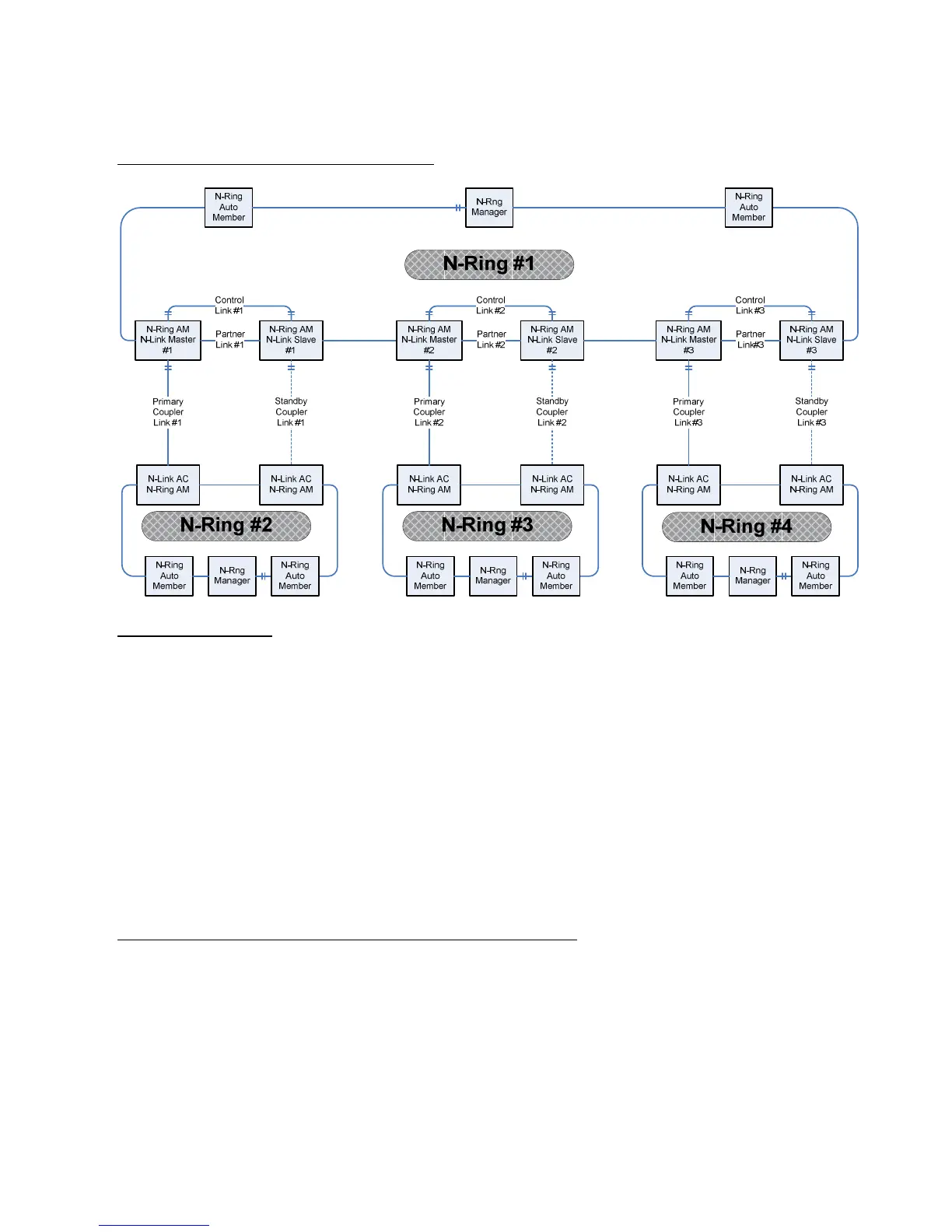
Complex N-Link Configuration (Example):
Configuration Notes:
• The Master and Slave must be part of the N-Ring topology.
• If using default configuration choices, the administrator only needs to configure the N-Link Master.
The N-Link Slave and both Coupler switches will auto-detect any needed configuration.
• If not using default configuration choices, the administrator may also need to configure the Default
Coupler port on the N-Link Slave.
• There must be a direct link between the Master and Slave Control ports. Use of media converters or
other switches is not supported.
• There must be a direct link between the Master and Slave Partner ports. Use of media converters or
other switches is not supported.
• There must be at least one other switch, besides the Master and Slave, that supports N-Link on the
N-Ring.
• N-Link will only support a single point of failure. Multiple points of failure and misconfiguration
are not supported and may cause a network storm under some circumstances.
Configuration Steps to redundantly couple 2 N-Ring networks:
1. Ensure the Coupler and Control cables are disconnected at this point.
2. Get Both N-Rings working with a status of OK.
3. Configure N-Link Slave: Ensure that the N-Link Slave is set to Auto Configure and select a Default
Coupler Port. Save Configuration.
4. Configure N-Link Master: Select the Control and Coupler ports. Save the Configuration.
5. Connect the Control Link cable. Ensure that the Slave switch status now shows a state of “Slave”
6. Connect the Coupler Link cables.
7. Check N-Link status by selecting the N-Link Status View page.



 To Next Page