EasyManua.ls Logo

NAD 7080 - Alignment (Audio); Alignment (Tuner)

NAD 7080
14 pages
Print Icon
To Next Page IconTo Next Page
To Previous Page IconTo Previous Page
Loading...
ALIGNMENT
(AUDIO
1.
IDLE
CURRENT
ALIGNMENT
{.
5
Minutes
minimum
pre-heating
is
necessary
for
idle
current
alignment.
2.
Set
the
volume
control
at
minimum
position,
ge
3.
Speaker
switch
should
be
set
at
off
position.
4.
Connect
DC
voltmeter
across
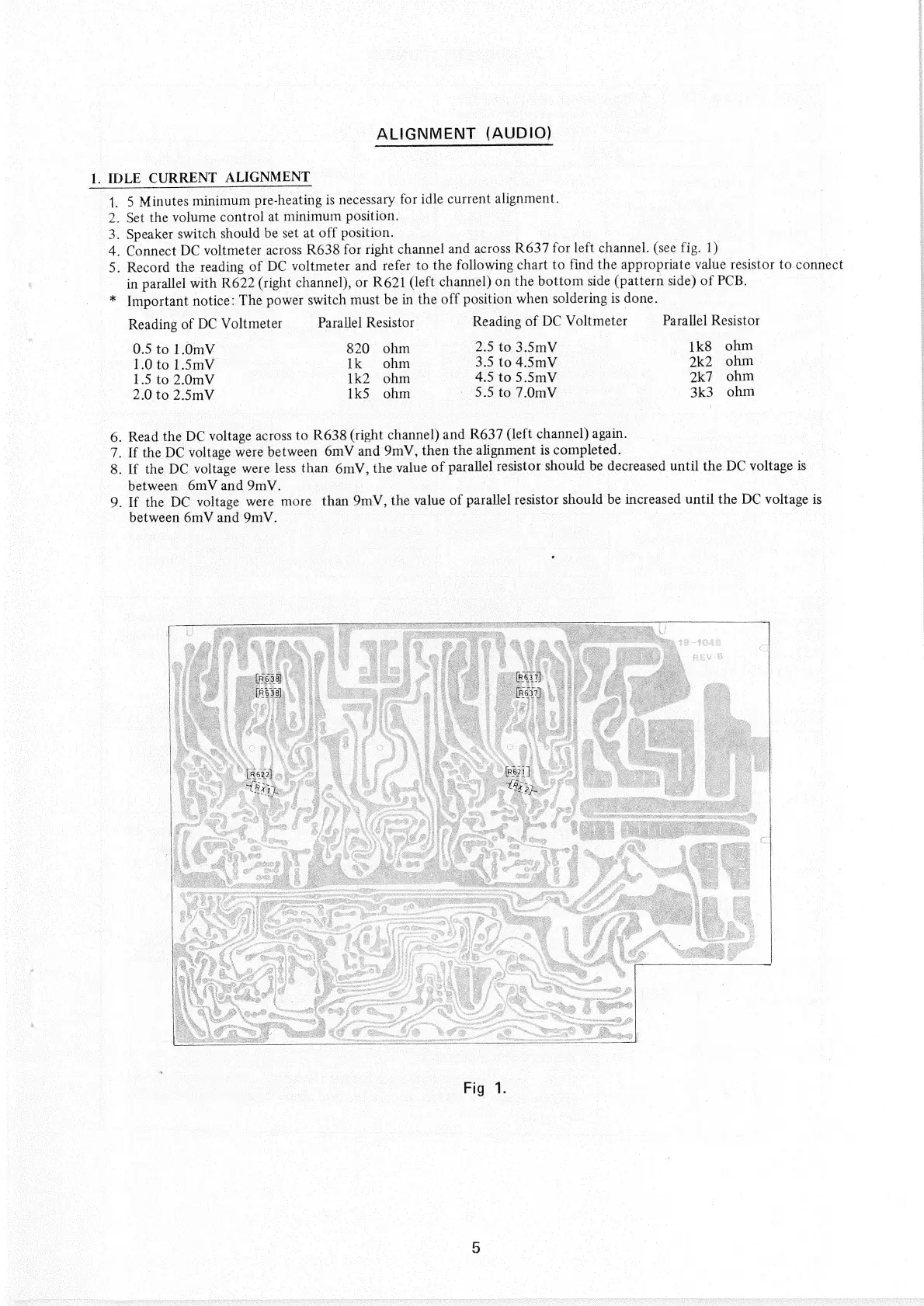
R638
for
right
channel
and
across
R637
for
left
channel.
(see
fig.
1)
5.
Record
the
reading
of
DC
voltmeter
and
refer
to
the
following
chart
to
find
the
appropriate
value
resistor
to
connect
in
parallel
with
R622
(right
channel),
or
R621
(left
channel)
on
the
bottom
side
(pattern
side)
of
PCB.
_*
Important
notice:
The
power
switch
must
be
in
the
off
position
when
soldering
is
done.
Reading
of
DC
Voltmeter
Parallel
Resistor
Reading
of
DC
Voltmeter
_—
Parallel
Resistor
0.5
to
1.0mV_
820
ohm
_-
2.5
to3.5mV
1k8
ohm
1.0
to
1.5mV
Ik
ohm
3.5
to
4.5mV
:
2k2
ohm
1.5
to
2.0mV
1k2
ohm.
|
4.5
to
5.5mV
2k7
ohm
2.0
to
2.5mV
1k5
ohm
—
3.5
to
7.0mV
|
3k3
ohm
6.
Read
the
DC
voltage
across
to
R638
(right
channel)
and
R637
(left
channel)
again.
|
7.
If
the
DC
voltage
were
between
6mV
and
9mV,
then
the
alignment
is
completed.
3
es
8.
If
the
DC
voltage
were
less
than
6mV,
the
value
of
parallel
resistor
should
be
decreased
until
the
DC
voltage
is
between
6mV
and
9mV.
aes
|
|
9.
If
the
DC
voltage
were
more
than
9mV,
the
value
of
parallel
resistor
should
be
increased
until
the
DC
voltage
is
|
between
6mV
and
9mV.
:
eens

Related product manuals