6
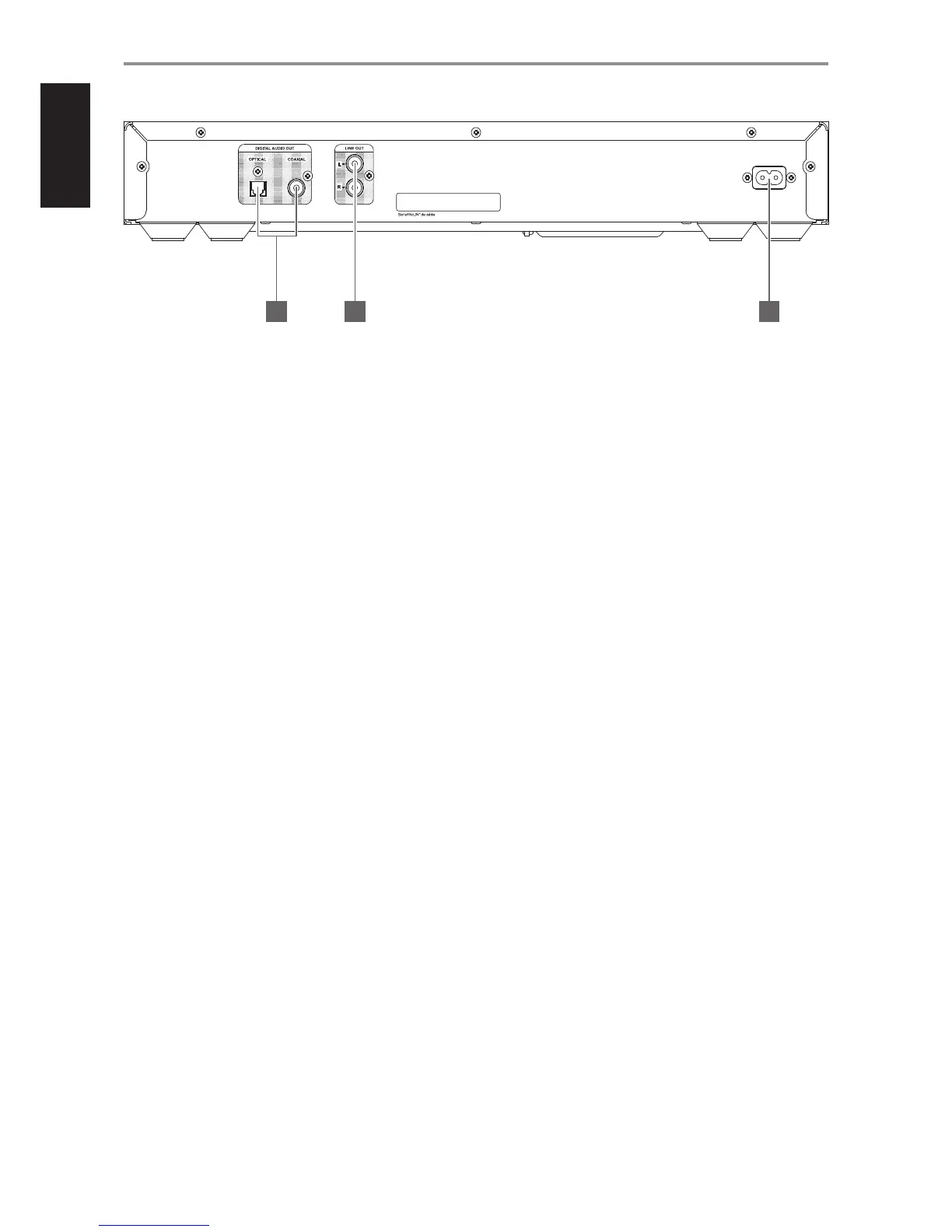
1 DIGITAL AUDIO OUT (OPTICAL/COAXIAL)
• Connect optical or coaxial digital audio output ports to
corresponding digital input of a receiver, amplier, computer
soundcard or other digital processors.
• Use a high quality 75 ohms digital RCA interconnect cable to obtain
best results.
2 LINE OUT
• Use good quality RCA interconnect cables to connect these sockets
to any line level input of a receiver, amplier or any compatible
audio system.
3 AC MAINS INPUT
• Ensure that the supplied power cord’s female connector end is
rmly secured to C 538’s AC Mains input socket and the male plug
connected to the mains power source.
• Always unplug the power cord from the mains power source before
disconnecting the female connector end from C 538’s AC Mains
input socket.
IDENTIFICATION OF CONTROLS
REAR PANEL
© NAD C538
100-240V ~ 50/60Hz 15W
1 2 3


 To Next Page