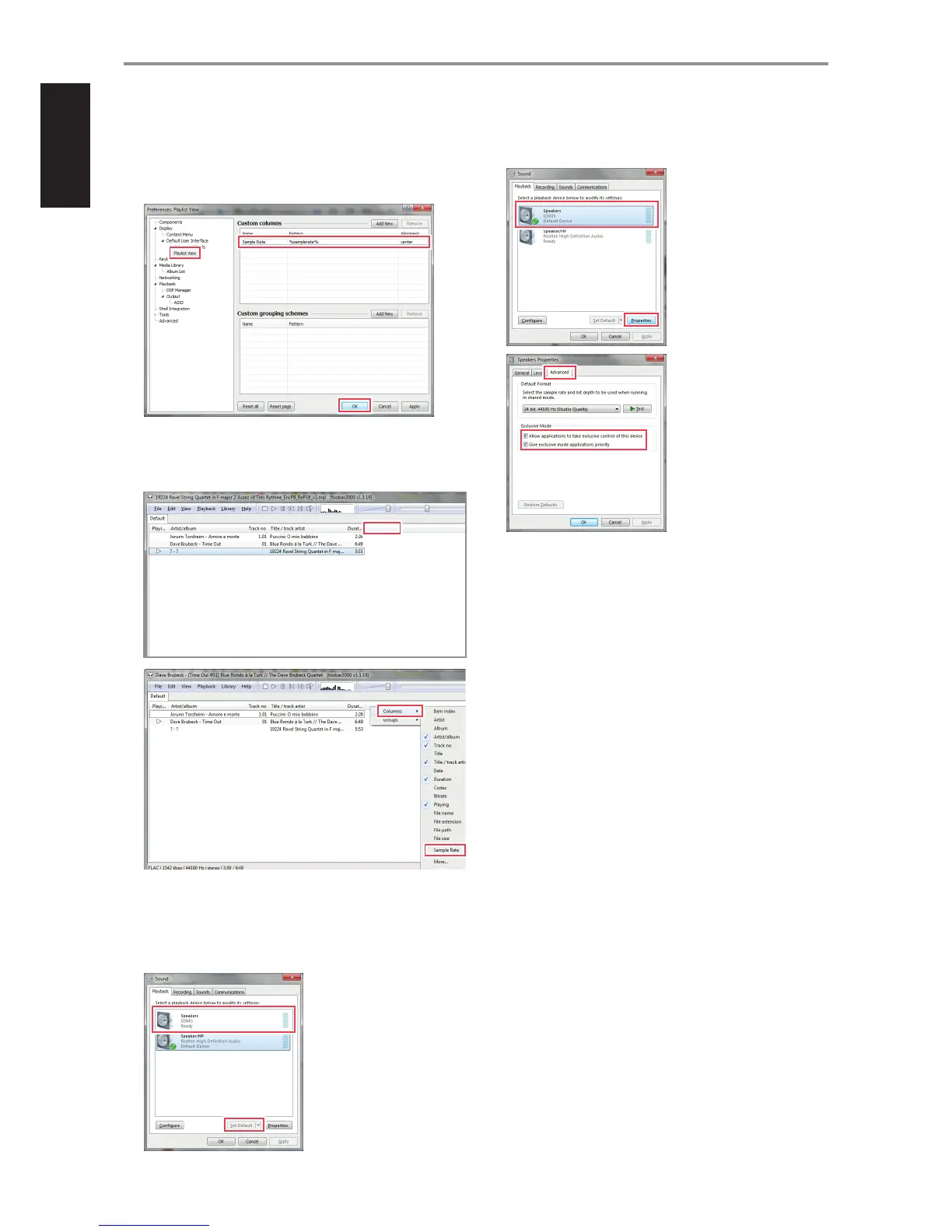
15 The column header for sample-rate is not standard. Manually input
sample rate as shown below.
File $ Preferences $ Display $ Default User Interface $ Playlist
View $ Custom Columns $ Name $ Sample Rate $ Pattern $
%samplerate% $ OK
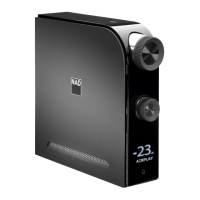
16 Activate Sample Rate in the playlist view by selecting any spot in the
header and right click. Columns $ Sample Rate. You may select other
indicators like Bit Rate, File Size and others.
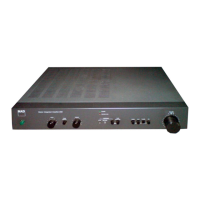
17 Select Playback device for your computer. Select “D3045” as the default
speaker. Below sequence is a guideline only and may dier according
to the Windows version of your computer.
Control Panel $ Hardware and Sound $ Sound $ Manage audio
devices $ Playback $ Speakers D3045 $ Set Default
18 With D3045 as the default speaker, go to “Properties” and then
“Advanced”. Ensure that both options under “Exclusive Mode” are
selected.
19 Foobar2000 installation is now completed. Select foobar2000 to
playback MQA les from your computer to D3045.
OTHER FEATURES
10


 To Next Page