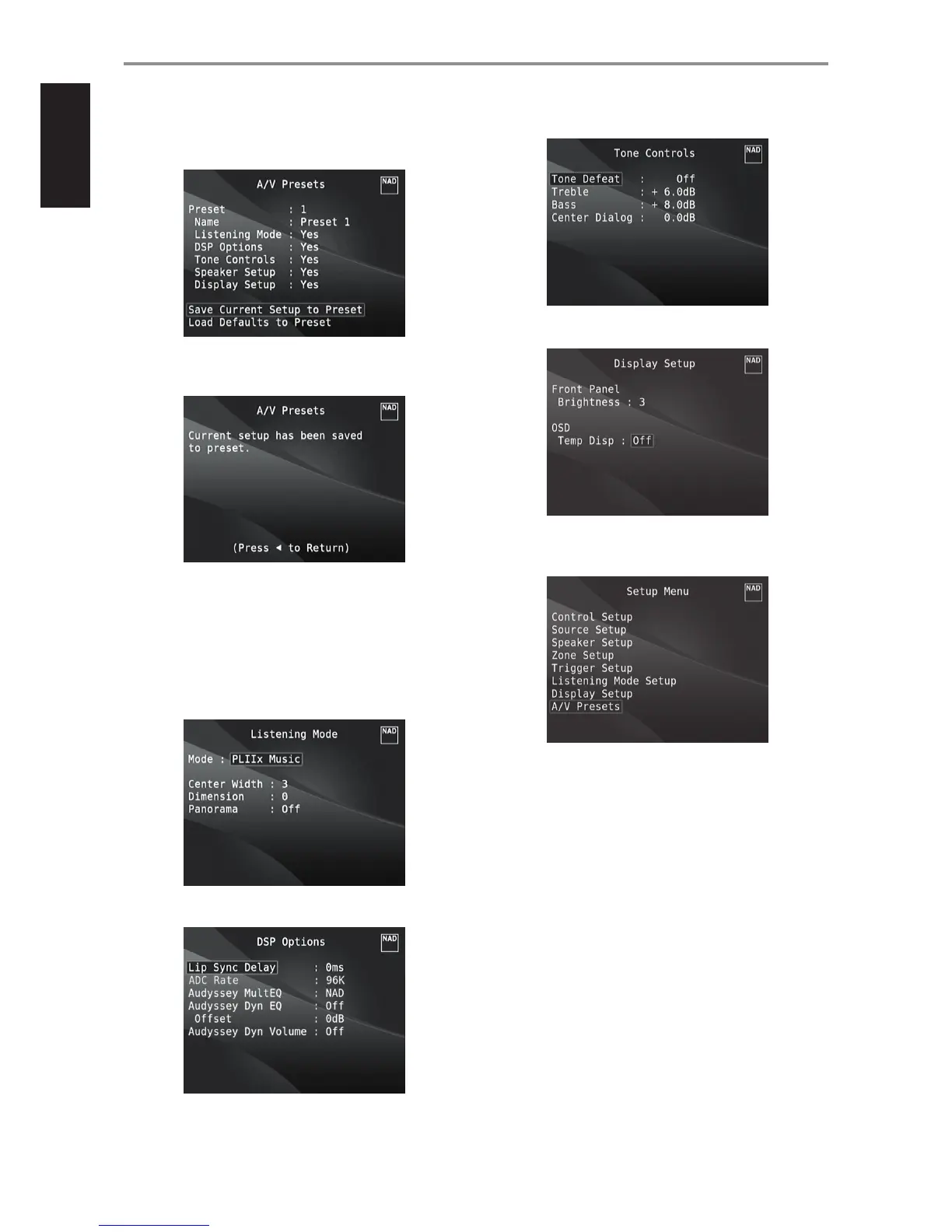
3 At “A/V Presets” page, set “Preset: 1” to the following conditions - use
[R/T] to select “Yes” or “No” and press [ENTER] to conrm selection and
move on to the next setting.
While at “Save Current Setup to Preset” menu line, use [w] to save the
above settings to Preset 1. Below OSD will be shown, arming that the
above settings are now saved to “Preset 1”.
When you recall “Preset 1” using the remote control (for HTRM 2, “A/V
PSET” + “1”), the above preset values allocated at “Preset 1” (preset
settings as shown in the OSD captures at Step 1) will be recalled and
implemented at the current source.
4 Now, repeat again Step 1 above but this time with the following
settings
Listening Mode: PLIIx Music
DSP Options: 0ms
Tone Controls: Tone Defeat: O
Display Setup: Set “Temp Disp” to “O”
5 With the above settings, scroll to “A/V Presets” from the SETUP MENU
page. Use [E] to access “A/V Presets” menu.
OPERATION
USING THE M17 SETUP MENU
28


 To Next Page