HDMI OUT CONNECTION
t For the 480i/576i resolution setting, the output resolution of HDMI OUT
will change to 480p/576p.
t If you select a resolution manually and then connect the HDMI
jack to TV and your TV does not accept it, the resolution setting will
automatically be set to “Auto”.
t The 1080p video output frame rate may be automatically set to either
24Hz or 50/60Hz depending upon the capability and preference of the
connected TV and based on the native video frame rate of the BD-ROM
disc’s contents.
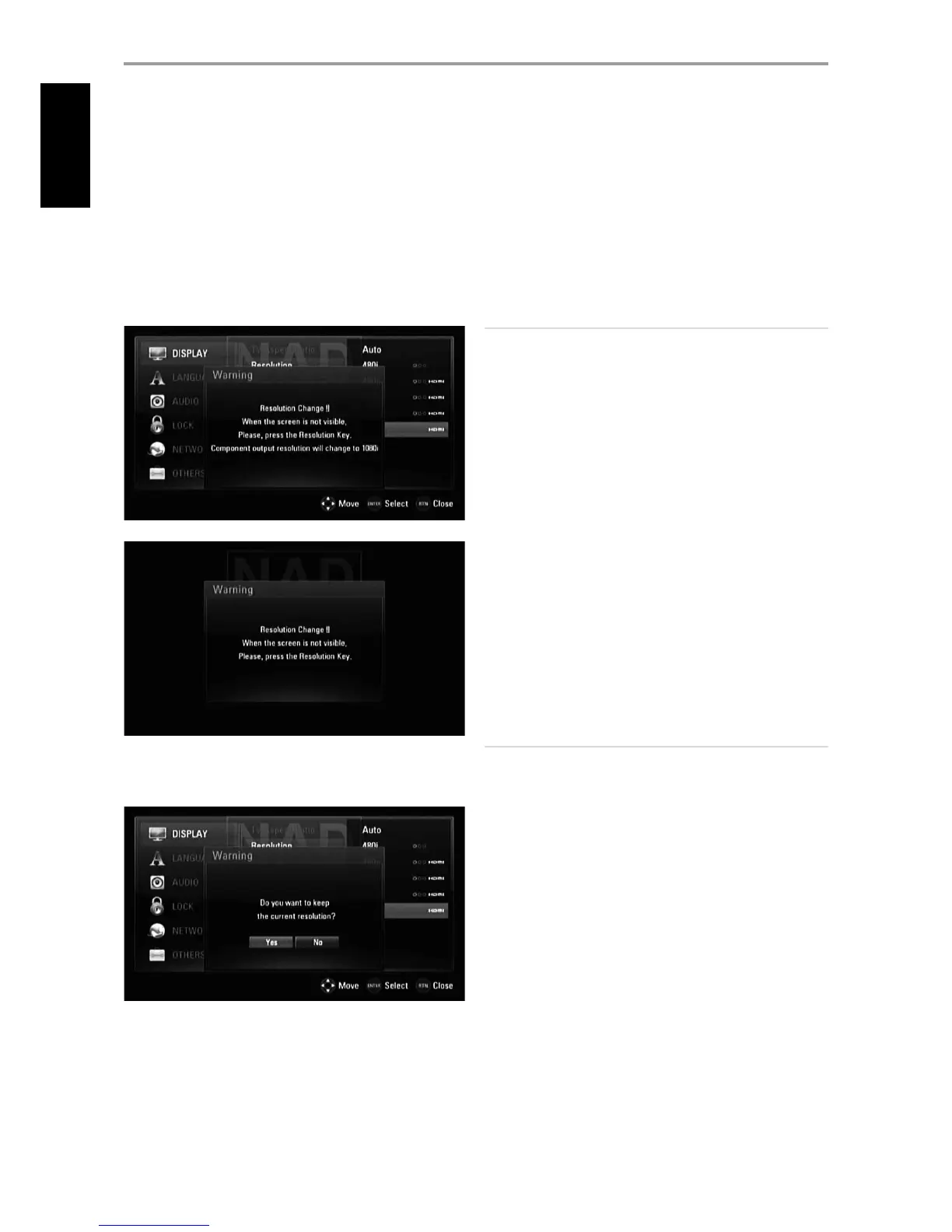
t If you select a resolution that is not compatible with your TV, a warning
message as shown below will appear.
After resolution change, if you cannot see the screen, please wait for about
20 seconds and the resolution will automatically revert back to the previous
resolution or a message screen as below may appear
Select “Yes” for the current resolution setting (the VFD will show the
current resolution setting) to be applied. “Current” resolution setting is the
suggested new resolution setting.
Select “No” to seek for the next applicable resolution setting. The above
“Warning” screens will interchangeably be displayed until you select “Yes” to
a suggested resolution setting.
COMPONENT VIDEO OUT CONNECTION
t For the 1080p resolution setting with unprotected media, the
COMPONENT VIDEO OUT resolution will change to 1080i.
t When a protected media is loaded for playback, 720p, 1080i or 1080p
resolution settings of COMPONENT VIDEO OUT will change to either
480i/576i or 480p/576p (depends upon the connectivity of a HDMI
cable - plugged-in or unplugged).
t BD or DVD could prevent up-scaling on analog output.
VIDEO OUT CONNECTION
t The resolution of the VIDEO OUT jack is xed to 480i/576i.
NOTES
t %FQFOEJOHPOZPVSEJTQMBZTPNFPGUIFSFTPMVUJPOTFUUJOHTNBZSFTVMU
to abnormal picture or the picture disappearing altogether. When this
IBQQFOTQSFTT<)0.&>LFZBOEUIFOUPHHMF<3&4>SFQFBUFEMZVOUJMUIF
picture reappears.
t 5IF5TVQQPSUTTJNVMUBOFPVTPVUQVUPGBMMWJEFPPVUKBDLT5IF
SFTPMVUJPOPGUIF)%.*PVUQVUXJMMOPUCFUIFTBNFBTUIFSFTPMVUJPOPO
UIF$PNQPOFOU7JEFPPVUQVU
t 'PSBMJTUPGBQQMJDBCMFSFTPMVUJPOTFUUJOHTXJUISFTQFDUUPWJEFPPVUQVU
QPSUBOEUZQFPGNFEJBQMFBTFSFGFSUPi3&40-65*0/4&55*/(4wVOEFS
UIFi3&'&3&/$&wNBJOIFBEJOH
1080P DISPLAY MODE
Movies shot with lm camera consist of 24 frames per second. Since
conventional televisions display frames either at 1/60 or 1/50 second
intervals, the 24 frames do not appear at an even pace. The “24Hz” setting of
the T 587’s “1080p Display Mode” option enables the faithful reproduction
of such lm-based materials, displaying each frame at 1/24 second intervals.
24Hz: Using an HDMI-equipped display compatible with 1080/24p
input, set “1080p Display Mode” to “24Hz” for smooth presentation of
lm-based materials.
50/60Hz: If “24Hz” is selected and some picture disturbance is
experienced when the video switches between video and lm material,
set “1080p Display Mode” to “50Hz” (European version model only) or
“60Hz” (North America version model only) instead.
NOTE
*GZPVS57JTOPUDPNQBUJCMFXJUIQUIFBDUVBMGSBNFGSFRVFODZ
PGUIFWJEFPPVUQVUXJMMCF)[FWFOUIPVHIUIFiQ%JTQMBZ
.PEFwJTTFUUPi)[w
HDMI COLOR SETTING
Set the type of video output from HDMI OUT jack. Select the setting that
matches your display device.
YCbCr: Select when connecting to an HDMI display device.
RGB: Select when connecting to a DVI display device..
OPERATION
USING THE T 587
12
ENGLISH



 To Next Page