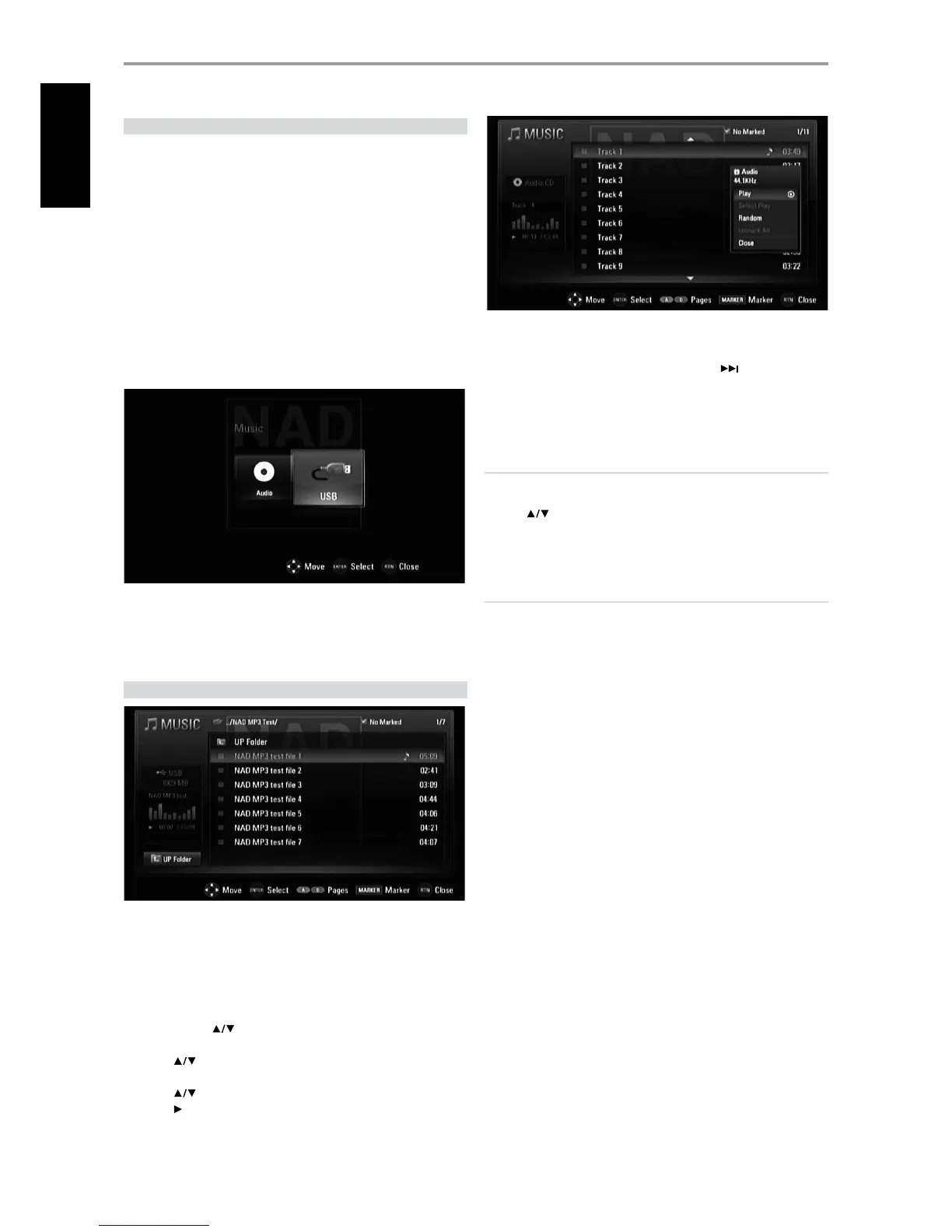
USB MODE
The T 587 can play back MP3/WMA/PHOTO/PNG/DivX les stored in
external USB (Universal Serial bus) devices. The following are the T 587’s
capabilities with respect to USB device playability.
t Support only USB Flash Drive.
t Support USB 1.1 and USB 2.0.
t Support up to 4 partitions of the USB device.
t Digital camera and mobile phone are not supported.
t If a USB extension cable or USB HUB is used, the USB device may not be
recognized.
USB PLAYBACK
1 Connect the external USB device to the front panel’s USB input.
2 Press [HOME]. Select “Movie”, “Photo” or “Music” option. Press [ENTER].
3 If a disc is loaded and a USB device is inserted simultaneously, the menu
prompt for selecting a media will appear
4 Select “USB” as the desired media and then press [ENTER].
For details of operations on applicable le type, refer to the relevant
sections below about MP3/WMA/Photo/DivX playback.
PLAYING AUDIO CD/MP3/WMA
The T 587 can play Audio CD and MP3/WMA formatted recordings on
CD-R/RW, DVD±R/RW,BD-R/RE discs or USB ash drive.
1 Load the applicable disc or connect USB containing les. Select “Music”
from the “Home” menu.
2 Press [ENTER]. The “MUSIC” menu appears at the OSD. A list of folders,
tracks or les is shown at the OSD.
3 Use the BR 1’s [
] keys to navigate through the folders, tracks or
les.
4 Press [
] to select a folder, and press ENTER to see the folder
contents.
5 Press [
] to select a track or le.
6 Press [
] (Play) to start playback or press [ENTER] for more options - the
drop down playability menu appears.
Play: Start playback of the selected track or le.
Select Play: Playback only the marked track(s) or le(s). Use BR 1’s
[MARKER] for selecting the multiple les or tracks.
Random: Start or stop random playback. Press [
] during random
playback to select another random track or le. “Random” and “Select
Play” mode cannot be enabled simultaneously.
Unmark All: Unmark all marked tracks or les.
Close: Exit menu options.
NOTES
t 1MBZCBDLNBZTUBSUBVUPNBUJDBMMZJGBO"VEJP$%JTMPBEFE
t *GZPVBSFJOBöMFMJTUBOEXBOUUPSFUVSOUPUIFQSFWJPVT'PMEFSMJTUVTF
UIF<
>CVUUPOTPOUIFSFNPUFUPIJHIMJHIUi61'PMEFSwBOEQSFTT
<&/5&3>
t "Ui.64*$wNFOV#3TSFEPSCMVFDPMPSCVUUPODBOCFVTFEUPNPWFUP
UIFQSFWJPVTPSOFYUQBHF
IMPORTANT NOTICE
t $VTUPNFSTTIPVMEOPUFUIBUQFSNJTTJPOJTSFRVJSFEJOPSEFSUPEPXOMPBE
.18."öMFTBOENVTJDGSPNUIF*OUFSOFU/"%&-&$530/*$4
*/5&3/"5*0/"-IBTOPSJHIUUPHSBOUTVDIQFSNJTTJPO1FSNJTTJPO
TIPVMEBMXBZTCFTPVHIUGSPNUIFDPQZSJHIUPXOFS
t .BYJNVNöMFTQFSEJTD64#MFTTUIBOUPUBMOVNCFSPGöMFTBOE
GPMEFST
OPERATION
USING THE T 587 FEATURES
16
ENGLISH



 To Next Page