IDENTIFICATION OF CONTROLS
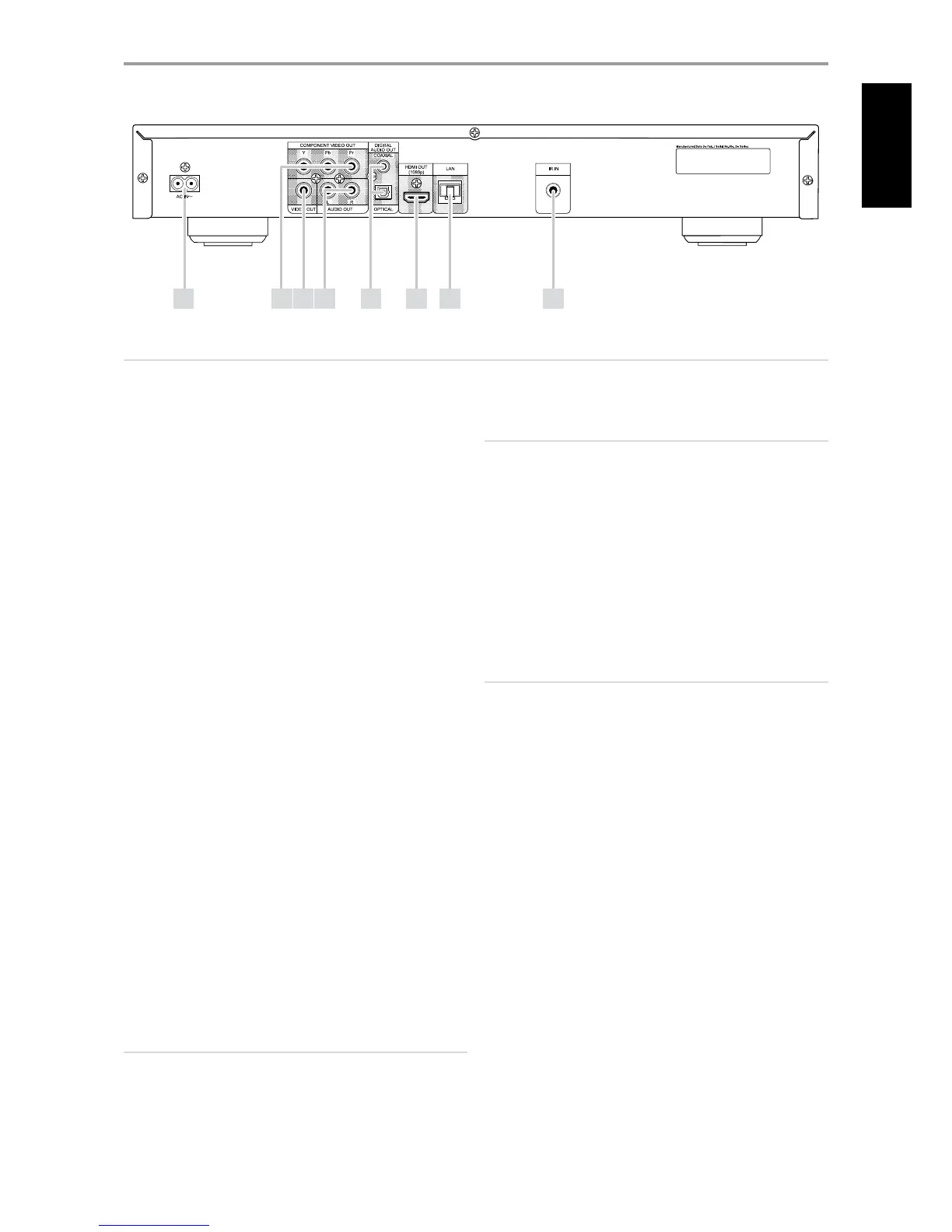
REAR PANEL
1 AC MAINS INPUT: The T 587 comes supplied with a separate AC Mains
cable. Before connecting the cable to a live wall socket, ensure rst
that it is rmly connected to the T 587’s AC Mains input socket. Always
disconnect the AC Mains cable plug from the live wall socket rst,
before disconnecting the cable from the T 587’s Mains input socket.
2 COMPONENT VIDEO OUT: Connect to the corresponding component
video input of a compatible equipment like a monitor/television,
projector, A/V receiver or processor. Be sure to observe consistency
in connecting the appropriate Y/ Pb/Pr jacks to the corresponding
sources/inputs. Do not rely purely on the color coding of the jacks,
which may not always be consistent among brands.
3 VIDEO OUT: Connect to the corresponding composite video input of
a compatible monitor/television, projector, A/V receiver or processor
using quality dual-RCA cable designed for video signals.
4 AUDIO OUT: This analog audio output can be connected to the
corresponding analog audio input of a compatible equipment like an
amplier, receiver, TV or stereo system.
5 DIGITAL OUT (COAXIAL, OPTICAL): The digital playback audio output
signal is available at these ports. Connect the optical or coaxial digital
OUT ports to the corresponding S/PDIF digital input of an amplier,
receiver, computer soundcard or other digital processors.
6 HDMI OUT: Using a HDMI cable (supplied only for European version
model), connect the HDMI OUT jack to the corresponding HDMI input
jack of a compatible equipment like a HDTV, a projector or an A/V
Receiver.
Dolby TrueHD, Dolby Digital Plus and DTS-HD Master Audio are
supported with maximum 7.1 channels when HDMI OUT is the selected
audio output port. Make sure to connect to an amplier or receiver with
a built-in (Dolby Digital, Dolby Digital Plus, Dolby TrueHD, Dolby Digital
Plus, DTS-HD Master Audio and other applicable formats) decoder to
playback applicable multichannel audio formats.
WARNING
#FGPSFDPOOFDUJOHBOEEJTDPOOFDUJOHBOZ)%.*DBCMFTCPUIUIF5
BOEUIFBODJMMBSZTPVSDFNVTUCFQPXFSFE0''BOEVOQMVHHFEGSPNUIF
"$PVUMFU'BJMVSFUPPCTFSWFUIJTQSBDUJDFNBZDBVTFQFSNBOFOUEBNBHF
UPBMMFRVJQNFOUDPOOFDUFEWJB)%.*TPDLFUT
IMPORTANT NOTICE
*GZPVS)%.*FRVJQQFE57JTOPUDBQBCMFPGEFDPEJOH%54PS%PMCZ
%JHJUBM#JUTUSFBNTFUUIF5T)%.*PS41%*'TFUUJOHBUUIFi"VEJP
4FUVQ.FOVwUPi1$.4UFSFPw5IFSFNBZCFBSVTIJOHOPJTFIFBSEJGZPVS
57JTOPUDBQBCMFPGEFDPEJOHUIF%54PS%PMCZ%JHJUBM#JUTUSFBNNPTU
57TEPOPUIBWFUIJTDBQBCJMJUZ
7 LOCAL AREA NETWORK (LAN) PORT: Using a commercially available
straight LAN cable (Category 5/CAT5 or better with RJ45 connector),
connect this LAN port to the corresponding port of your modem
or router. By connecting the T 587 to broadband internet, you can
playback a disc that oers BD-Live function. Refer also to the “NETWORK
SETUP MENU” section of “USING THE T 587” under the “OPERATION” main
heading.
NOTES
t /"%JTOPUSFTQPOTJCMFGPSBOZNBMGVODUJPOPGUIF5BOEPSUIF
JOUFSOFUDPOOFDUJPOEVFUPDPNNVOJDBUJPOFSSPSTPSNBMGVODUJPOT
BTTPDJBUFEXJUIZPVSCSPBECBOEJOUFSOFUDPOOFDUJPOPSPUIFSDPOOFDUFE
FRVJQNFOU$POUBDUZPVS*OUFSOFU4FSWJDF1SPWJEFS*41GPSBTTJTUBODFPS
UIFTFSWJDFCVSFBVPGZPVSPUIFSFRVJQNFOU
t $POUBDUZPVS*41GPSQPMJDJFTDIBSHFTDPOUFOUSFTUSJDUJPOTTFSWJDF
MJNJUBUJPOTCBOEXJEUISFQBJSBOEPUIFSSFMBUFEJTTVFTQFSUJOFOUUP
internet connectivity.
t 4PNFEJTDSFMBUFENBUFSJBMBWBJMBCMFUISPVHIJOUFSOFUNBZOPUCF
DPNQBUJCMFXJUIUIF5$POUBDUUIFQSPEVDFSPGUIFEJTDGPSRVFTUJPOT
about such content availability or compatibility.
8 IR IN: This input is connected to the output of an IR (infrared) repeater
(Xantech or similar) or the IR output of another component to allow
control of the T 587 from a remote location. Most NAD products with IR
OUT are fully compatible with the T 587.
3 4 5 81 2
ATTENTION!
1MFBTFNBLFTVSFUIBUUIF5JTQPXFSFEPòPSVOQMVHHFECFGPSFNBLJOHBOZDPOOFDUJPOT*UJTBMTPBEWJTBCMFUPQPXFSEPXOPSVOQMVHBMMBTTPDJBUFE
DPNQPOFOUTXIJMFNBLJOHPSCSFBLJOHBOZTJHOBMPS"$QPXFSDPOOFDUJPOT
6 7
9
ENGLISH



 To Next Page