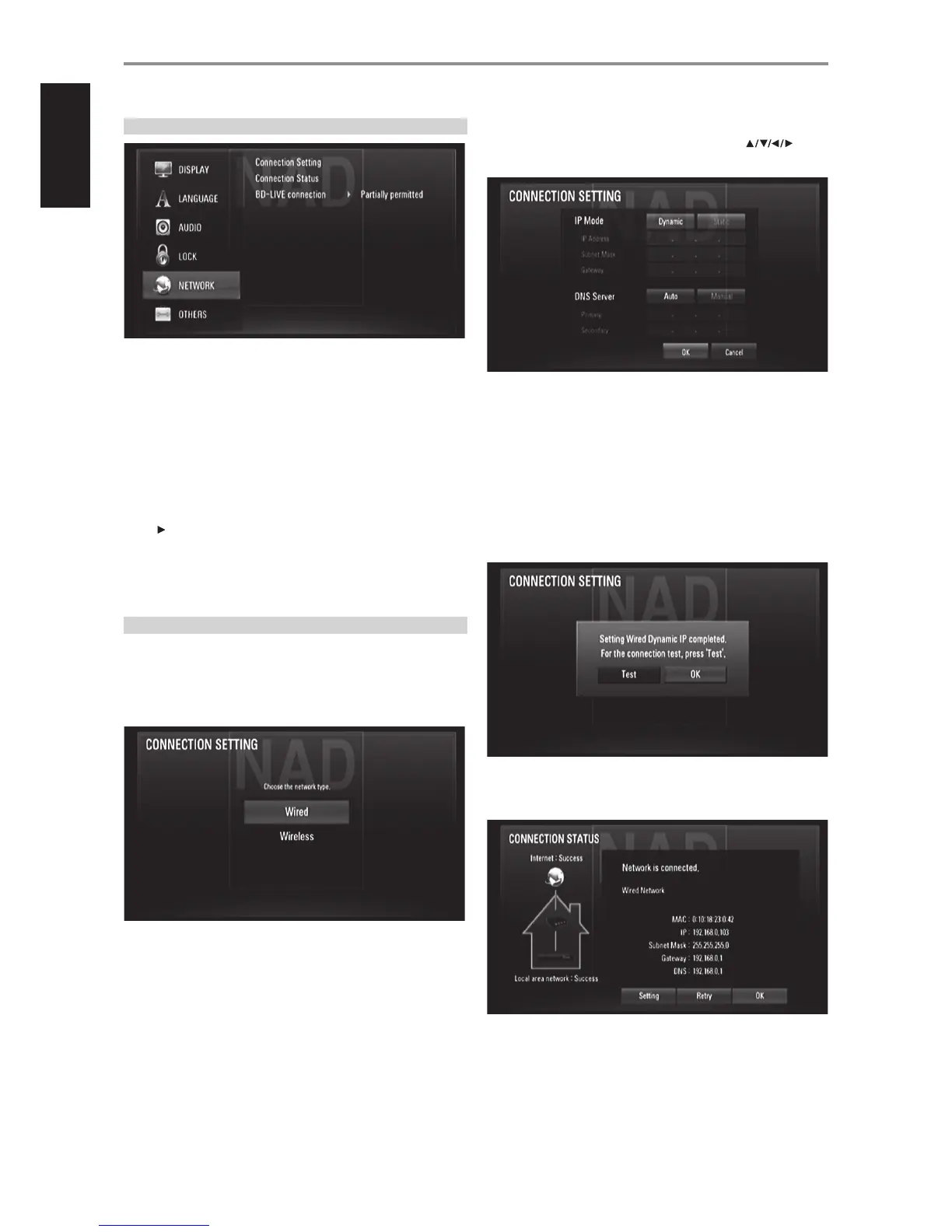
NETWORK SETUP MENU
The NETWORK settings are needed to use the BD Live feature. By
connecting the T 577 to the internet, special BD-ROM sites can be enabled
by some BD-ROM discs. Online contents can be downloaded and watched
if a BD-ROM site contains links to future movie trailers, bonus contents and
other related features.
Ensure proper broadband connectivity when conguring the following
NETWORK features.
CONNECTION SETTING
Press [ ] or [ENTER] to setup your network connection. An OSD menu
prompt allows you to select “Wired” or ‘Wireless”.
Follow the below procedure in setting up your “Wired” or “Wireless”
connection.
WIRED NETWORK
Selecting “Wired” network provides the best performance for your network
connection. Wired connection allows attached devices direct connection to
the network and thus not subject to radio frequency interference.
1 Select “Wired” from the “CONNECTION SETTING” menu.
2 A menu prompts you to select “OK” to reset any existing connection
or “No” to retain current connection. Select “OK”. Use [ ] to
congure your connection with below OSD.
Static: Select to set manually the IP address, Subnet Mask, Gateway and
consequently the DNS Server settings.
Dynamic: Select to automatically allocate an IP address.
3 After selecting either “Static” or “Dynamic”, click “OK” to complete the
network connection.
4 After setting up the connection, a menu will prompt you test your
network connection. Click “OK” to complete the network connection
and exit the “CONNECTION SETTING” menu.
5 If “Test” is selected, the network connection status is displayed as in
below
OPERATION
USING THE T 577
16
ENGLISH FRANÇAIS ESPAÑOL ITALIANO DEUTSCH NEDERLANDS SVENSKA РУССКИЙ



 To Next Page