VIEWING A PHOTO FILE
The T 577 allows the playback or viewing of PHOTO les.
1 Load the applicable disc or connect USB containing les. Select “Photo”
from the “Home” menu. Press [ENTER].
2 The PHOTO menu appears on the TV screen. A thumbnail of the photos
loaded in the disc will be shown in the OSD.
3 Press [ ] to go over the photo les.
4 Press [ENTER] or [ ] to select a le and start playback.
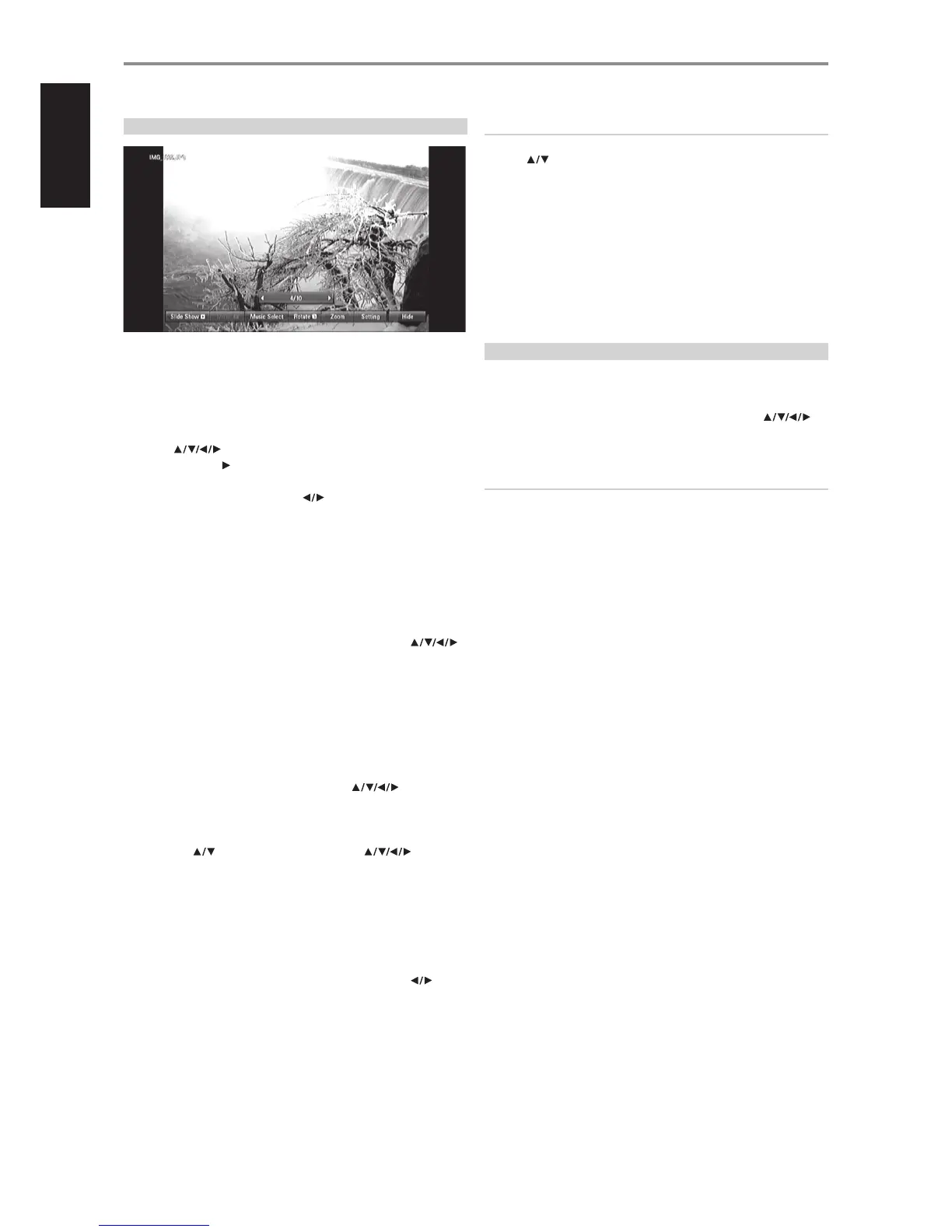
5 During photo playback, several selectable options are shown in the
bottom portion of the photo. Use [ ] to highlight and select any of
the following options.
Slide Show: Press [ENTER] button to start or pause the slide show.
Music: Press [ENTER] to play or pause the background music. This option is
available after the background music is selected using “Music Select” option.
Music Select: Select the background music during photo playback. Press
[ENTER] and the “Select the music album” submenu appears. Use [ ]
to select a media or folder containing music les. Press ENTER to conrm your
selection and start playback of selected background music.
Rotate: Toggle [ENTER] to continually rotate the picture clockwise. This
option is not available during slide show.
Zoom: During playback or pause mode, press [ZOOM] to display the [Zoom]
menu. Use BR 2’s green or yellow buttons to zoom in or out of the picture.
You can move through the zoomed picture using [ ] buttons.
Press RTN to exit the [Zoom] menu and return to the normal picture size. The
zoom function can also be operated by BR 2’s [ZOOM] button.
Setting: Use [ ] to select “Eect” or “Delay”. Use [ ] and then
press ENTER to set the selected option.
Eect: Apply various eects when sliding photos.
O: Slide Show without any eect.
Random: Slide show eects are applied randomly.
Slide: Slides a photo from various directions.
Door: Photo will be appear like door opening.
Lattice: Photo will be appear from tiled pieces to full screen image
Delay: Set the photo delay time for Slide Show. Use BR 2’s [ ] to
select Slow, Normal or Fast.
Hide: Toggle [ENTER] to exit or display the menu options.
NOTES
• If you are in a le list and want to return to the previous Folder list, use
the [ ] buttons on the remote to highlight the folder and press
[ENTER].
• Use BR 2’s red (A), green (B), yellow (C) or blue (D) buttons as indicated in
the OSD – go to the rst le/page, move up or down the le/page list or
jump to last le/page.
• During playback, press [RTN] once or twice to go back to the previous
menu/page/OSD.
• Recommended size: less than 4000 x 3000 x 24 bit/pixel or less than
3000 x 3000 x 32 bit/pixel.
• Maximum les per disc/USB: less than 2000 (total number of les and
folders).
DIVX PLAYBACK
The T 577 supports DivX playback.
1 Load the applicable disc or connect USB containing les. Select “MOVIE”
from the “Home” menu.
2 Press [ENTER]. A list of DivX les is shown in the OSD. Use [ ]
to select a le.
3 Press [ENTER] to select a le and start playback.
NOTE
Use BR 2’s red (A), green (B), yellow (C) or blue (D) buttons as indicated in
the OSD – go to the rst le/page, move up or down the le/page list or
jump to last le/page.
MOVIE FILE REQUIREMENTS (USB/DISC)
Movie le compatibility with the T 577 is limited as follows:
1 Available resolution size: 1920 x 1080 (W x H) pixels
2 File extensions: “.avi”, “.divx”, “.mpg”, “.mpeg”, “.mp4”, “.mkv”
3 Playable subtitle: SubRip (.srt / .txt), SAMI (.smi), SubStation Alpha (.ssa/.
txt), MicroDVD (.sub/.txt), VobSub (.sub), SubViewer 1.0 (.sub), SubViewer
2.0 (.sub/.txt), TMPlayer (.txt), DVD Subtitle System (.txt)
4 Playable Codec format: “DIVX3.xx”, “DIVX4.xx”, “DIVX5.xx”, “XVID”, “DIVX6.
xx” (Standard playback only), H.264/MPEG-4 AVC, DIVX-HD, MPEG1 SS,
MPEG2 PS, MPEG2 TS
5 Playable Audio format: “Dolby Digital”, “DTS”, “MP3”, “WMA”, “AAC”,“AC3”
6 Sampling frequency: within 32-48 kHz (WMA), within 16-48 kHz (MP3)
7 Bit rate: within 20-320 kbps (WMA), within 32-320 kbps (MP3)
8 CD-R/RW, DVD±R/RW, BD-R/RE Format: ISO 9660+JOLIET, UDF and UDF
Bridge format
9 Maximum Files/Folder: Less than 2000
• The movie le name and subtitle are limited to 180 characters.
• Not all the WMA and AAC Audio format is compatible with this unit.
• HD movie les contained on the CD or USB 1.0/1.1 may not be
played properly. BD, DVD or USB 2.0 are recommended to play back
HD movie les.
• This player support H.264/MPEG-4 AVC prole Main, High at Level
4.1.
• For a le with higher level, a warning message will appear on the
screen.
• This player does not support les that are recorded with GMC
(Global Motion Compensation) or Qpel (Quarter pixel). Video
encoding techniques in MPEG4 standard, like DivX or XVID, are
supported.
OPERATION
USING THE T 577 FEATURES
20
ENGLISH FRANÇAIS ESPAÑOL ITALIANO DEUTSCH NEDERLANDS SVENSKA РУССКИЙ



 To Next Page