10 VOL [ ] : Press [VOL ] button to increase or decrease the loudness level. Release the
button when the desired level is reached. The VFD on the front panel will indicate the level set.
For NAD Receivers, the VFD will also show “Volume Up”, “Volume Down” or “Volume: _ _ dB” (_ _
indicates the numerical dB level) while pressing AVR 3’s .
11 [ ] : Select an item in a menu.
12 SLEEP: Switch o the NAD Receiver or Tuner after a preset number of minutes.
SLEEP MODE
The Sleep Mode timer will switch the T 737 to Standby mode automatically after a preset number of
minutes. Pressing the AVR 3’s [SLEEP] button once will display the setting of the sleep time increment.
Pressing the AVR 3’s [SLEEP] button a second time within a 3-second period will change the sleep time
increment in 15-minute intervals, after which time the T 737 will automatically switch into Standby mode.
To adjust the sleep delay, press the AVR 3’s [SLEEP] button twice; rst to display the sleep time
increment, and a second time to change the sleep time increment. The sleep time increment
will continuously be displayed on the T 737’s front panel Vacuum Fluorescent Display (VFD). Each
consecutive press increases the sleep time in 15-minute increments from 15 to 90 minutes. To
cancel the sleep mode, continue pressing the AVR 3’s [SLEEP] button until “Sleep O” is displayed
on the VFD. Switching the T 737 to standby from either the AVR 3’s OFF or the T 737’s Power button
will also cancel the sleep mode.
DVD/BD/CD PLAYER CONTROL (for use with NAD CD Player, Blu-ray Disc Player or DVD
Player): Set the DEVICE SELECTOR to “BD” in order to gain access to these buttons. Some of the control
buttons below are applicable only to specic NAD CD Player, Blu-ray Disc Player or DVD Player models;
check the owner’s manual of your NAD model for control button compatibility. You can also load the
applicable NAD code library to this device so that it can be made compatible with your other NAD
equipment. Refer to the section below about “LIBRARY” on how to load a NAD code library.
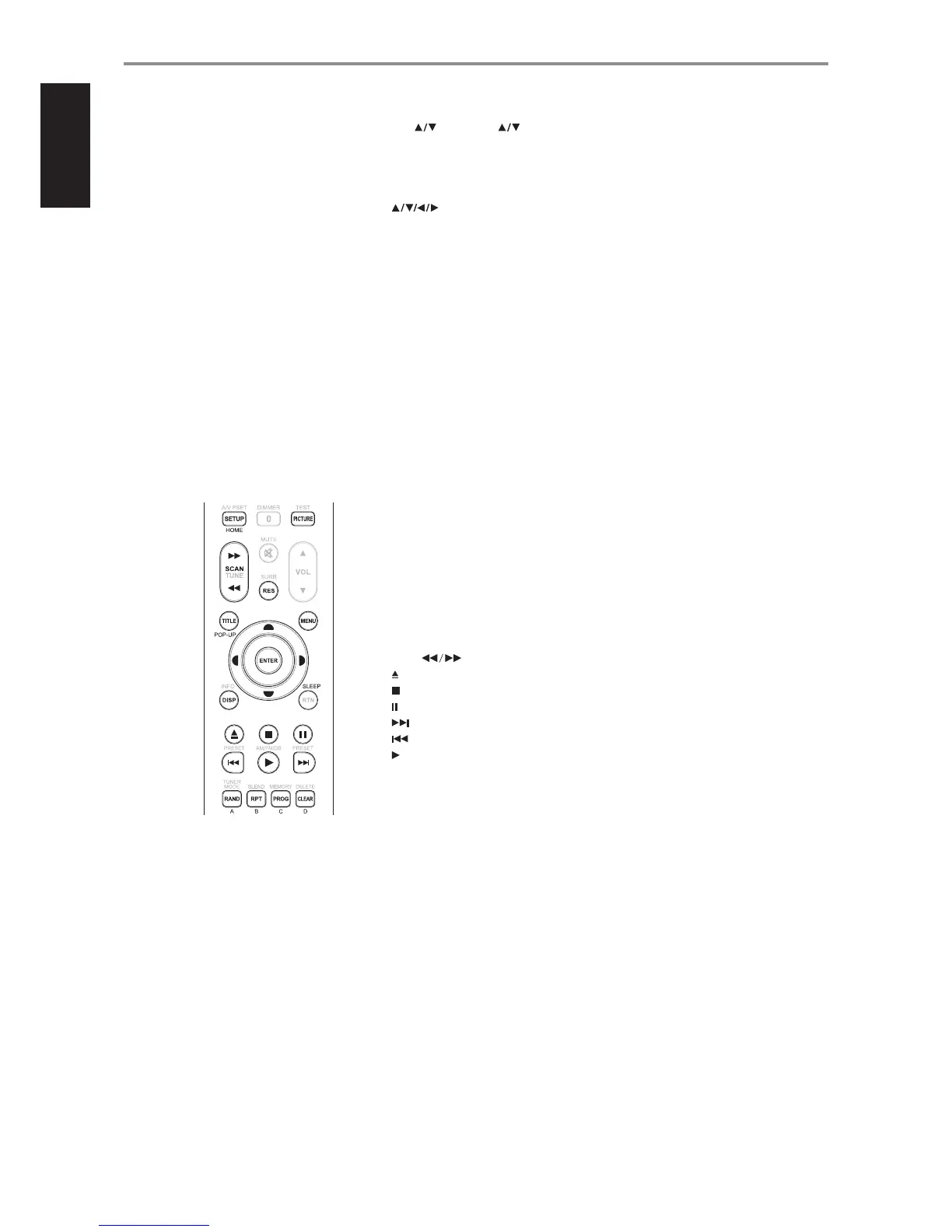
HOME: Display or exit HOME menu.
PICTURE: Display or exit Picture mode menu.
TITLE/POP-UP: Display DVD title menu or BD-ROM pop menu, if available.
MENU: Access menu on a DVD disc, if available.
SCAN [ ]: Fast reverse/forward search.
[ ] : Open or close disc tray.
[ ] : Stop playback.
[ ] : Pause playback temporarily.
[ ] : Go the next track, le or chapter.
[ ] : Go to the beginning of current/previous track, le or chapter.
[ ]: Start playback.
ENTER: Select desired track, folder or WMA/MP3 le.
DISP: Show playback time and other display information.
RAND: Play tracks/les in random order.
RPT: Repeat track, le or whole disc.
PROG: Enter or exit program mode.
CLEAR: Delete programmed track/le.
RES: Set output resolution of HDMI and Component Video output.
SETUP: Access or remove setup menu.
A,B,C,D: Navigate or select BD-ROM menu, if applicable; Page up/down PHOTO and MUSIC menu
list.
IDENTIFICATION OF CONTROLS
AVR 3 REMOTE CONTROL
12
ENGLISH FRANÇAIS ESPAÑOL ITALIANO DEUTSCH NEDERLANDS SVENSKA РУССКИЙ


 To Next Page