SETUP MENU
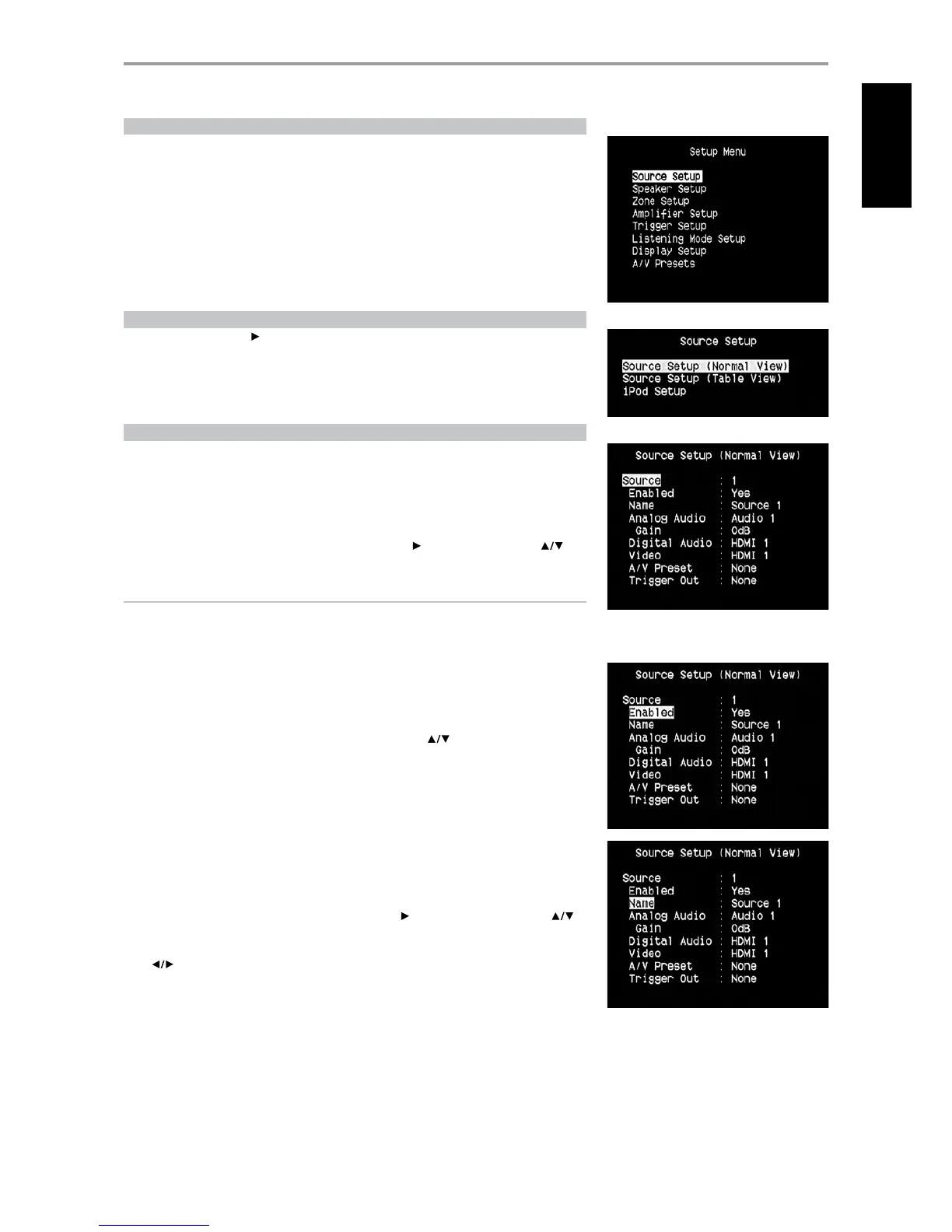
The Setup Menu allows one to customize the operation of the T 775 to the ancillary equipment used
in one’s specic AV system. Unless your system exactly matches the factory defaults as shown in the
accompanying Quick Start Guide, you will need to use the setup menu to congure the inputs of the T 775.
At Setup Menu, the following are congurable – Source Setup, Speaker Setup, Zone Setup, Amplier
Setup, Trigger Setup, Listening Mode Setup, Display Setup and A/V Presets.
To access and navigate through Setup Menu and its sub-menu selections, please refer to and follow
the directions stated in the sections ‘Display the OSD’ and ‘Navigating the OSD and Making Changes.’
SOURCE SETUP
From Setup Menu, pressing will direct you to the Source Setup menu wherein you could adjust
allocate or change the settings of the following – Source Setup (Normal View), Source Setup (Table
View) and iPod Setup.
SOURCE SETUP (NORMAL VIEW)
The Source Setup (Normal View) menu makes it possible to set, allocate or change the following settings.
SOURCE
The T 775 is equipped with ten congurable Sources. The settings for each Source are dependent on
the congurations set forth in the parameters for that particular Source window.
To change or toggle through the Sources, scroll to ‘Source’, press button and then ENTER or to
move up or down the Source selections.
NOTE
Source 5 is defaulted to iPod. For Source 5 to be changed and allocated for other inputs, go to ‘iPod
Setup’ menu under the ‘Source Setup’ menu. At iPod Setup menu, set ‘Enabled’ to ‘No’ – you can
now assign Source 5 to other inputs or settings as desired.
ENABLED
One can enable/disable a Source via this option. This is particularly useful if only few Sources are used
and one directly selects the Source from the front panel, bypassing unused sources.
To enable or disable a particular Source, scroll to ‘Enabled’ and press keys to select ‘Yes’ or ‘No’.
NAME
A new Name maybe assigned to a Source label. For example, if your DVD player is attached to
‘Source 1’, it is possible to rename ‘Source 1’ to ‘DVD Player.’
In order to rename the Source label, scroll to ‘Name’ and press to go the character. Then, press
to pick through the alphanumeric selections.
Press to move to the next character and at the same time save the changes done on the current
character. The name can be as long as twelve characters.
The new Name will be shown in the VFD as well as on the OSD.
OPERATION
USING THE T 775 SETUP MENU
17
ENGLISHFRANÇAISESPAÑOLITALIANODEUTSCHNEDERLANDSSVENSKAРУССКИЙ


 To Next Page