34 35
BLENDER BLENDER
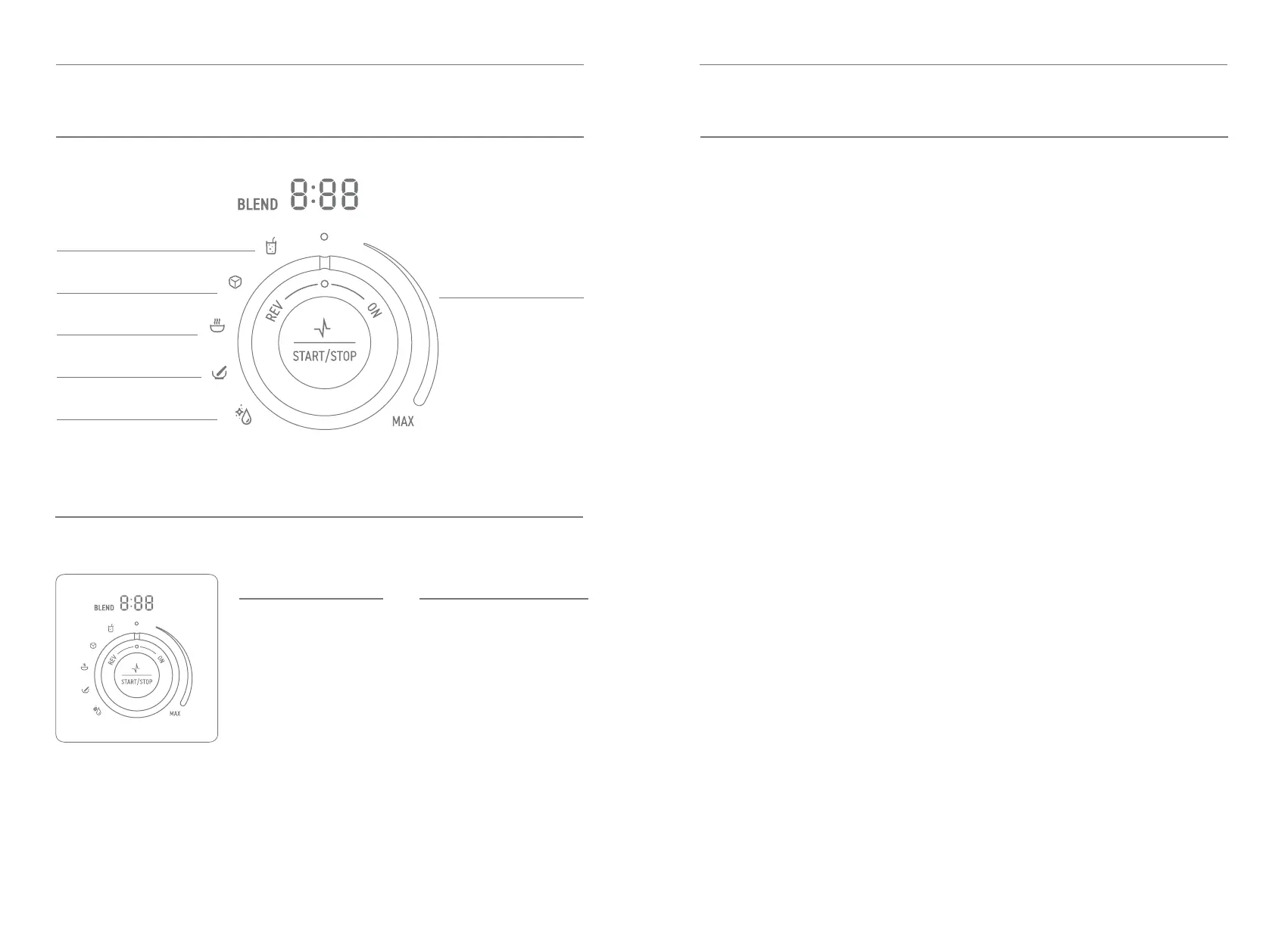
CONTROL KNOB AND DISPLAY BLENDING MODES OVERVIEW
Manual Mode
• Manual mode has variable
speed control which allows
user to adjust the speed
throughout the blending
operation. Turning the
control knob clockwise
increases the speed up to
MAX. Turning the control
knob counterclockwise
decreases the speed.
• Turn the control knob
clockwise and set the
indicator to desired speed.
• Press the Start/Stop button
to start blender.
• To increase speed, turn the
control knob clockwise up
to maximum speed MAX.
• To decrease speed,
turn the control knob
counterclockwise down
to minimum on speed
range indicator.
• To stop blending, either
press the Start/Stop
button or turn control knob
counterclockwise to top
center position.
Auto Modes
• Turn the control knob to select
the desired preset program and
the display will show the preset
time. Press the start button
to start blending and it will
automatically stop when the
program is complete. Program
can be paused during operation
by pressing the stop button
and then resume program by
pressing the button again.
• To stop operation, turn control
knob back to center position.
Manual Mode - Pulse
• Using the pulse function,
rst select pulse speed by
turning the control knob to
desired speed. The pulse
will operate at the speed
selected, turn the control
knob to MAX to operate
motor at maximum speed.
• Press and hold Start/Stop
button for at least 1 second
to start pulse and release the
button to stop pulse. Once
the button is pressed the
display time will count down
from 1:00 minute and when
button is released the display
time is 0:00.
Variable Speed
Smoothie
Clean
Mill
Soup
Ice Crush
Auto
Modes
Manual
Mode
Details illuminated when blending.
BLEND Light
BLEND will be solid
illumination once the jug is
installed on base.
BLEND will blink once any
blending mode has activated.
BLEND will be solid
illumination when any mode
is paused or canceled.
Timer Light
When base is powered without
jug installed, a dash will move
around display.
In manual mode, timer will
count up starting at 0:00.
In auto modes, timer will
count down from selected
program time.


 To Next Page