WWW.NANLITE.COM
16
MENU
SMART
CH: 512
OUTPUT MODE
ADDRESS/DMX
WIRELESS CONTROL
FAN CONTROL
ROTATE SCREEN
3 RDM Control
3.1 Connect the light fixture to the console with RDM function by using a connection cable, the connecting method is
the same as that of DMX/RDM console.
3.2 Control the fixture via a console with RDM function. (For specific operation methods, please refer to the RDM
console operation manual.)
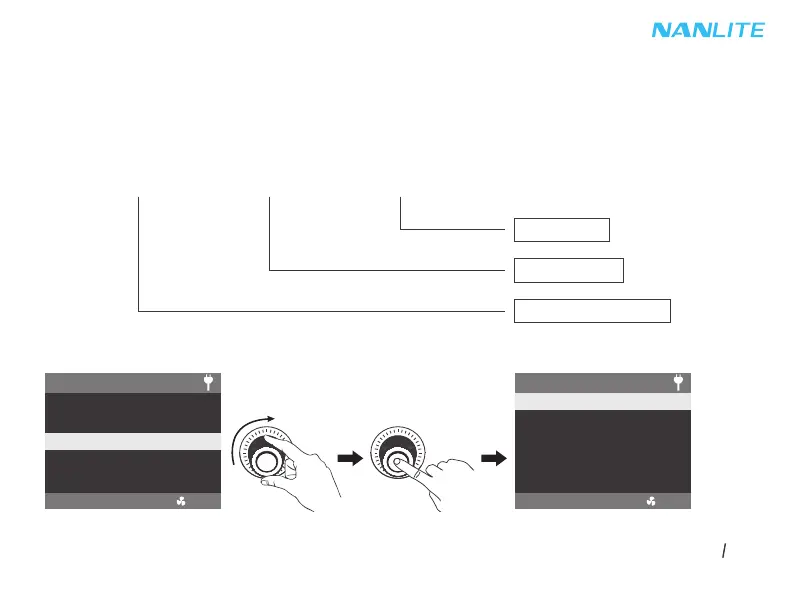
Note: The UID format of the fixture is as follow:
4. WIRELESS CONTROL
4.1 FC-300B has built-in Bluetooth function for connection via Bluetooth.
Rotate the right knob to WIRELESS CONTROL, and press the right knob to enter the secondary menu.
0008 XXXX XXXX
Serial Number
Manufacturer: Nanguang
0A02:FC-300B
SMART
MENU
BLUETOOTH SETTINGS
2.4G SETTINGS
CH: 512
PRESS “MENU” TO RETURN


 To Next Page
 Loading...