WWW.NANLITE.COM
24
SMART
CCT MODE
CH: 512
100%
DIM
2700K
CCT
SMART
CCT MODE
CH: 512
100%
DIM
6500K
CCT
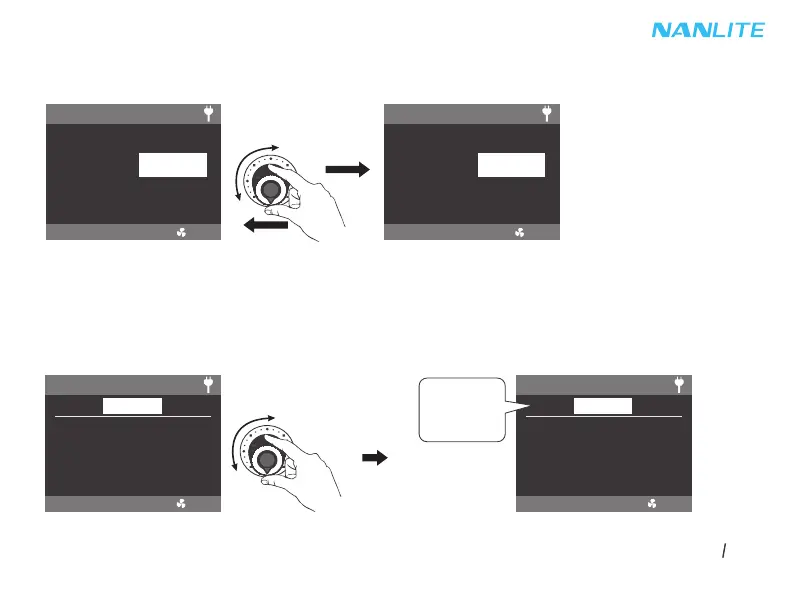
②CCT Setting, Rotate the right knob clockwise to increase the color temperature, rotate anticlockwise to decrease,
the CCT value will be shown on the screen, CCT range: 2700K -- 6500K.
Note: In other modes, the CCT range is the same as that in CCT MODE. Presss the right knob to promptly toggle
among: 2700K, 3200K, 4300K, 5600K and 6500K, which can be toggled in a loop.
2.2 EFFECT Mode
FC-300B has built-in effects including CCT LOOP, INT LOOP, FLASH, PULSE, STORM AUTO, STORM MANUAL, TV,
PAPARAZZI, CANDLE/FIRE, BAD BULB, FIREWORK, EXPLOSION AUTO, EXPLOSION MANUAL and WELDING.
Rotate the left knob to select the needed effect, they can be selected in a loop.
EFFECT MODE
CH: 512
EFFECT: CCT LOOP
SMART
DIM: 100%
CCT: 3200K - 5600K
SPEED: 8s
EFFECT MODE
CH: 512
EFFECT: WELDING
SMART
DIM: 0% - 100%
CCT: 5600K
SPEED: 50
PAUSE: OFF
CCT LOOP
.
.
.
WELDING


 To Next Page
 Loading...