11
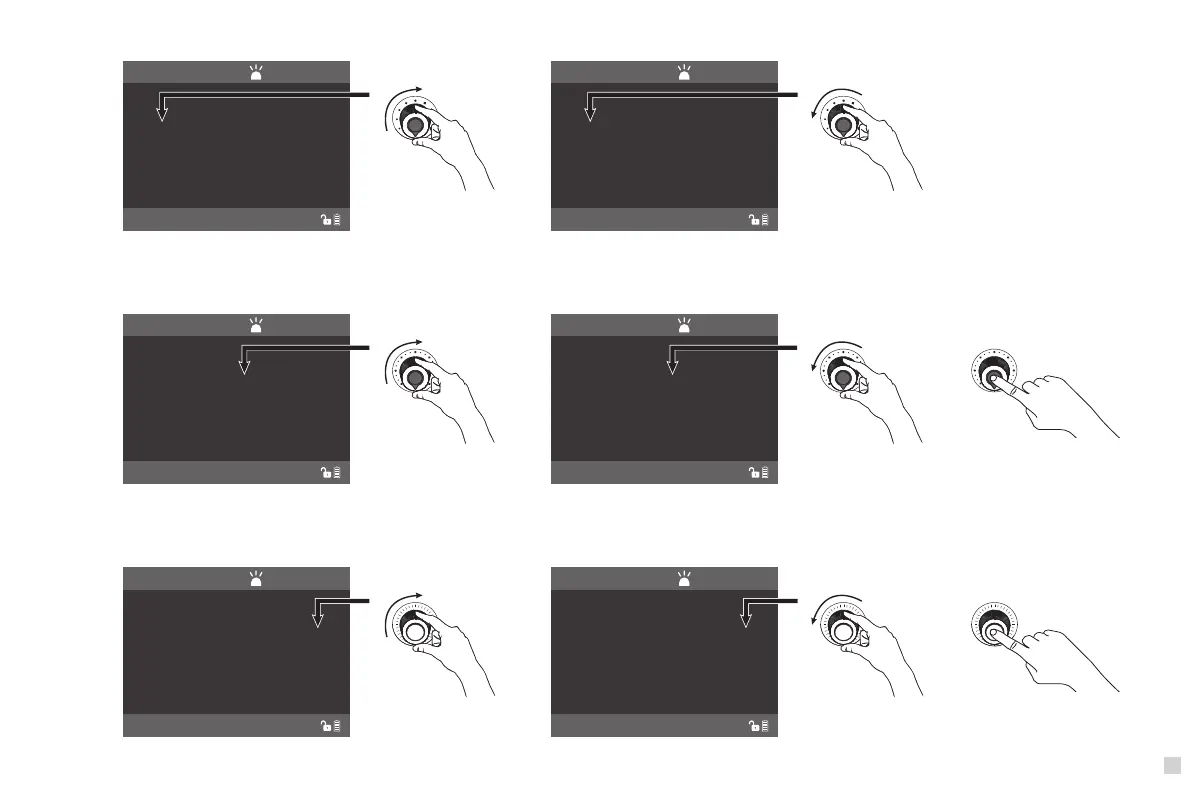
(1)DIM setting: Rotate the " Dimmer knob" to adjust the brightness. ( As shown in figure 6)
000% 360 100%
DIM HUE SAT
(2)HUE setting: Rotate the " Function knob " to select HUE, the range of color adjusting range is 000-360, ( As shown in figure 7 ) Press the " Function knob" to adjust
the color in sequence, each time to press, the values will increase 60. When it gets to 360, it starts from 60 again.
( HUE: 000: Red, HUE:120 :Green, HUE:240:Blue, HUE:360:Red ). ( As shown in figure 8 )
000% 000 100%
DIM HUE SAT
Figure 7 Figure 7
100% 240 100%
DIM HUE SAT
000% 240 100%
DIM HUE SAT
Figure 6 Figure 6
Clockwise rotation Counterclockwise
Clockwise rotation Counterclockwise
Figure 8
000% 360 100%
DIM HUE SAT
000% 000 000%
DIM HUE SAT
Clockwise rotation Counterclockwise
Figure 9 Figure 9
HSI
CH:512
NORMAL
HSI
CH:512
NORMAL
HSI
CH:512
NORMAL
HSI
CH:512
NORMAL
HSI
CH:512
NORMAL
HSI
CH:512
NORMAL
(3)SAT setting: Rotate “ SELECT knob” , clockwise to increase the color saturation while counterclockwise to reduce the color saturation. SAT shows the percentage of
the color saturation on the display, the color saturation range is from 000%- 100%. Press the "SELECT knob", saturation wil cycle in 100%-075%-050%-025%-000%.
( As shown in figure 9 )



 To Next Page