22
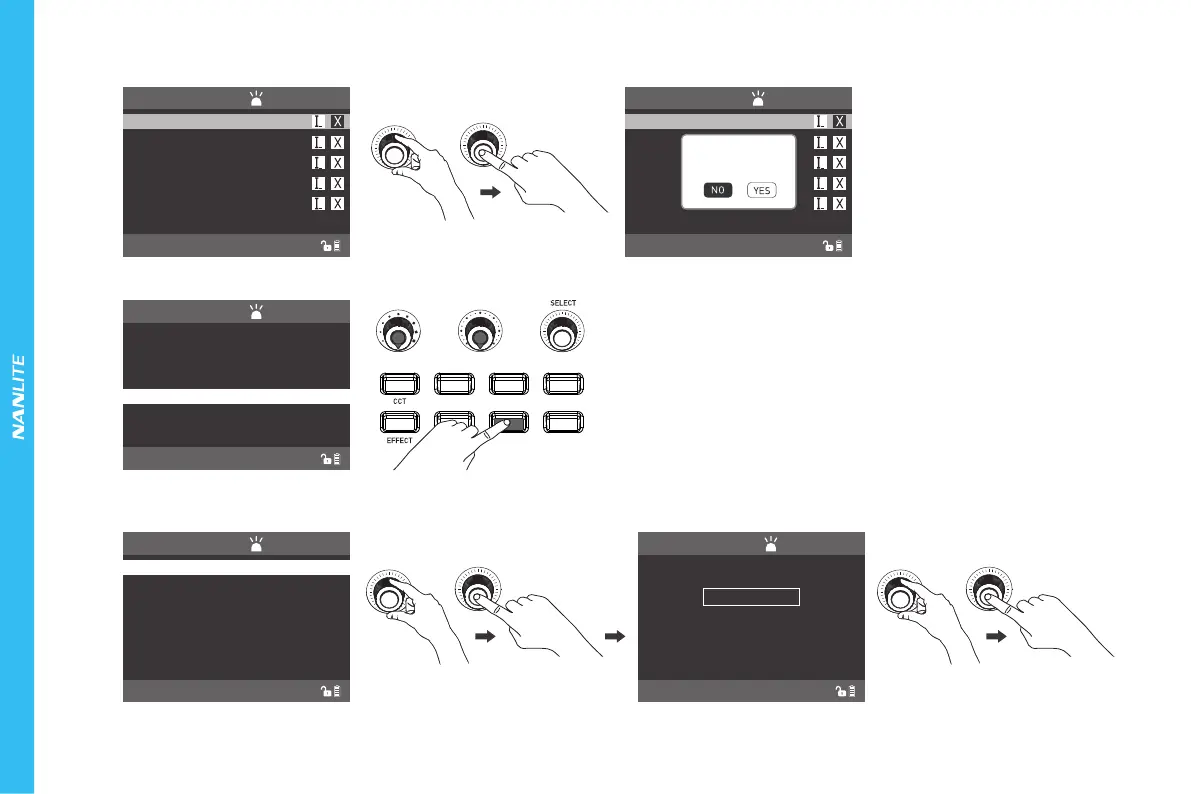
⑧MENU Key: Press the "MENU " to enter the main menu interface.
PRESET
LONG PRESS”PRESET”TO SAVE CURRENT LIGH
CH:512
NORMAL
5
444
555
MANAGE PRESET...
2
CONFIRM DELETING
“2”?
HSI RGBW GEL
PRESET
MENU
LOCK
LIGHTING MODE
MENU
PRESS”MENU”TO RETURN
CH:512
NORMAL
ROTATE SCREEN
SCREEN BRIGHTNESS
BUTTON BACKLIGHT
LANGUAGE
DMX/CHANNEL
MENU
PRESS”MENU”TO RETURN
CH:512
NORMAL
ROTATE SCREEN
SCREEN BRIGHTNESS
BUTTON BACKLIGHT
LANGUAGE
DMX/CHANNEL
MENU
PRESS”MENU”TO RETURN
CH:512
NORMAL
*SILENT MODE
NORMAL NODE
BOOST MODE
Rotate the "SELECT Knob" to the LIGHTING MODE, press
"SELECT Knob" to enter the corresponding secondary menu.
Rotate "SELECT Knob" to select LIGHTING MODE, press
"SELECT knob" to release the lighting mode.
LIGHTING MODE
·Press the "SELECT knob" to switch to EXIT MANAGE PRESENT interface to change or delete the saved lighting settings. The current saved lighting setting can be
renamed or deleting in the interface.
PRESET
LONG PRESS”PRESET”TO SAVE CURRENT LIGH
CH:512
NORMAL
5
444
555
MANAGE PRESET...
2
(1)Rotate the "SELECT Knob" to select the setting item, press "SELECT Knob" to enter the corresponding secondary menu, rotate the "SELECT Knob" again to select
the corresponding option, press the "SELECT Knob" to set or press the "MEUN" to return to the previous menu.









 To Next Page