4
Brightness Setting ( Brightness )
In this submenu you can adjust brightness of the screen. See Fig. 14.
VOX Sensitivity Setting ( VOX Sensitivity )
This submenu lets you choose the VOX (voice activation) sensitivity level.
When the level set too high, the screen will be triggerd by lower sounds.
See Fig. 15.
4.3
4.2
Status Information
The status bar will be displayed on the top of the screen. See Fig. 16.
1. Signal strength indicator 2. Temperature alert on/off indicator
3. Room temperature indicator 4. Zoom in indicator
5. Audio only mode indicator 6. Music indicator
7. Mute indicator 8. Talkback indicator
9. Battery status/Charging indicator
5
2.3
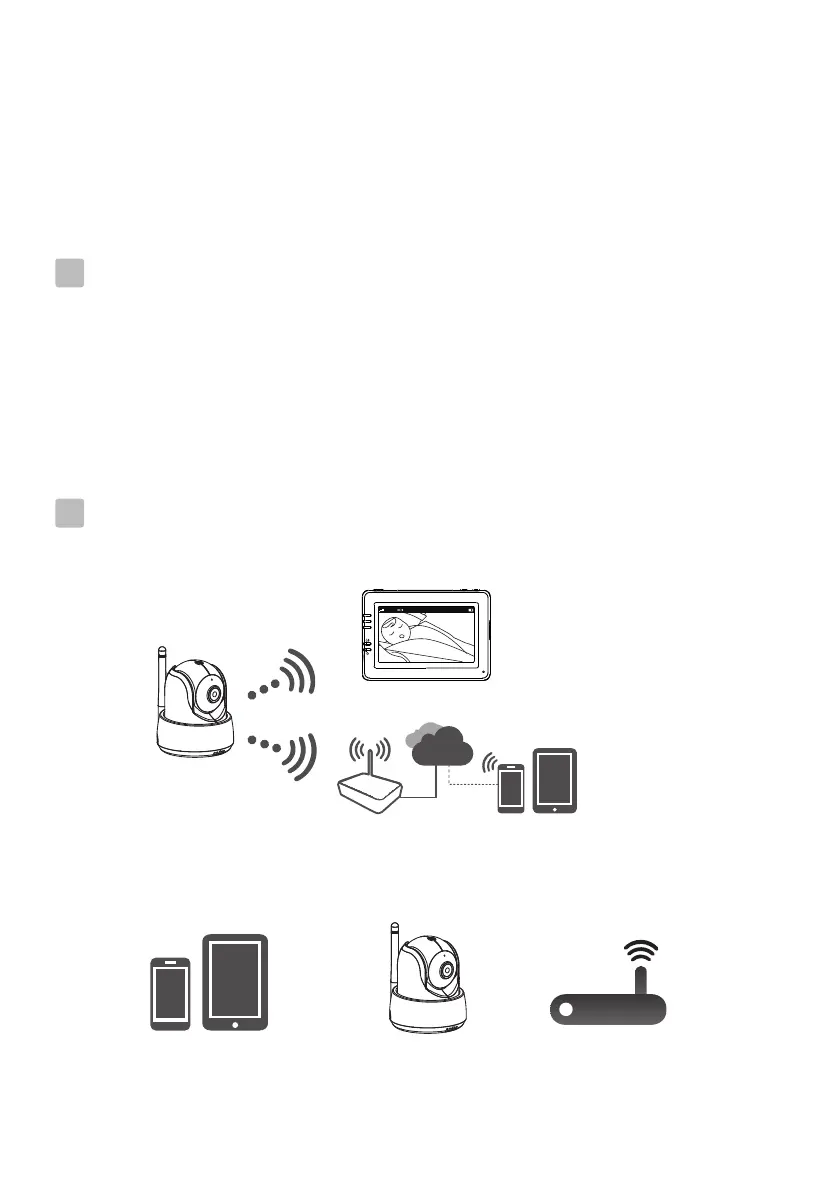
Internet Viewing
Watch the things that matter to you anytime and anywhere
6
6.1
iPhone, iPad,
Android smartphone
or Android tablet
Wi-Fi RouterMini Nanny
Mini Nanny
Monitor
Wi-Fi Router
Internet
Smartphone,Tablet
Before connecting to the Internet, you need:
6.2


 To Next Page