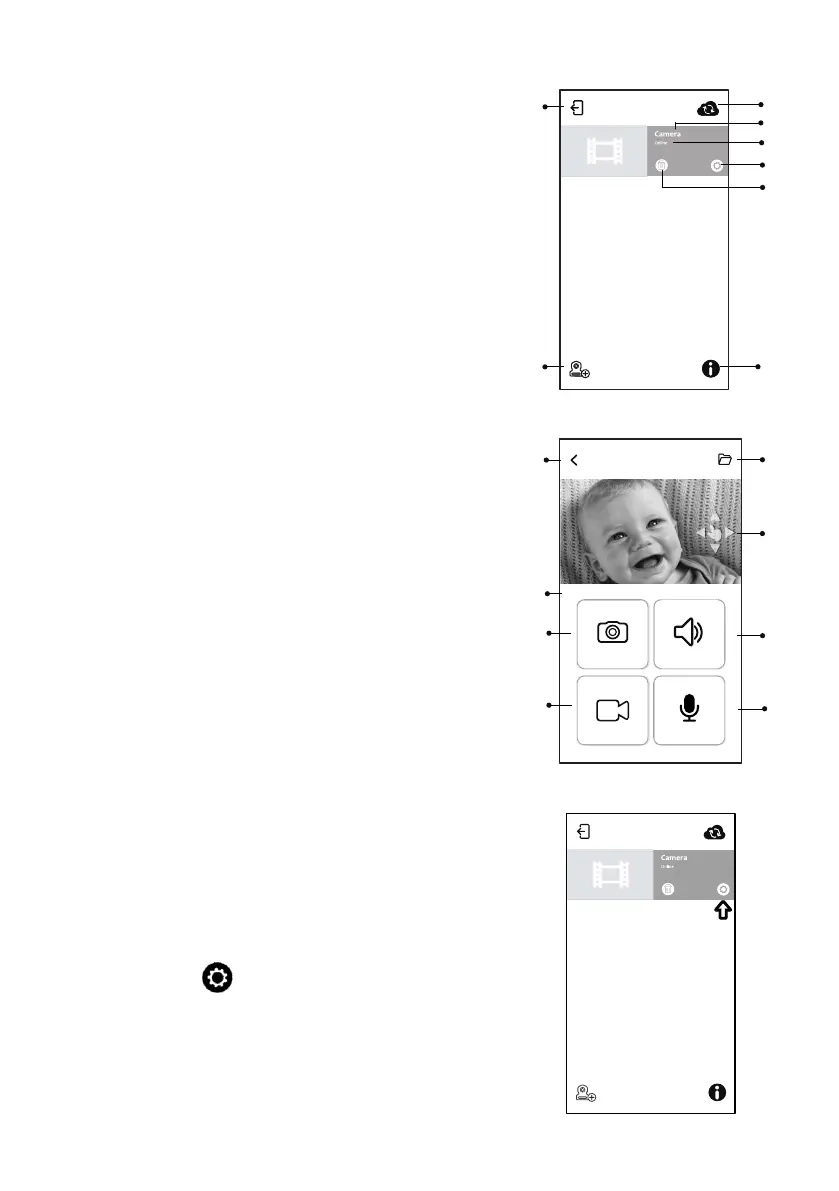
Function of the APP (See A9)
1.Photo: Tap icon to save a photo on your
smartphone or tablet.
2. Video: Tap icon to start/stop recording.
(3minutes limitation per each recording)
Note: Photo and video will be stored on the
internal memory of your Smartphone or tablet.
3. Two-way talk: Tap icon to talk, tap again to stop
talking.
4. Volume: Tap icon to adjust volume.
5. Camera Album: Tap icon to view and manage
photos/videos. Tap and hold to delete for
Android, press “Edit” for iOS>setting
6. Back: Tap icon and go back to previous page.
7. Temperature measure: It will display below the
liveview.
8. Pan and tilt indicator : It will display for 3 seconds
once you tap liveview screen.Slide on screen for
pan and tilt control.
7
Camera List
1. Camera Name
2. Connecting status
3. Setting
4. Delete camera
5. Refresh
6. Quit
7. Add camera
8. APP information
6.5
6.6
4
6
5
7
1
2
3
Camera setting
Tap icon on the page. (See A10)
6.7
A8
A9
A10
3
1
2
4
5
7
6
8
8
24°C


 To Next Page