14 | ni.com | GPIB Hardware Installation Guide and Specifications
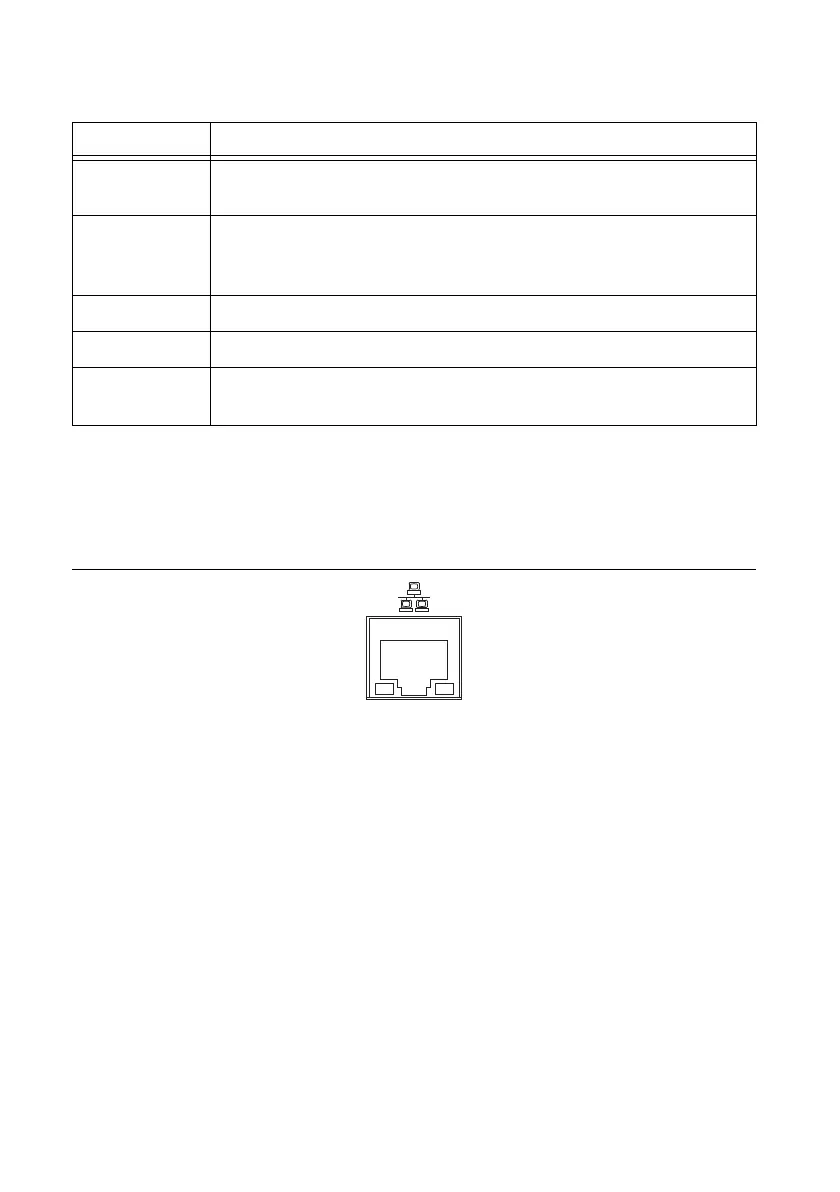
Table 3 summarizes the functionality of all the front-panel LEDs on the GPIB-ENET/1000.
Ethernet Connector LEDs
The Ethernet connector LEDs on the back panel, shown in Figure 8, indicate your Ethernet
connection status.
Figure 8. Ethernet Connector LEDs
The 10/100/1000 LED indicates your Ethernet connection speed.
• Yellow—Indicates your network connection is 1000 Mbit/s.
• Green—Indicates your network connection is 100 Mbit/s.
• Off—Indicates your network connection is 10 Mbit/s, or the Ethernet is not connected if
the ACT/LINK LED also is off.
The ACT/LINK LED indicates network activity.
• Steady green—Indicates you have a network link, but no network activity is detected.
• Blinking green—Indicates you have a network link and network activity is detected.
• Off—Indicates you do not have a network link.
Software Recognition
In Windows, use the GPIB Ethernet Wizard to add the GPIB-ENET/1000 to your system.
Launch the GPIB Ethernet Wizard from Start»Programs»National Instruments»NI-488.2.
Table 3. GPIB-ENET/1000 LED Descriptions
LED Description
POWER Indicates the power cord is connected and the GPIB-ENET/1000 is
switched on.
READY Flashes green rapidly at startup while booting and acquiring network
parameters. A steady green state indicates the unit is ready for operation.
A steady red or slow red blinking pattern indicates an error occurred.
TALK Indicates the GPIB-ENET/1000 is configured as a GPIB Talker.
LISTEN Indicates the GPIB-ENET/1000 is configured as a GPIB Listener.
ACT/LINK Indicates the GPIB-ENET/1000 detected an Ethernet link and blinks to
indicate network activity.



 To Next Page
 Loading...



