Trex™ HD Monitoring Amplifier User & Service Manual
44
Channel Test Signal Control
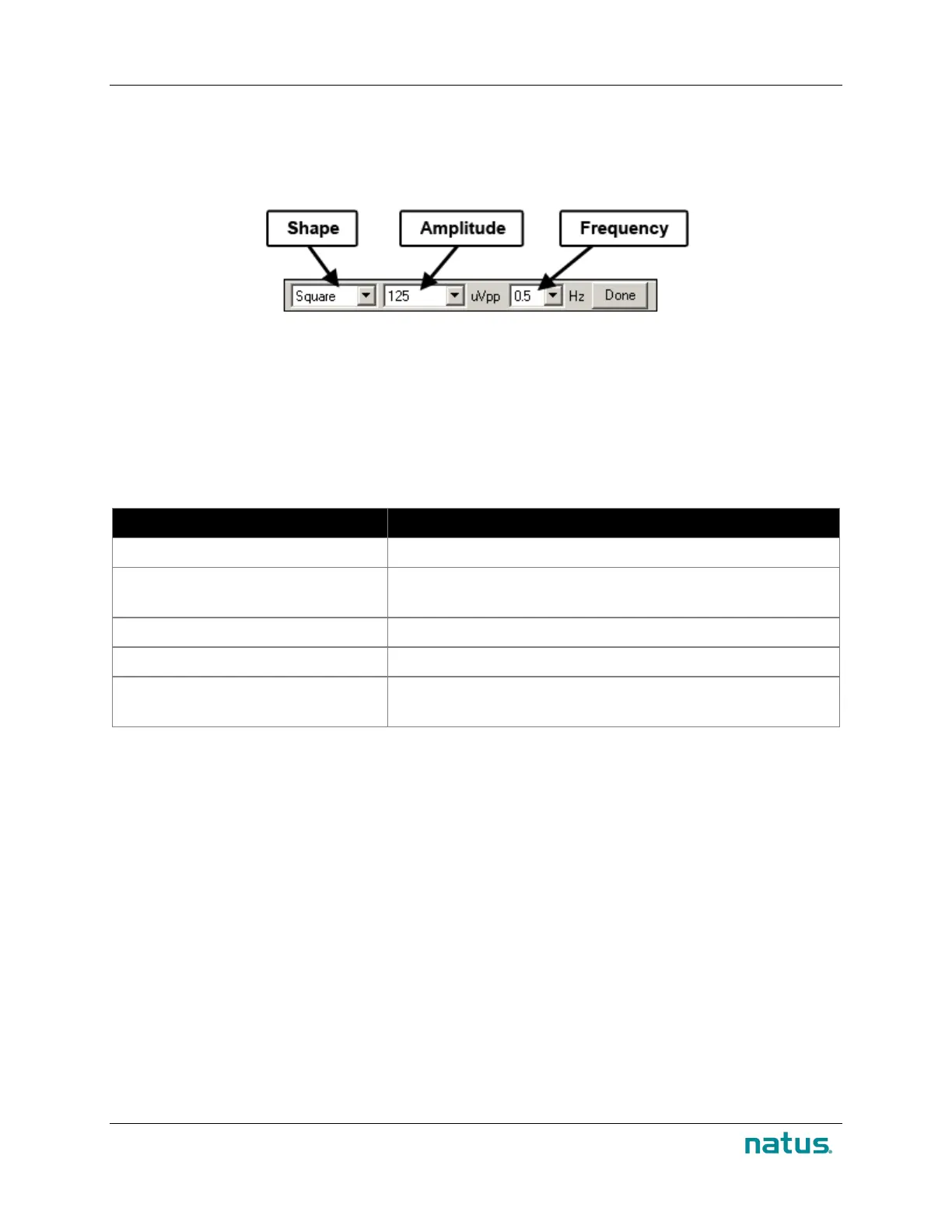
The Channel Test Signal control turns on the channel test signal according to the last settings saved and
displays a Test Signal toolbar. The Test Signal toolbar is located above the trace display. The toolbar
has controls for shape, amplitude and frequency.
Channel Test Signal Toolbar
9.4.3. Impedance Check
An impedance check is performed to ensure that the electrode contact with the patient is satisfactory. You
can perform an impedance check at any time during a study.
To Run an Impedance Check from the Software
When an impedance check is initiated, the software scans all channels (in auto scan mode).
To… Do this…
Start the impedance check
Choose Controls > Impedance Check
Lock onto a channel
Click Lock Channel. Then, make adjustments to the electrode
connection until satisfactory levels are achieved
Proceed to a full impedance check
Click Release Lock
End the impedance check
Click End
Save the impedance check as part of
the study
Click End and Start Recording
An impedance check displays bar graphs that show the impedance of each electrode connection. A
green bar indicates that the reading is below the set threshold. A red bar indicates the reading is above
the threshold. To set the impedance threshold, click one of the Threshold buttons in the Threshold
Group box on the right side of the Check Impedance box.


 To Next Page