NV30/NV40 Operations and Maintenance Manual Operating the transmitter
Issue 3.3 2014-12-10 Page 2-83
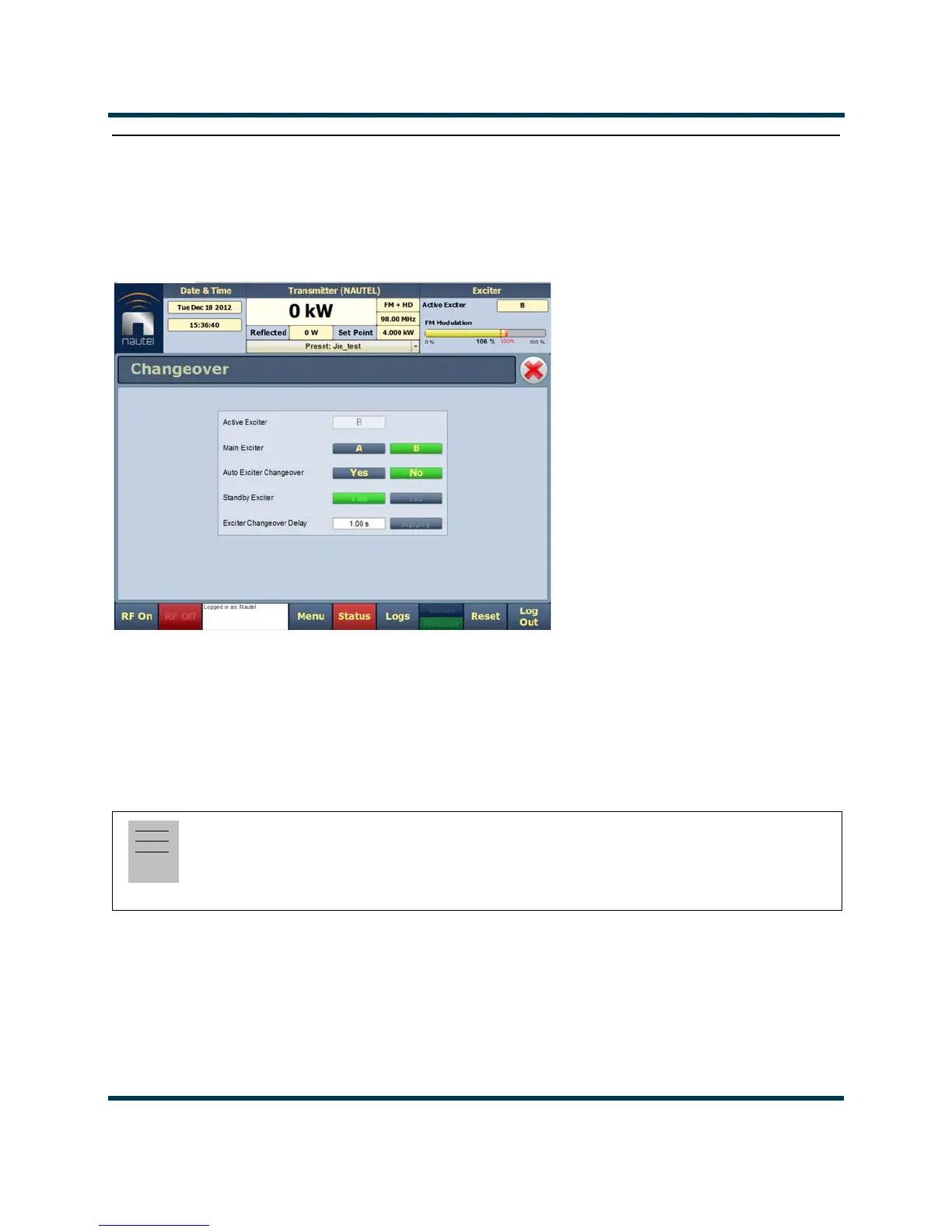
Changeover page
You can control the auto exciter transfer function using the Changeover page. To view the
Changeover
page, select Changeover from the Menu options.
Figure 2.63: Changeover page
The Active Exciter is the same as is displayed in the top, right corner of the AUI.
For Main Exciter , select A or B. This will default to A if No is selected for Standby Exciter.
For Auto Exciter Changeover, select Yes if automatic changeover is desired or No if user selected
(manual) changeover is desired. Auto setting cannot be changed if the selected Standby Exciter
button is No.
For
Standby Exciter, select Yes if standby operation is available or desired or No if standby operation
is not available or not desired. This is factory set and does not typically require adjustment.
In the Exciter Changeover Delay field, enter the desired delay (allowable range is 0-300 seconds,
defaulted to 1 second) and press
Set. The time entered will be added to the pre-existing fixed amount
of time required for a changeover to occur once a fault is detected with the active exciter.
Note:
If standby exciter must be removed for service, Nautel recommends you set Auto Exciter Changeover to
No while the standby exciter is unavailable for operation, instead of temporarily setting Standby
Exciter to
No.



 To Next Page