© Pro Advantage by NDC. All rights reserved
PS-733 Rev 00-3/10 12/23
4. Analyzer Set-Up
How to change your urine analyzer settings:
Your Pro Advantage Urine Analyzer allows you to change the settings to fit your laboratory or workplace
requirements
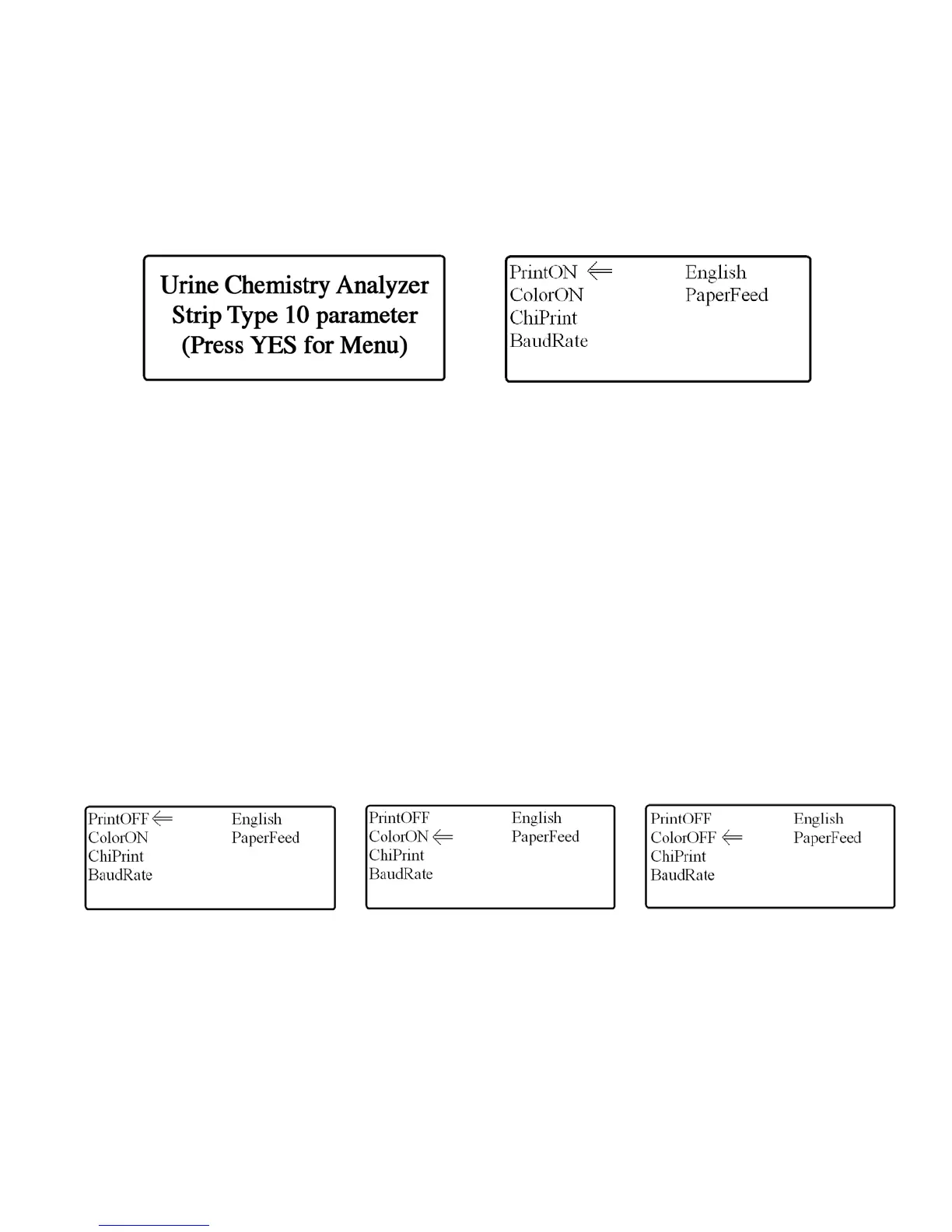
To change your setting turn on your analyzer and you will see the Welcome Screen appear (see Fig. 17). From
this screen you will be able to change the settings by
1. Press the “UP” key and the Settings Screen will appear (see Fig. 18) after your selection.
Figure 17: Welcome Screen Figure 18: Settings Screen
Printer Settings:
The print function can be turned on or off depending on your workplace requirements. To turn on or off
your printer function, enter the Settings Screen (see How to change your urine analyzer settings on
this page).
1. Use the selection keys to highlight the PrintON/PrintOFF menu option (see Fig 18).
2. Turn on/off the print function by pressing the “YES” key. The setting with change to
PrintOFF/PrintON.(see Fig. 19) depending on what function the analyzer was previously performing
PrintOFF – The analyzer will not print via the on board thermal printer
PrintON – The analyzer will print via the on board thermal printer
If you choose to connect a dot matrix style external printer and have the print function turned off, this
analyzer will print via the external printer.
Figure 19: Print Option Turned Off Figure 20: Urine Color Selected Figure 21: Urine Color Option Turned Off
Urine Color Settings:
The user may choose to not display the urine color on the analyzer print out depending on your workplace
requirements. To turn on or off your urine color function, enter the Setting Screen (see How to change
your urine analyzer settings on this page).
1. Use the selection keys to highlight the ColorON/ColorOFF menu option (see Fig 20).
2. Turn on/off the urine color function by pressing the “YES” key. The setting will change to
ColorON/ColorOFF (see Fig. 21) depending on what function the analyzer was previously performing
ColorOFF – The analyzer will not print the urine color on your patient results print out
ColorON – The analyzer will print the urine color on your patient results print out


 To Next Page