© Pro Advantage by NDC. All rights reserved
PS-733 Rev 00-3/10 13/23
Language Settings:
The user may choose the language which is displayed on the analyzer depending on your workplace
preferences. To change the language option in the Setting Screen (see How to change your urine
analyzer settings on Page 12).
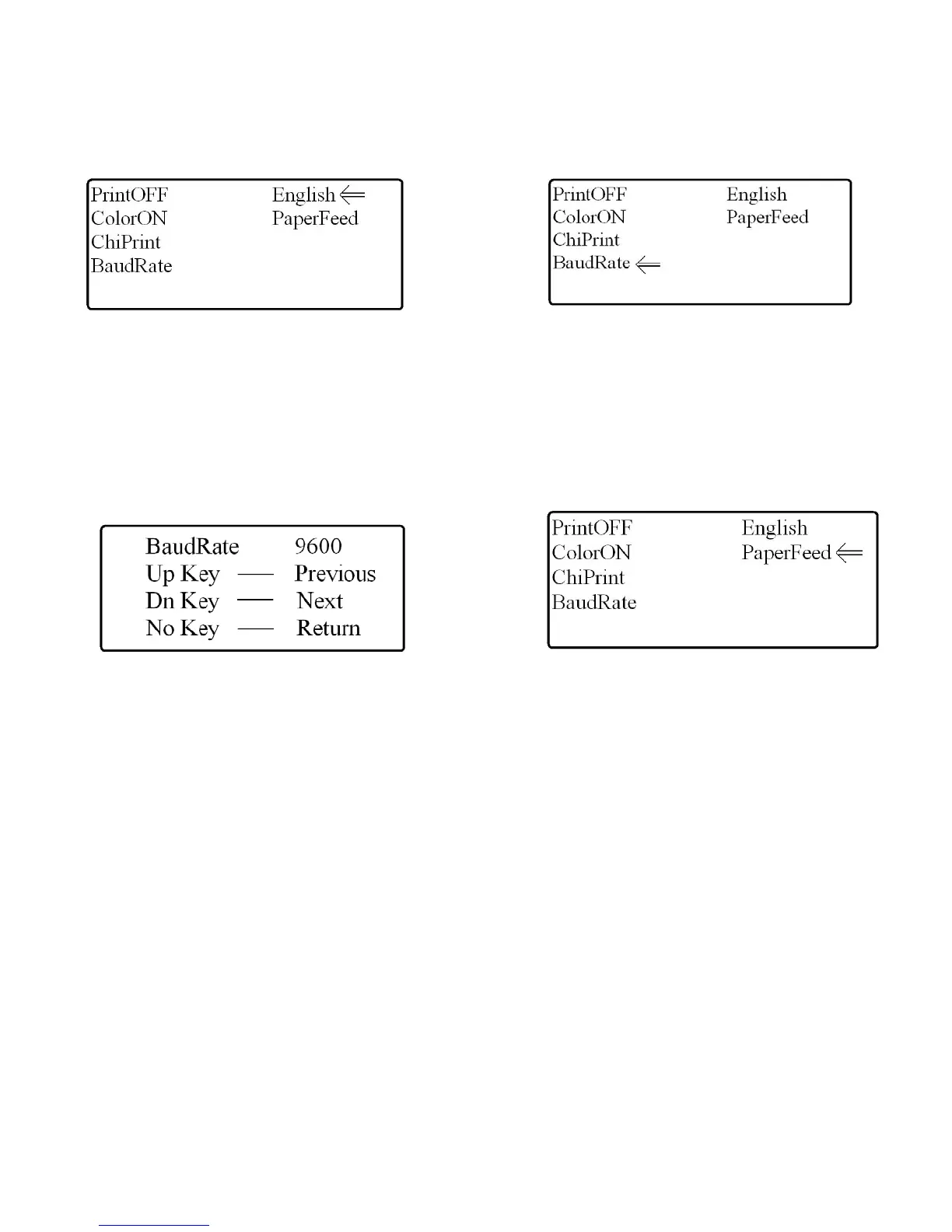
1. Use the selection keys to highlight the English menu option (see Fig. 22).
2. Press the “YES” key to change the language from English to Chinese.
Figure 22: Language Option Figure 23: Baud Rate Option
Baud Rate:
The user may choose to change the Baud Rate settings within the analyzer if the analyzer will be
connected to a computer or information software. To change the Baud Rate in the Setting Screen (see
How to change your urine analyzer settings on Page 12).
1. Use the selection keys to highlight the Baud Rate menu option (see Fig. 23).
2. Press the “YES” key to enter the Baud Rate screen
3. Use the selection keys to select the Baud Rate required (see Fig. 24)
4. Press “NO” to return to the previous screen
Figure 24: Baud Rate Settings Screen Figure 25: Paper Feed Option
How to feed printer paper through the printer head:
The Pro Advantage Urine Analyzer requires a thermal paper roll to be used to properly print the results of
each patient sample. At times it may be difficult to feed the paper through the printer head manually, so
the analyzer has an option to feed the paper through mechanically.
The user must enter the Setting Screen (see How to change your urine analyzer settings on Page 12).
1. Highlight the PaperFeed option using the selection keys.
2. Once highlighted, press the “YES” key to feed paper through the printer (see Fig. 25).
How to change LCD screen contrast:
The Pro Advantage Urine Analyzer allows the contrast of the display to be increased or decreased to suit
the user.
1. Enter the Welcome Screen (see how to change your urine analyzer settings, Fig. 17
2. ).
3. Hold the “NO” key, and use the selection keys to adjust the contrast to be darker or lighter
4. When finished release the “NO” key


 To Next Page