Installation
1. To change the configuration of the IOR, remove the lid and mount
or remove jumpers. The jumper settings are described on pages
7-9 in this manual.
2. Connect alarm transmitters and/or alarm receivers to IOR as
described in pages 10-13 in this manual.
3. Close and fasten the lid using the screws supplied.
4. Mount the IOR in an appropriate place.
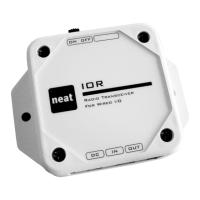
5. Connect the inputs to the jack marked
IN
.
6. Connect the output to the jack marked
OUT
.
7. Connect the AC/DC adapter to the jack marked
DC
.
Then connect the AC/DC adapter to a mains outlet in the
apartment. Only use the AC/DC adapter provided by NEAT,
part no. NE31 03001-01.
8. Turn on the IOR with the switch marked
ON OFF
.
6


 To Next Page