E-22
INSTALLATION AND CONNECTIONS
⬎
Setting Up the Screen and theProjector
406.4(W)
⳯304.8(H)/160"(w)
⳯120"(H)
365.8(W)
⳯274.3(H)/144"(W)
⳯108"(H)
304.8(W)
⳯228.6(H)/120"(W)
⳯90"(H)
243.8(W)
⳯182.9(H)/96"(W)
⳯72"(H)
203.2(W)
⳯152.4(H)/80"(W)
⳯60"(H)
162.6(W)
⳯121.9(H)/64"(W)
⳯48"(H)
121.9(W)
⳯91.4(H)/48"(W)
⳯36"(H)
81.3(W)
⳯61.0(H)/32"(W)
⳯24"(H)
61.0(W)
⳯45.7(H)/24"(W)
⳯18"(H)
Screen size (Unit: cm/inch)
Lens center
Screen size
Distance (Unit: m/feet)
1.7/5.6
(1.3/4.3)
2.6/8.5
(2.0/6.6)
3.5/11.5
(2.7/8.9)
4.4/14.4
(3.4/11.2)
5.3/17.4
(4.1/13.5)
6.6/21.7
(5.2/17.1)
7.9/25.9
(6.2/20.34)
8.8/28.9
(6.9/22.6)
1.3/4.3
(1.0/3.3)
200"
180"
150"
120"
100"
80"
60"
40"
30"
Selecting a Location
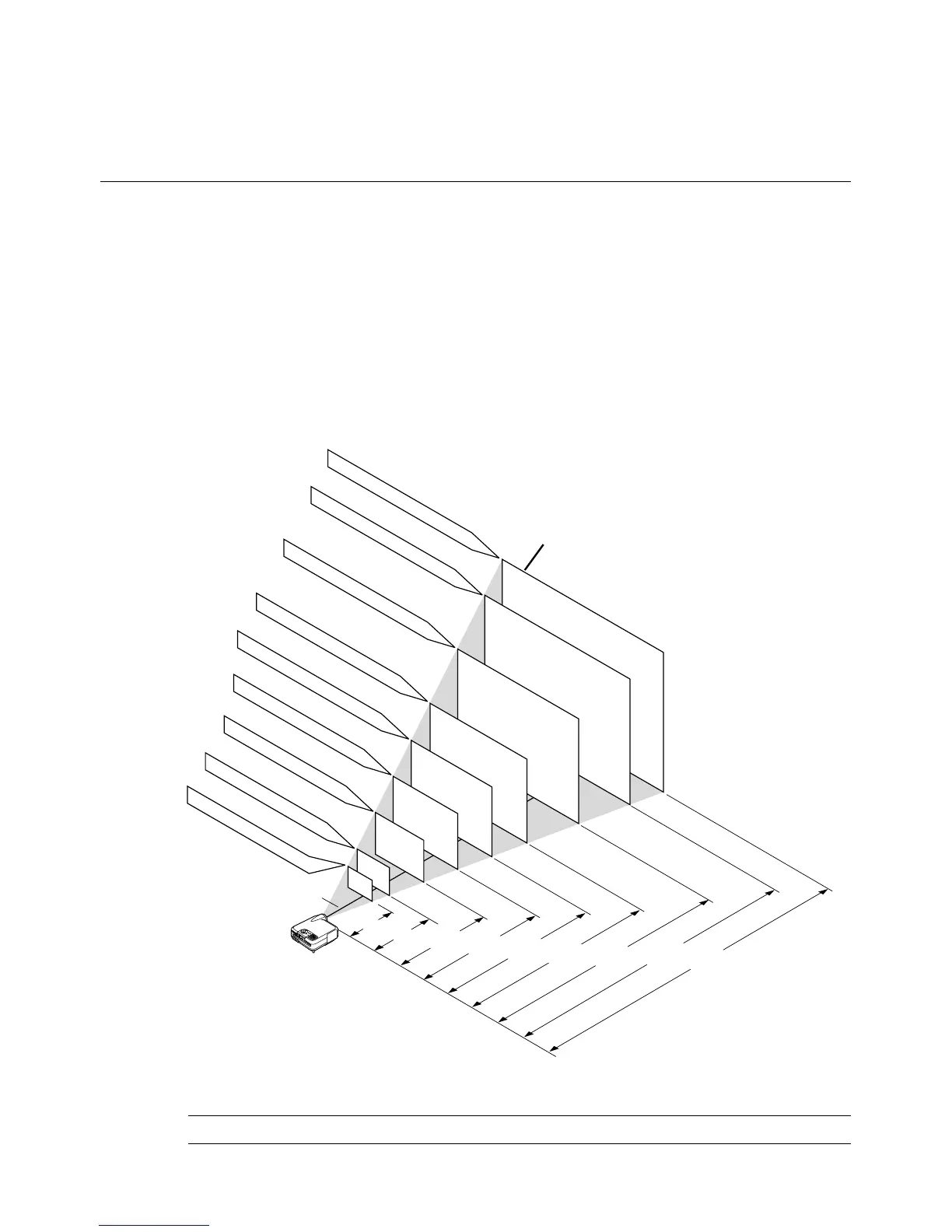
The further your projector is from the screen or wall, the larger the image.
The minimum size the image can be is approximately 30" (0.8 m) mea-
sured diagonally when the projector is roughly 4 feet (1.3 m) from the wall
or screen. The largest the image can be is 500" (12.7 m) when the projec-
tor is about 80.83 feet (24.64 m) from the wall or screen. Use the drawing
below as a guide.
Setting Up the Screen and the Projector
NOTE: Values in parentheses for LT240K.



 To Next Page