EasyManua.ls Logo

Necta Kikko Espresso - Page 59

Default Icon
76 pages
Print Icon
To Next Page IconTo Next Page
To Previous Page IconTo Previous Page
Loading...
© by NECTA VENDING SOLUTIONS SpA
02-2004 184 02
55
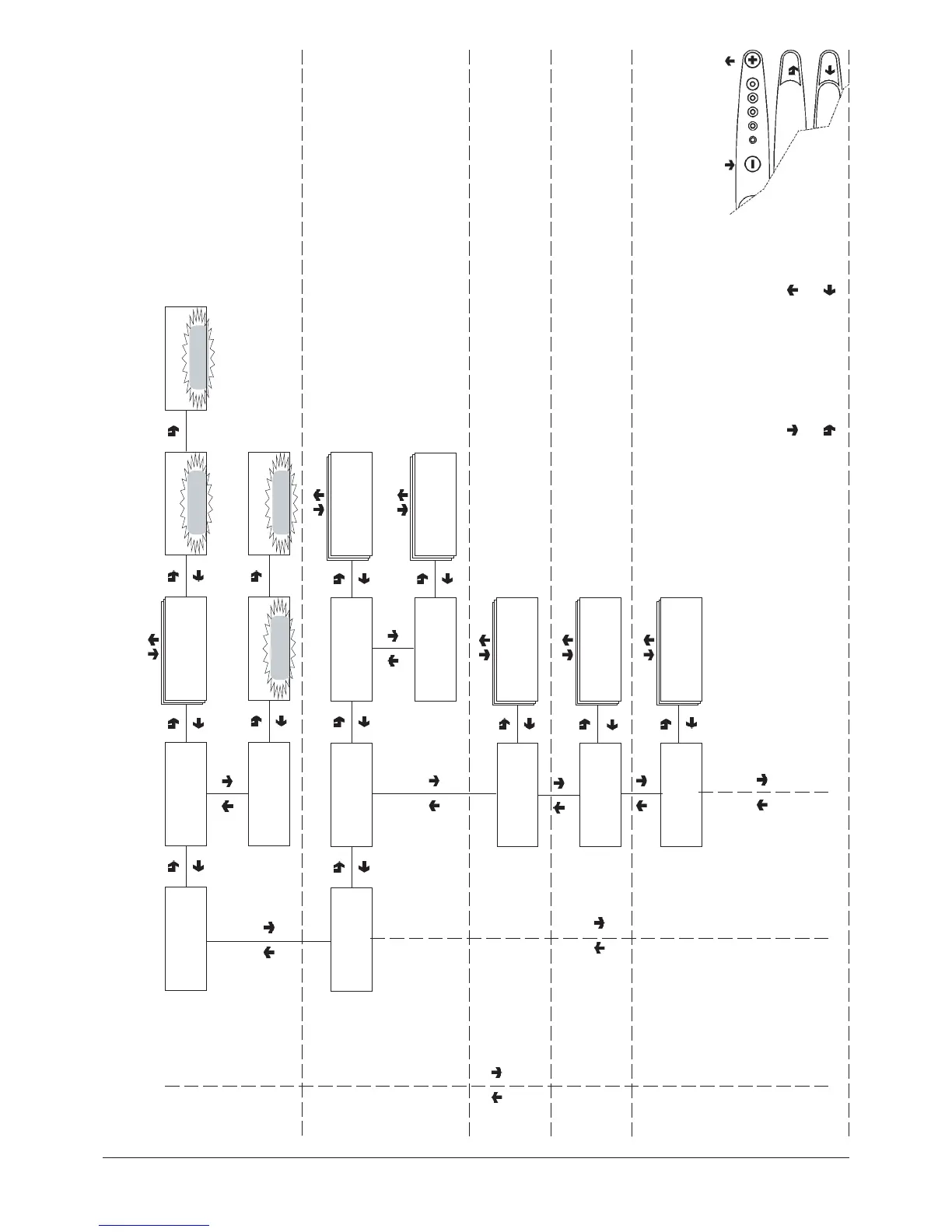
"Technician Menu" - Summary
CONFIRM DATA /
CONFIRM FUNCTION
DELETE DATA /
EXIT FUNCTION
PREVIOUS FUNCTION /
DECREASE DATA UNIT (-
1)
NEXT FUNCTION/
INCREASE DATA UNIT (+1)
Delete data for:
Selections
Discounts
Failures
Coin mechanism data
DELETE STATISTICS
TECH>3.3.1
Delete partial
TECH>3.3.1.x
Delete sel. counter
Confirm?
Delete sel. counter
Working...
Delete sel. counter
TECH>3.3.2
Delete total
Confirm?
Delete total
Working...
Delete total
TECH>3.3
Delete statistics
TECH>3.4
Display relative stats
Display sales by single
selection for each time
band and total
Display total sales by
single selection
RELATIVE STATISTICS
Display total sales in
normal operation and
test mode
TECH>3.4.1
Display sel. counter
TECH>3.4.1.1
Disp. single counter
Selection ##
Time band # = ####
TECH>3.4.1.2
Disp. total counter
Selection ##
Total = ###
TECH>3.4.2
Count. by time bands
Time band 0 to 4
Counter = ###
Instant boiler
Counter = ###
TECH>3.4.4
Display failures
Discounts
Counter = ###
TECH>3.4.3
Disp. discount count.
Monitored failures
Water failure
Boiler
Mobile spouts
Cup failure
Espresso unit
Coffee failure
Coffee release
Volumetric counter
Liquid waste full
Air-break
Coin mechanism
RAM data
Control board

Table of Contents

Related product manuals