5
Questions? Call Neogen at 800/234-5333 or 517/372-9200
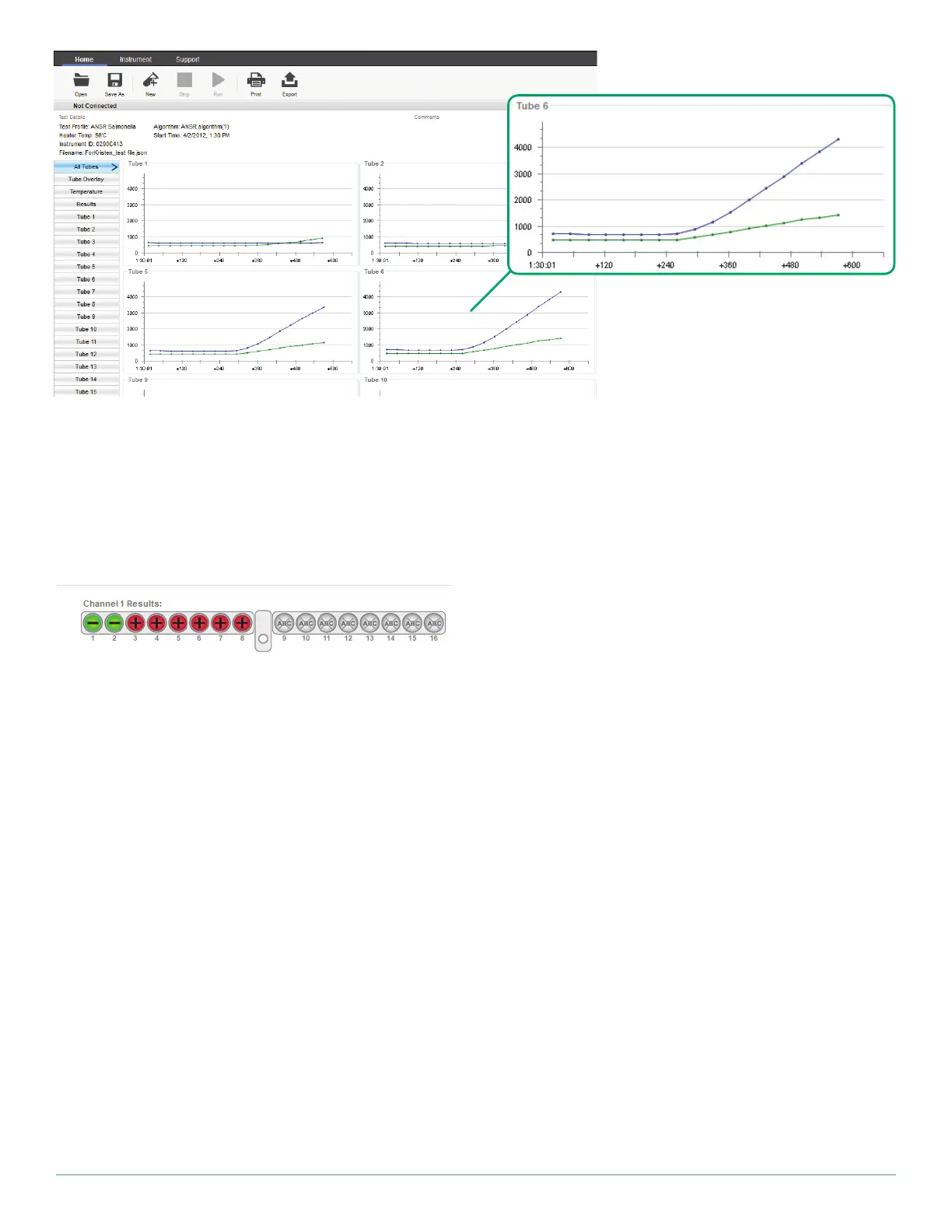
can be selected along with a total view, which will show the for-
mation of the curve that denotes a negative or a positive result.
6. Once the assay is complete, the software will display an overall
graphical view of the results. See example above.
7. Click Results on the left side of the window to view a graphic
depicting whether the tubes were positive (red), negative (green)
or invalid (yellow). On the left side of the window, users have the
option to click on individual tube tabs for graphs related only to
one sample, all of the graphs together, or temperature data. To
view the Summary report, which contains a summary of the
test results, click Print and check the box for Summary report.
Users also can print the Tube graphs from the Print menu. Once
the desired selections are made, click Print preview to review
the selections, and click Print.
8. The data can be saved to the computer or exported. To export
data, click the Export icon in the toolbar. Select which data files
to export (e.g., the data file, a .csv file for use in Microsoft Excel,
or a graph). NOTE: The data file is the most important and con-
tains results and traceability information. It is saved as a .json
file and only can be opened using the ANSR software. The data
automatically is saved in the Records folder on the computer’s
C: drive (Program files(x86)/Axxin/AxxinT16ISODesktop/
TestResults/Records). The default file name includes the in-
strument ID, date and time. The file extension is .json. This file
type can only be opened using the ANSR software. The user can
use the Save As function to save the file with a specific name
and in a user-specified location.
9. To begin a new test, click New in the toolbar. The software will
autofill the user name and lot number. These may be edited.
NOTE: Ensure data is saved before clicking New.
10. To shut down the reader, click Disconnect in the upper right
corner of the software window. Once the reader is disconnected
from the software, the computer and reader may be shut down.
Running high throughput samples – Two step lysis
(ANSR for Salmonella and ANSR for Listeria)
NOTE: This procedure begins after the 37°C incubation step. See the
ANSR for Salmonella or ANSR for Listeria kit insert for further instruc-
tions.
The ANSR reader can process 32 samples (Listeria) or 48 samples
(Salmonella) an hour by adhering to the following procedure:
1. Follow the procedures for preparing and enriching the samples
in the ANSR kit insert. Ensure the reader is on and heated
to 56°C.
2. Place up to four rows of lysis tubes containing samples in the
80°C heater block for 20 minutes per the kit’s instructions.
3. Transfer the lysed samples from the first row of tubes to reac-
tion tubes 1–8 (from the left) in the reader. Transfer the lysed
samples from the second row of tubes to reaction tubes 9–16
(from middle) in the reader. Follow pipetting, mixing and capping
procedures as listed in the ANSR kit insert.
4. Close the reader’s lid and run the test by pressing Start on the
software screen.
5. Once the 10 or 18 minute assay is complete, save the results to a
desired location. Discard the used reaction and lysis tubes once
results have been obtained. NOTE: After each run of 16 samples,
select New for the next set of 16. The remaining lysis tubes
containing samples may remain in the heater block for up to
60 minutes.
6. Complete the assay with the next two rows of lysis tubes con-
taining samples.
7. Repeat steps 3–6 until all samples have been run.


 To Next Page
 Loading...